Data Watchdog
Overview
The Data Watchdog monitors a reference instrument's price feed (usually the ES front-month contract) for each broker connection and triggers a reconnect when data stops moving. This catches a class of problems that a simple connection status check misses. Your connection may show as "Connected" in NinjaTrader, but the price data has silently stopped updating.
Data Watchdog is available in CrossTrade NT8 Add-On v1.12.0+. It is configured per connection in the CrossTrade dashboard, under My Account > Trading, or through the API.
How It Works
The Watchdog subscribes to market data for a reference instrument (default: front-month ES) and tracks the timestamp of the last price tick for each monitored connection. Every few seconds, it compares the elapsed time since the last tick against your configured timeout.
If the data has been stagnant longer than the timeout and the market is open, the Watchdog triggers a recovery, handing it to Auto-Reconnect when that is enabled. See below.
The Watchdog automatically pauses checking when the market is closed. Weekends, holidays, and outside-of-session hours do not trigger false alarms.
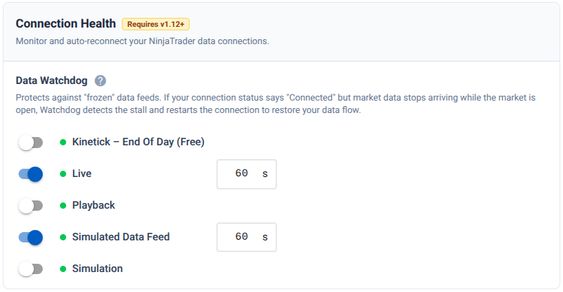
Configuration
The Data Watchdog is configured per connection from My Account → Trading, in the Connection Health section. Each connection can have its own Watchdog settings:
| Setting | Default | Description |
|---|---|---|
| Connection | — | The broker connection to monitor. |
| Instrument | ES (front month) | The reference instrument to watch for price updates. It is not required for users to set this value. |
| Timeout (seconds) | 60 | How long the data must be stagnant before triggering a recovery. |
Interaction with Auto-Reconnect
When both features are enabled for the same connection, they coordinate:
- The Data Watchdog detects the problem (stale data) and initiates a disconnect.
- Auto-Reconnect handles the actual reconnection with its delay, retry budget, and deduplication guards.
- The Watchdog keeps no separate attempt counter here; it defers to Auto-Reconnect's budget so attempts are not double-counted.
If Auto-Reconnect is not enabled, the Watchdog runs its own recovery loop with the same maximum attempt limits.