Overview
The CrossTrade NT8 Add-On runs inside your NinjaTrader instance and acts as the bridge between CrossTrade's cloud infrastructure and your broker. It's the component that actually reads your positions, submits orders, manages ATM strategies, and monitors account state, all on your local machine where NinjaTrader is running.
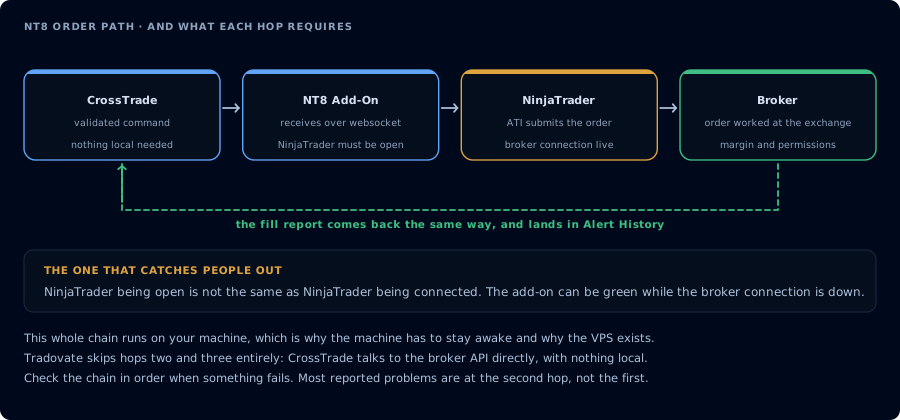
Where the add-on sits, and what each hop in the chain requires.
Why the Add-On Exists
This architecture exists because NinjaTrader doesn't expose a remote API. There's no way to place an order on your NinjaTrader account from an external server over the internet: everything has to go through NinjaTrader's internal APIs on the machine where it's running.
When a TradingView alert hits CrossTrade's servers, the signal needs to travel the last mile into NinjaTrader itself. That's what the add-on does. It maintains a persistent connection to CrossTrade, listens for incoming commands, translates them into NinjaTrader API calls, and reports back the results (positions, fills, order states, and account data) in real time.
What It Handles
Beyond basic order execution, the add-on is responsible for all of the advanced features documented here:
- Strategy Lock - position ownership tagging across multiple strategies
- Strategy Synchronization - state drift detection and correction between TradingView and NT8
- Bracket Orders - TP/SL management with wait-for-fill behavior
- Trade Copier - local order and execution replication between accounts
- Account Management - P&L monitors, kill switches, and outlier protection
- Auto-Reconnect - automatic broker connection recovery
- Data Watchdog - stale market data detection
Do not connect to CrossTrade in more than one location at the same time using the same set of user credentials.
Every add-on signed in to the same account subscribes to the same channel, so each one receives every command CrossTrade sends. Two add-ons means the same order placed twice.