Chat with Your Trading History: AI Trade Journal Workflows
A trade journal is only useful if you read it. Most traders don't. AI agents make the journal addressable in natural language: ask a question, get an answer derived from your real fills.
CrossTrade MCP exposes the matched-trade journal as a read-only tool. An agent can pull entries and exits matched into round trips, with realized P&L, instrument, side, timing, and (if you tag) setup. The result is a junior analyst who reads every trade you take.
Why traders miss patterns in their own data
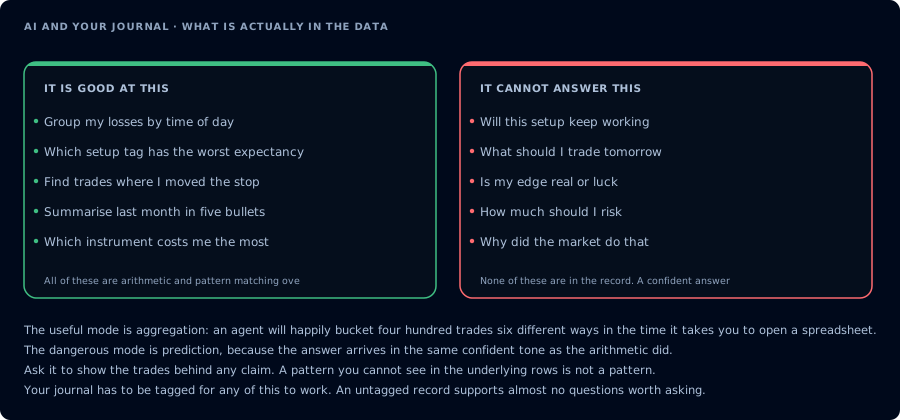
Aggregation it does well. Prediction it cannot do, in the same confident tone.
You see one trade at a time. The journal sees ten months at a time. The patterns that matter most rarely live in a single session:
- Setup decay: a setup that worked in January and lost money in April.
- Time-of-day effects: a strategy that posts most of its losses in the first 15 minutes.
- Symbol bleed: a strategy that wins on MES and loses on MNQ that traders run on both.
- Revenge entries: trades that follow a loser by less than 60 seconds.
- First-loss behavior: how often the first loss of the day becomes the worst.
The agent will not invent insights, but if you ask the right question it can compute the answer in seconds.
What data the agent can inspect
| Tool | Use |
|---|---|
GetJournalTrades | Matched trades with entry, exit, P&L. |
ListExecutions | Raw fills. |
GetActivityLog | Add-on activity for context. |
GetSignalHistory | Webhook signals if the trade originated from TradingView. |
GetAccountSummary / GetWatermarks | Daily P&L and drawdown context. |
All read-only. mcp:read is enough.
Post-session review workflow
Run this at the end of the trading day.
Pull today's matched trades on PROP1234. Group by instrument and side. Report total realized P&L, win rate, average win, average loss, biggest win, biggest loser, and any trades that happened within 60 seconds of a prior loser. Redact the account number in the summary.
What you get is a one-screen summary of the day with the revenge-trade flag attached.
Weekly review workflow
Once a week.
Pull the last seven trading days of matched trades. Group by setup if tagged, otherwise by instrument. For each group report trade count, expectancy in dollars, win rate, average R, and the largest five losers. Highlight any setup with negative expectancy and at least 10 trades.
This is the report that catches setup decay before you start a fresh evaluation.
Strategy decay workflow
When you suspect a webhook-driven or deployed strategy is fading.
Pull matched trades over the last 30 days for any trade that originated from webhook signals. Bucket by week. Report weekly expectancy and trade count. Tell me whether expectancy is trending down.
For the same question on an MCP-deployed strategy, add GetDeployedStrategyState and GetSignalHistory so the agent can correlate.
Funded trader risk review
Once a session, after the close.
On PROP1234, pull today's matched trades plus GetWatermarks and GetAccountSummary. Tell me the lowest point I hit today, the highest, the trailing drawdown room I had at the worst moment, and whether any trade pushed me within $150 of the limit. Do not place anything.
A safe ritual for evaluation accounts. The agent reports; you decide whether tomorrow needs adjustments.
Prompt examples
"What were my biggest losers?"
List my five biggest losers in the last 30 days on Sim101. For each, show entry time, exit time, instrument, P&L, and any webhook signal that started it. If two of them are within 60 seconds of each other, flag that.
"What time of day do I trade worst?"
Bucket the last 60 days of matched trades by 30-minute window. Compute expectancy in dollars per trade per window. Tell me the worst window.
"Did I revenge trade today?"
Pull today's matched trades on PROP1234. Find any trade that started within 90 seconds of a prior losing trade in the same instrument. Report them.
"Am I sizing correctly?"
For the last 50 trades, compute the average dollar risk implied by stop distance and quantity. Compare against my account size on PROP1234. Flag any trade where implied risk exceeded 1% of starting balance.
What to avoid
- Asking the agent to predict future trades from the journal. The journal is descriptive, not predictive.
- Asking the agent to grade your strategy without context. A strategy with bad expectancy in a chop month can be a great strategy in a trending month. Use the agent to extract data, not to grade.
- Letting the agent confuse correlation with cause. The agent will produce plausible explanations; your judgment is required.
- Pasting journal exports into chat windows when MCP can read directly. The MCP path keeps data closer to where it lives and supports redaction.
FAQ
Does the agent see my entire history?
The agent sees what GetJournalTrades and related tools return, scoped to your account. Limit the time range and account in the prompt to keep the data set tight.
Can I share the agent's summary?
Yes, but redact account identifiers and broker names first. The agent can do this if you instruct it; you should still review.
Will the agent fix my journal?
No. The journal is the truth source. The agent reads it; it does not edit it.
Does this work with manual trades only?
It works with whatever the journal contains: manual trades, webhook-driven trades, deployed strategy trades, copier trades.