How to Analyze Your NinjaTrader Trade Journal with AI
The trade journal is the highest-value first AI workflow because the OAuth scope can be mcp:read and the answers come from your real fills. This tutorial walks the prompts and the patterns that pay off.
Direct answer
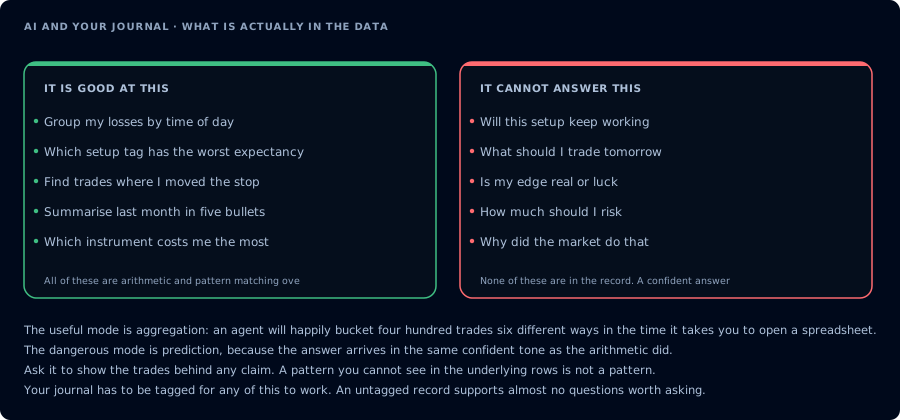
Aggregation it does well. Prediction it cannot do, in the same confident tone.
Authenticate with mcp:read. Use one of these prompts to have the AI agent call GetJournalTrades (and related read tools) and produce structured analysis. No write permission, no risk to the account.
Prerequisites
| Requirement | Detail |
|---|---|
| CrossTrade subscription | Elite |
| CrossTrade NT8 Add-On | v1.13.0 or higher |
| MCP client | Any |
| Scope | mcp:read |
If your MCP client is not set up yet, see How to Authenticate the CrossTrade MCP Server.
Step 1: Verify the connection
Use read-only tools only. Confirm CrossTrade MCP is connected and list my
available accounts.
Step 2: Last 20 trades summary
Pull the last 20 closed trades on <account>. Group by instrument and side.
Report win rate, average win, average loss, biggest loser. Redact account
identifiers in the summary.
The agent calls GetJournalTrades. The response is a structured summary you can act on tomorrow.
Step 3: Revenge-trade detection
Pull today's matched trades on <account>. Find any trade whose entry timestamp
is within 90 seconds of a prior losing trade exit on the same instrument.
Report them. Tell me how much of today's P&L came from those trades.
This catches the pattern that ruins funded evaluations.
Step 4: Time-of-day analysis
Bucket the last 60 days of matched trades by 30-minute window. Compute
expectancy in dollars per trade per window. Tell me the worst window.
This catches "I trade my worst session at 10:15 AM" patterns.
Step 5: Setup decay
For the last 30 days of matched trades, bucket by setup if tagged. Report
weekly expectancy per setup. Flag any setup with negative expectancy and at
least 10 trades.
The agent catches setup decay before the next evaluation starts.
Step 6: Sizing audit
For the last 50 trades on <account>, compute implied dollar risk from quantity
and stop distance. Flag any trade where implied risk exceeded 1% of starting
balance.
Step 7: Weekly review
Combine the above into a single weekly prompt:
For the last 7 trading days on <account>:
- Win rate, average win, average loss
- Three biggest losers
- Revenge-trade count and total P&L
- Worst time-of-day window
- Any setup with negative expectancy and ≥10 trades
Redact account identifiers.
What to avoid
- Asking the agent to predict next session's trades from the journal. The journal is descriptive, not predictive.
- Treating expectancy as edge. A bull-market window is not a strategy.
- Sharing the agent's output before redacting account identifiers.
FAQ
Does this require mcp:trade?
No. Read-only is enough.
Can the agent edit my journal?
No. The journal is the truth source; the agent reads it.
Can the agent expose real PnL?
It can in summaries. Instruct it to redact before sharing.
Related
- Main site: Trade Journal
- Learn: Run a Daily Trading Review with AI
- Learn: First Read-Only AI Trading Agent
- Docs: GetJournalTrades