How to Connect 5ire to NinjaTrader 8 with CrossTrade MCP
5ire is an open-source (Apache 2.0) MCP-native desktop chat app. Free, multi-model, lightweight. The transport auto-detects from the URL: if the URL ends with 'sse', it tries SSE first; otherwise Streamable HTTP. Bearer-token auth only — no native OAuth as of this writing.
mcp:readMulti-model harnessPrerequisites
| Requirement | Detail |
|---|---|
| CrossTrade subscription | Elite |
| CrossTrade NT8 Add-On | v1.13.0 or higher |
| NinjaTrader 8 | Running, broker connected |
| Account | Sim101 for first runs |
| OAuth scope | mcp:read |
| Config file | mcp.json (managed via Tools UI — Alt+1) |
streamable-http. Auth: OAuth 2.1 + PKCE. Request scope mcp:read. Read-only. Inspect accounts, orders, positions, journal, NinjaScript.Step 1: Install 5ire
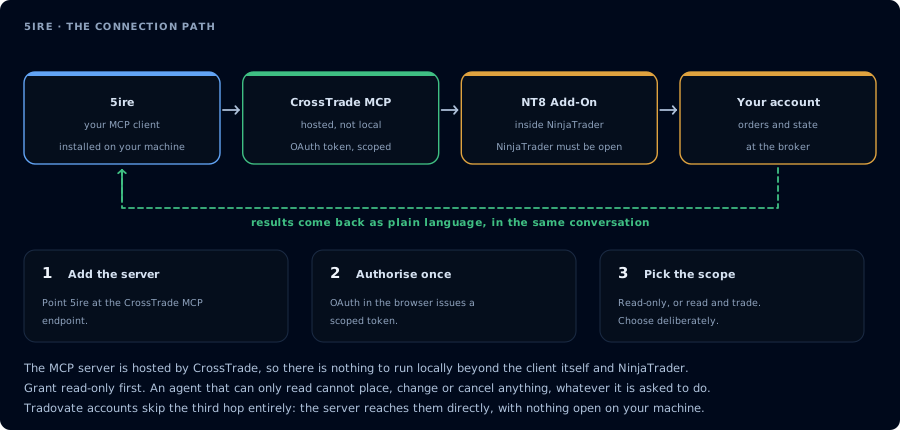
Four hops, authorised once. Read-only is the scope to start with.
Download from 5ire.app or:
# macOS
brew tap brewforge/extras && brew install --cask 5ire
Available for macOS (Apple Silicon and Intel), Windows, Linux.
Step 2: Add CrossTrade MCP
Open the Tools page (Alt+1). Click Add or use the built-in market drawer for curated MCP servers. For a custom server, the underlying JSON shape in mcp.json:
{
  "key": "crosstrade",
  "type": "remote",
  "url": "https://app.crosstrade.io/v1/api/mcp",
  "headers": {
    "Authorization": "Bearer YOUR_TOKEN"
  },
  "isActive": true
}
Schema:
key: unique id (2+ alphanumeric/hyphens, must start with a letter)type:"local"(stdio) or"remote"(HTTP/SSE — auto-detected from URL)- For remote:
url, optionalheaders - Optional:
proxy,isActive,capabilities
Step 3: Get a bearer token
5ire's official docs don't mention a native OAuth flow. To get a CrossTrade token:
- Authorize CrossTrade via Claude Desktop, Cursor, or any OAuth-capable client.
- Copy the issued token from AI Clients page.
- Paste in 5ire's headers field.
Step 4: One-click install via deep link
5ire supports app.5ire://install-tool#<base64-encoded-config> deep links — useful if CrossTrade wants to publish a one-click installer button later.
Step 5: First prompt
Confirm CrossTrade MCP. ListAccounts and summarize open positions. Read-only.
FAQ
Free?
Yes — Apache 2.0, fully open source, completely free.
What providers does 5ire support?
OpenAI, Azure (Azure OpenAI), Anthropic (Claude), Google (Gemini), Baidu, Mistral, Moonshot (Kimi), Doubao, Grok (xAI), DeepSeek, Ollama (local). Custom OpenAI-compatible endpoints can be added via UI. The first tool call surfaces an authorization URL. Open it in a browser, approve See CrossTrade MCP OAuth for the full flow, and 403/408 troubleshooting if the handshake fails. Smoke-test before doing anything stateful:OAuth handshake
mcp:read, and return to the harness. The access token is stored by the harness (keychain, config file, or memory depending on the client).Verify the connection
Call GetMcpCapabilities and McpSelfTest. Then ListAccounts and GetConnections.
Report add-on version, NT8 version, and which accounts are linked.
mcp:read. The agent can inspect state but cannot place orders, deploy strategies, or write NinjaScript files.Troubleshooting
| Symptom | Likely cause | Fix |
|---|---|---|
| 403 insufficient_scope | Token authorized at mcp:read but tool requires mcp:trade | Reauthorize the connection and select mcp:trade |
| OAuth callback fails | System browser blocked the redirect or popup | Copy the auth URL manually, complete it, paste the code back |
| Tools list is empty after connect | Server registered but session did not refresh | Restart the harness or trigger a tool list refresh |
| Add-on offline error | NT8 not running, or add-on not loaded | Confirm NT8 is open and the CrossTrade NT8 add-on (v1.13.0+) is installed |
| 5ire defaults to SSE for an HTTP MCP server | URL accidentally contains "sse" substring | CrossTrade's URL /v1/api/mcp is fine; if you're on a custom URL with "sse" in the path, change it |
| OAuth not initiating | 5ire docs do not document a native OAuth flow | Obtain a bearer token from another OAuth-capable client and paste in headers |
| uvx command not found when launching from Finder/Dock | PATH not inherited from Finder | pipx install uv; or launch 5ire from a terminal so PATH is inherited |