How to Connect Aider to NinjaTrader 8 with CrossTrade MCP
Aider is one of the most popular git-aware CLI coding agents. Important note: Aider does NOT ship a native MCP client as of this writing (tracked in Aider-AI/aider issue #4506). To use Aider with CrossTrade you pair it with a sibling MCP-capable host, OR you expose Aider as an MCP tool via aider-mcp-server and call it from Claude/Cursor/OpenCode.
mcp:tradeMulti-model harnessPrerequisites
| Requirement | Detail |
|---|---|
| CrossTrade subscription | Elite |
| CrossTrade NT8 Add-On | v1.13.0 or higher |
| NinjaTrader 8 | Running, broker connected |
| Account | Sim101 for first runs |
| OAuth scope | mcp:trade |
| Install command | python -m pip install aider-install && aider-install |
| Config file | ~/.aider.conf.yml (provider keys only; no MCP client config) |
streamable-http. Auth: OAuth 2.1 + PKCE. Request scope mcp:trade. Read plus write. Place/cancel orders, deploy strategies, compile NinjaScript.The honest situation
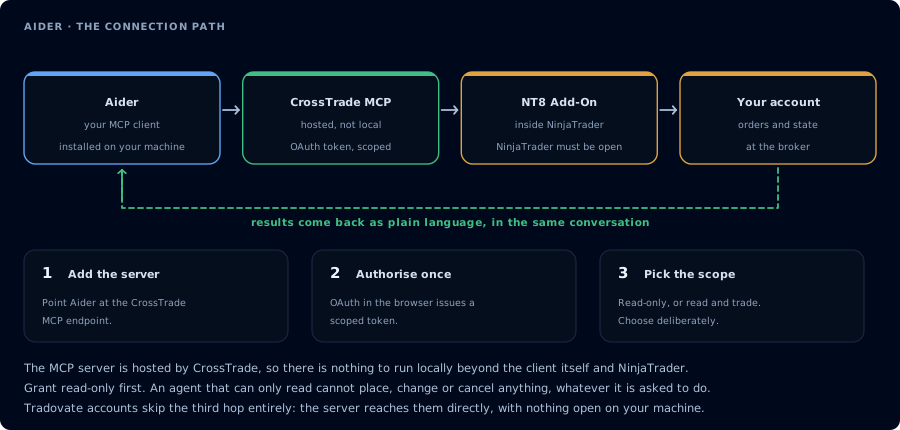
Four hops, authorised once. Read-only is the scope to start with.
Aider does not have a built-in MCP client. The closest thing in the ecosystem is disler/aider-mcp-server, which does the opposite: it exposes Aider's editing capabilities as an MCP tool that another MCP host (Claude Code, Cursor, OpenCode) can call.
So there are two patterns:
- Use a different host for CrossTrade, keep Aider for pure editing. Run Claude Code, OpenCode, or Cursor when you want CrossTrade tools; run Aider when you just want fast git-aware refactoring.
- Inverse: expose Aider through
aider-mcp-serverand call it from an MCP host that already has CrossTrade attached.
Pattern 1: Use Claude Code / OpenCode for CrossTrade work
Install Aider for what it's best at:
python -m pip install aider-install
aider-install
For NinjaScript work that needs to talk to NT8, use Claude Code (see Connect Claude Code) or OpenCode (see Connect OpenCode). Both are MCP-native, both edit local files, both pair well with Aider's git workflow because they all leave the same file structure behind.
Pattern 2: Expose Aider as a tool via aider-mcp-server
If you really want Aider in the loop, run disler/aider-mcp-server. It launches Aider as a subprocess and exposes its editing commands as MCP tools that any MCP host can call.
git clone https://github.com/disler/aider-mcp-server
cd aider-mcp-server
uv sync
Then register it as a stdio MCP server in Claude Code, Cursor, etc. Now the workflow becomes:
Claude Code (or Cursor / OpenCode)
   ├─ CrossTrade MCP → NinjaTrader 8 state
   └─ aider-mcp-server → Aider edits files
Claude can ask "compile this NinjaScript, then if it fails, use Aider to fix the imports."
Why isn't this natively integrated?
Native MCP client support in Aider is requested in Aider-AI/aider#4506. The maintainers haven't shipped it as of this writing. If they do, this page will be updated; in the meantime treat Aider as an editing tool that pairs WITH an MCP host, not AS one.
FAQ
So I shouldn't use Aider for NinjaTrader at all?
Use it for the parts it's great at: refactoring NinjaScript files locally, batch-renaming variables, applying spec changes across many strategies. Run Claude Code or OpenCode for anything that needs to talk to NT8 (compile, backtest, deploy, journal review).
When will Aider support MCP directly?
There's no committed timeline. Watch issue #4506.
Is the aider-mcp-server bridge production-ready?
It's a community project, not endorsed by Aider's maintainers. Useful for personal workflows; evaluate before relying on it for funded-account work. The first tool call surfaces an authorization URL. Open it in a browser, approve See CrossTrade MCP OAuth for the full flow, and 403/408 troubleshooting if the handshake fails. Smoke-test before doing anything stateful: If you authorized OAuth handshake
mcp:trade, and return to the harness. The access token is stored by the harness (keychain, config file, or memory depending on the client).Verify the connection
Call GetMcpCapabilities and McpSelfTest. Then ListAccounts and GetConnections.
Report add-on version, NT8 version, and which accounts are linked.mcp:trade, also confirm Sim101 is the default account before any order placement.
mcp:trade scope grants order placement. The scope does not protect a funded account; your prompt and account selection do. Default to Sim101 during setup. For funded accounts, verify the firm's automation policy first.Troubleshooting
| Symptom | Likely cause | Fix |
|---|---|---|
| 403 insufficient_scope | Token authorized at mcp:read but tool requires mcp:trade | Reauthorize the connection and select mcp:trade |
| OAuth callback fails | System browser blocked the redirect or popup | Copy the auth URL manually, complete it, paste the code back |
| Tools list is empty after connect | Server registered but session did not refresh | Restart the harness or trigger a tool list refresh |
| Add-on offline error | NT8 not running, or add-on not loaded | Confirm NT8 is open and the CrossTrade NT8 add-on (v1.13.0+) is installed |
| Aider doesn't see CrossTrade tools | Aider has no built-in MCP client (issue #4506) | Run Aider and an MCP host like Claude Code in parallel; or use the aider-mcp-server bridge below |
| aider-mcp-server bridge install fails | Out-of-date Python or missing uvx | pip install uv; ensure Python 3.10+ |