How to Connect Sourcegraph Amp to NinjaTrader 8 with CrossTrade MCP
Sourcegraph Amp is the newer frontier-agent product (different from Cody). Unlike Cody, Amp natively supports remote HTTP MCP with OAuth Dynamic Client Registration. Pay-as-you-go credits, no subscription. Cross-IDE: JetBrains, VS Code variants, Neovim, Zed, plus a CLI.
mcp:tradeMulti-model harnessPrerequisites
| Requirement | Detail |
|---|---|
| CrossTrade subscription | Elite |
| CrossTrade NT8 Add-On | v1.13.0 or higher |
| NinjaTrader 8 | Running, broker connected |
| Account | Sim101 for first runs |
| OAuth scope | mcp:trade |
| Install command | curl -fsSL https://ampcode.com/install.sh | bash |
| Config file | amp.mcpServers in VS Code settings.json (or amp mcp add CLI) |
streamable-http. Auth: OAuth 2.1 + PKCE. Request scope mcp:trade. Read plus write. Place/cancel orders, deploy strategies, compile NinjaScript.Amp vs Cody (important distinction)
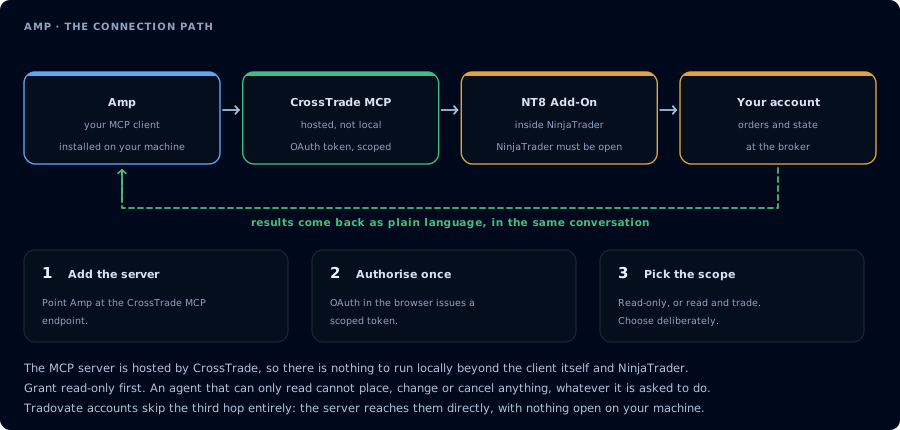
Four hops, authorised once. Read-only is the scope to start with.
Sourcegraph has two products in this space:
- Cody is the older coding assistant. Stdio-only MCP, requires Enterprise + a feature flag.
- Amp is the newer frontier-agent product. Native remote HTTP MCP, OAuth + DCR, pay-as-you-go.
For CrossTrade, Amp is the easier path.
Step 1: Install Amp
# macOS / Linux / WSL
curl -fsSL https://ampcode.com/install.sh | bash

# Windows (PowerShell)
powershell -c "irm https://ampcode.com/install.ps1 | iex"

# Homebrew
brew install ampcode/tap/ampcode
Then sign in:
amp login
For JetBrains: install Amp CLI, then run amp --jetbrains.
Step 2: Add CrossTrade MCP
Via the CLI:
amp mcp add crosstrade https://app.crosstrade.io/v1/api/mcp
Or edit VS Code settings.json:
"amp.mcpServers": {
  "crosstrade": {
    "url": "https://app.crosstrade.io/v1/api/mcp",
    "headers": {
      "Authorization": "Bearer ${CROSSTRADE_TOKEN}"
    }
  }
}
Variable substitution via ${VAR_NAME} is supported in header values.
Step 3: OAuth (automatic via DCR for compliant servers)
If CrossTrade's MCP server advertises Dynamic Client Registration (it does), Amp auto-starts the OAuth flow in your browser on first connection. No manual config.
For non-DCR servers:
amp mcp oauth login crosstrade \
  --server-url https://app.crosstrade.io/v1/api/mcp \
  --client-id YOUR_CLIENT_ID \
  --client-secret YOUR_SECRET \
  --scopes "mcp:trade"
Redirect URI to register: http://localhost:8976/oauth/callback.
Step 4: First prompt
Confirm CrossTrade MCP. ListAccounts, GetConnections. One-line status per account.
Step 5: NinjaScript compile loop
Same compile-loop pattern as Claude Code or Cursor. Amp's strength is multi-step planning across files.
Plans
Pay-as-you-go credits, $5 minimum top-up. No subscription. Enterprise plans cost ~50% more. BYOK is supported.
FAQ
Should I use Cody or Amp?
Amp, unless your team already pays for Sourcegraph Enterprise and uses Cody extensively. Amp's MCP integration is cleaner and the auth flow is simpler.
Which IDEs?
Cross-IDE: JetBrains (IntelliJ, WebStorm, GoLand), VS Code variants, Neovim, Zed, plus a CLI. The first tool call surfaces an authorization URL. Open it in a browser, approve See CrossTrade MCP OAuth for the full flow, and 403/408 troubleshooting if the handshake fails. Smoke-test before doing anything stateful: If you authorized OAuth handshake
mcp:trade, and return to the harness. The access token is stored by the harness (keychain, config file, or memory depending on the client).Verify the connection
Call GetMcpCapabilities and McpSelfTest. Then ListAccounts and GetConnections.
Report add-on version, NT8 version, and which accounts are linked.mcp:trade, also confirm Sim101 is the default account before any order placement.
mcp:trade scope grants order placement. The scope does not protect a funded account; your prompt and account selection do. Default to Sim101 during setup. For funded accounts, verify the firm's automation policy first.Troubleshooting
| Symptom | Likely cause | Fix |
|---|---|---|
| 403 insufficient_scope | Token authorized at mcp:read but tool requires mcp:trade | Reauthorize the connection and select mcp:trade |
| OAuth callback fails | System browser blocked the redirect or popup | Copy the auth URL manually, complete it, paste the code back |
| Tools list is empty after connect | Server registered but session did not refresh | Restart the harness or trigger a tool list refresh |
| Add-on offline error | NT8 not running, or add-on not loaded | Confirm NT8 is open and the CrossTrade NT8 add-on (v1.13.0+) is installed |
| Key amp.mcpServers not recognized | Copy-pasted mcp.servers or mcpServers from a different tool | Amp uses amp.mcpServers (with the amp. prefix) |
| OAuth doesn't auto-register | Server doesn't advertise Dynamic Client Registration | CrossTrade does support DCR; if Amp doesn't auto-register, run amp mcp oauth login <name> with explicit credentials |