How to Connect AnythingLLM to NinjaTrader 8 with CrossTrade MCP
AnythingLLM combines a document RAG layer with agent tooling. Pair with CrossTrade MCP to ask questions that span your local docs (trade rules, broker statements) and live NT8 state. Uses type: 'streamable' (not streamable-http or streamableHttp). No native OAuth, use a bearer token in headers.
mcp:readMulti-model harnessPrerequisites
| Requirement | Detail |
|---|---|
| CrossTrade subscription | Elite |
| CrossTrade NT8 Add-On | v1.13.0 or higher |
| NinjaTrader 8 | Running, broker connected |
| Account | Sim101 for first runs |
| OAuth scope | mcp:read |
| Config file | ${STORAGE}/plugins/anythingllm_mcp_servers.json (Docker) or ~/Library/Application Support/anythingllm-desktop/storage/plugins/anythingllm_mcp_servers.json (macOS Desktop) |
streamable-http. Auth: OAuth 2.1 + PKCE. Request scope mcp:read. Read-only. Inspect accounts, orders, positions, journal, NinjaScript.Step 1: Install AnythingLLM
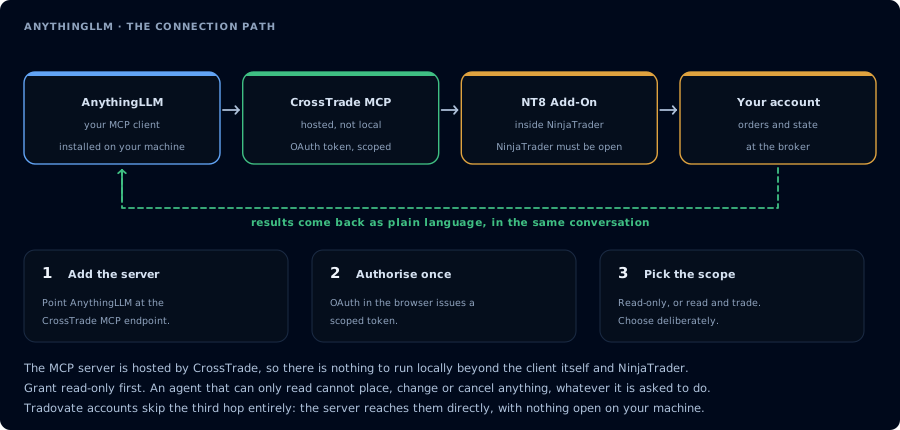
Four hops, authorised once. Read-only is the scope to start with.
Desktop or Docker. See anythingllm.com.
Docker:
docker pull mintplexlabs/anythingllm:latest
# See the official "How to Use Docker" guide for the full docker run with STORAGE_LOCATION mount
Default app port: 3001. Open http://localhost:3001.
Step 2: Add CrossTrade MCP
The MCP config lives in a JSON file (not the UI). File location:
- Desktop (macOS):
~/Library/Application Support/anythingllm-desktop/storage/plugins/anythingllm_mcp_servers.json - Docker:
${STORAGE_LOCATION}/plugins/anythingllm_mcp_servers.json(e.g./opt/anythingllm/storage/plugins/anythingllm_mcp_servers.json)
The file is auto-created when you first open the Agent Skills page.
{
  "mcpServers": {
    "crosstrade": {
      "type": "streamable",
      "url": "https://app.crosstrade.io/v1/api/mcp",
      "headers": {
        "Authorization": "Bearer YOUR_TOKEN"
      },
      "anythingllm": {
        "autoStart": true
      }
    }
  }
}
AnythingLLM uses "type": "streamable" for Streamable HTTP. Other tools use streamable-http, streamableHttp, http, or remote. Don't copy from other configs.
If you omit type entirely with a url, AnythingLLM defaults to SSE.
Step 3: Get a bearer token
AnythingLLM's MCP client doesn't support OAuth. To get a token:
- Authorize CrossTrade via Claude Desktop, Cursor, OpenCode, or any OAuth-capable client.
- Copy the issued token from your AI Clients page.
- Paste in the JSON above.
Step 4: Workspace pattern
Create a workspace that combines your trade rules, broker statements, and prop firm rule PDFs. Then:
Compare the current state in CrossTrade (open positions, watermarks) against my
trade rules PDF in this workspace. Am I in violation of any rule? Read-only;
don't act.
AnythingLLM joins the RAG context with the live tool calls.
Multi-user caveat
AnythingLLM stores MCP server config at the instance/global level. Tools registered via MCP are exposed to any workspace/agent in that instance. There is no per-user MCP credential scoping — users in a multi-user Docker deployment share whatever credentials the admin put in the JSON. If you need per-user isolation, LibreChat is the better fit.
FAQ
Free?
Yes — MIT-licensed.
Anythingllm-specific JSON keys?
The first tool call surfaces an authorization URL. Open it in a browser, approve See CrossTrade MCP OAuth for the full flow, and 403/408 troubleshooting if the handshake fails. Smoke-test before doing anything stateful:"anythingllm": { "autoStart": false } to prevent auto-launch of a configured server.OAuth handshake
mcp:read, and return to the harness. The access token is stored by the harness (keychain, config file, or memory depending on the client).Verify the connection
Call GetMcpCapabilities and McpSelfTest. Then ListAccounts and GetConnections.
Report add-on version, NT8 version, and which accounts are linked.
mcp:read. The agent can inspect state but cannot place orders, deploy strategies, or write NinjaScript files.Troubleshooting
| Symptom | Likely cause | Fix |
|---|---|---|
| 403 insufficient_scope | Token authorized at mcp:read but tool requires mcp:trade | Reauthorize the connection and select mcp:trade |
| OAuth callback fails | System browser blocked the redirect or popup | Copy the auth URL manually, complete it, paste the code back |
| Tools list is empty after connect | Server registered but session did not refresh | Restart the harness or trigger a tool list refresh |
| Add-on offline error | NT8 not running, or add-on not loaded | Confirm NT8 is open and the CrossTrade NT8 add-on (v1.13.0+) is installed |
| type: "streamable-http" or "streamableHttp" rejected | AnythingLLM uses type: "streamable" — different from other tools | Use type: "streamable" (or omit type; default for url is SSE) |
| JSON file disappears on restart | STORAGE_LOCATION volume not properly mounted in Docker | Confirm the storage volume mount before editing the JSON; otherwise file is regenerated empty |
| Cannot mix command and url | AnythingLLM rejects entries with both stdio and remote shape | Pick stdio (command) OR remote (url), not both |
| No OAuth flow | AnythingLLM's MCP client supports bearer tokens via headers only | Obtain a token via another OAuth-capable client and paste in headers |