How to Connect Cherry Studio to NinjaTrader 8 with CrossTrade MCP
Cherry Studio is an open-source (AGPL-3.0) multi-model desktop chat app popular in APAC. It supports MCP servers and routes to virtually every cloud and local model provider. Pin to current stable (v1.6.0+) because earlier builds had a security vulnerability in HTTP MCP OAuth flow handling.
mcp:readMulti-model harnessPrerequisites
| Requirement | Detail |
|---|---|
| CrossTrade subscription | Elite |
| CrossTrade NT8 Add-On | v1.13.0 or higher |
| NinjaTrader 8 | Running, broker connected |
| Account | Sim101 for first runs |
| OAuth scope | mcp:read |
| Config file | Settings → MCP Servers → Add Server (route /settings/mcp) |
streamable-http. Auth: OAuth 2.1 + PKCE. Request scope mcp:read. Read-only. Inspect accounts, orders, positions, journal, NinjaScript.Step 1: Install Cherry Studio (v1.6.0+)
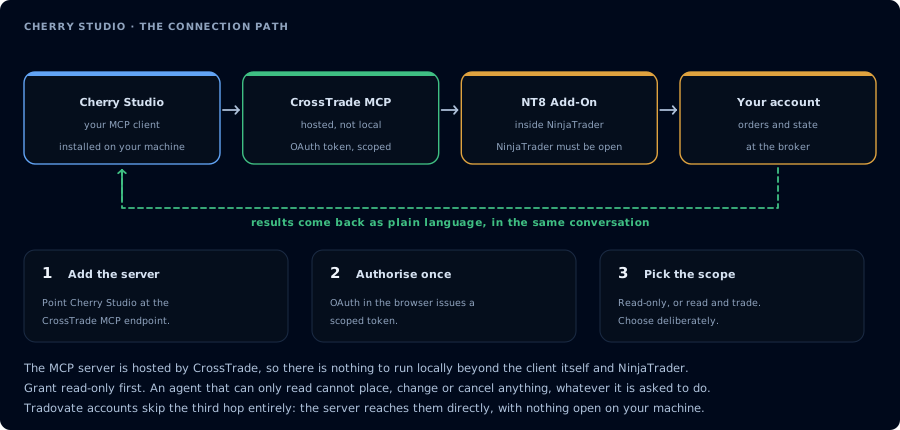
Four hops, authorised once. Read-only is the scope to start with.
Download from cherry-ai.com or github.com/CherryHQ/cherry-studio/releases.
Available for Windows 10+ (x64), macOS 11+ (Intel and Apple Silicon, or universal Homebrew cask), Linux (.deb, .rpm, .AppImage).
Versions at or below v1.5.1 are vulnerable to OS command injection via untrusted HTTP MCP server OAuth metadata (GHSA-8xr5-732g-84px). Use v1.6.0 or newer. Do not connect untrusted MCP servers on older versions.
Step 2: Add CrossTrade MCP
UI path: Settings → MCP Servers → Add Server (or route /settings/mcp).
Select Type: streamableHttp. Fill in:
- Name:
CrossTrade - baseUrl:
https://app.crosstrade.io/v1/api/mcp - Headers (if pre-issued token):
Authorization: Bearer YOUR_TOKEN
For JSON import, the underlying shape is:
{
  "type": "streamableHttp",
  "baseUrl": "https://app.crosstrade.io/v1/api/mcp",
  "headers": {
    "Authorization": "Bearer YOUR_TOKEN"
  }
}
For streamableHttp and sse types Cherry Studio uses baseUrl:. For stdio it uses command: and arguments:. Schema validation rejects mismatches.
Step 3: OAuth (if you didn't provide a static token)
When CrossTrade returns 401 on first tool call, Cherry Studio spins up a local OAuth callback server and opens your system browser. Sign in to CrossTrade, approve mcp:read, return.
Step 4: Pick model
Cherry Studio's model picker is per-conversation. For NinjaTrader work:
- Claude for NinjaScript drafting
- DeepSeek / Qwen for journal review (cheap, large context)
- GLM 4.6 / Kimi K2 as alternatives that handle tool calls well
Step 5: First prompt
ListAccounts. One-line summary per account.
FAQ
Free?
Yes — AGPL-3.0 Community Edition is free for personal and professional use. A separate paid Enterprise edition adds SSO, central admin, audit.
MCP marketplace inside the app?
Yes — Cherry Studio includes NPM-search-based MCP server discovery plus DXT file import. The first tool call surfaces an authorization URL. Open it in a browser, approve See CrossTrade MCP OAuth for the full flow, and 403/408 troubleshooting if the handshake fails. Smoke-test before doing anything stateful:OAuth handshake
mcp:read, and return to the harness. The access token is stored by the harness (keychain, config file, or memory depending on the client).Verify the connection
Call GetMcpCapabilities and McpSelfTest. Then ListAccounts and GetConnections.
Report add-on version, NT8 version, and which accounts are linked.
mcp:read. The agent can inspect state but cannot place orders, deploy strategies, or write NinjaScript files.Troubleshooting
| Symptom | Likely cause | Fix |
|---|---|---|
| 403 insufficient_scope | Token authorized at mcp:read but tool requires mcp:trade | Reauthorize the connection and select mcp:trade |
| OAuth callback fails | System browser blocked the redirect or popup | Copy the auth URL manually, complete it, paste the code back |
| Tools list is empty after connect | Server registered but session did not refresh | Restart the harness or trigger a tool list refresh |
| Add-on offline error | NT8 not running, or add-on not loaded | Confirm NT8 is open and the CrossTrade NT8 add-on (v1.13.0+) is installed |
| Streamable HTTP MCP fails to connect | Used url instead of baseUrl for streamableHttp type | Cherry Studio uses baseUrl: for HTTP MCP servers, not url |
| On older Cherry Studio (≤1.5.1) | OS Command Injection vuln in OAuth metadata handling (GHSA-8xr5-732g-84px) | Upgrade to latest stable (v1.6.0+ is safe); do not use ≤1.5.1 with untrusted HTTP MCP servers |