How to Connect Claude Code to NinjaTrader 8 with CrossTrade MCP
Claude Desktop is the right environment for chat-style account inspection. Claude Code is the right environment for NinjaScript work. The CLI can edit local files and call CrossTrade MCP tools in the same conversation, which makes the compile loop converge fast.
mcp:tradeSingle-vendor hostPrerequisites
| Requirement | Detail |
|---|---|
| CrossTrade subscription | Elite |
| CrossTrade NT8 Add-On | v1.13.0 or higher |
| NinjaTrader 8 | Running, broker connected |
| Account | Sim101 for first runs |
| OAuth scope | mcp:trade |
| Install command | curl -fsSL https://claude.ai/install.sh | bash |
| Config file | Managed by `claude mcp add` (writes to ~/.claude.json or .mcp.json depending on scope) |
streamable-http. Auth: OAuth 2.1 + PKCE. Request scope mcp:trade. Read plus write. Place/cancel orders, deploy strategies, compile NinjaScript.Why Claude Code for NinjaScript
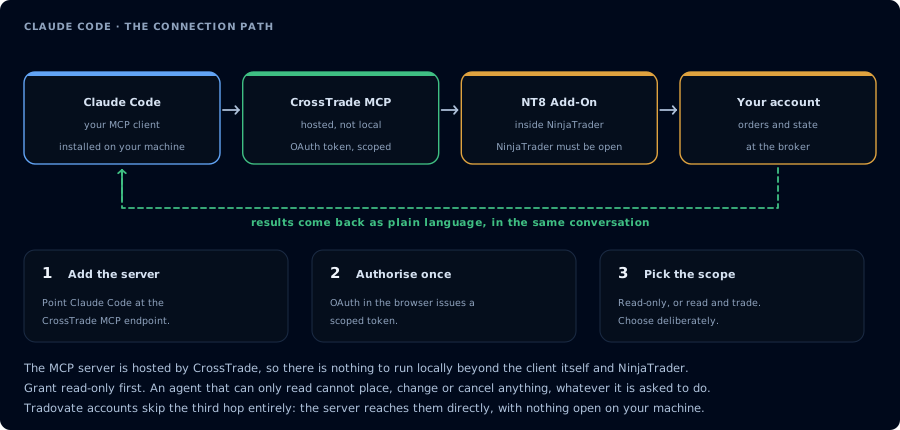
Four hops, authorised once. Read-only is the scope to start with.
Claude Code can read and write local files, run shell commands, and call MCP tools in one session. That combination is what turns a brittle "paste compile errors back to the chat" workflow into a real compile loop. CrossTrade MCP adds the part Claude Code cannot do on its own: it lets the agent look at your actual NT8 install instead of guessing.
| Capability | Tool |
|---|---|
| Look up the real NinjaScript symbols available in your install | GetNinjaScriptHelp, SearchNinjaScriptSymbols, LookupNinjaScriptSymbol |
| Compile against the running NT8 AppDomain without disk writes | CompileNinjaScript(in_memory: true) |
| Write the source file once compile is green | WriteNinjaScriptFile |
| Run NT8's actual Strategy Analyzer engine | RunStrategyBacktest |
| Verify a deployed strategy is actually trading | GetDeployedStrategyState |
Step 1: Install Claude Code
The native installer is the supported path:
# macOS / Linux / WSL
curl -fsSL https://claude.ai/install.sh | bash

# Windows PowerShell
irm https://claude.ai/install.ps1 | iex

# Or via Homebrew
brew install --cask claude-code

# Or via npm (requires Node 18+; do NOT use sudo)
npm install -g @anthropic-ai/claude-code
Claude Code requires a Pro, Max, Team, Enterprise, or Console subscription. The Free Claude.ai plan does NOT include Claude Code access. Alternatively, authenticate via Amazon Bedrock, Google Vertex AI, or Microsoft Foundry with their credentials.
Step 2: Register the CrossTrade MCP server
claude mcp add --transport http crosstrade https://app.crosstrade.io/v1/api/mcp
All flags (--transport, --scope, --header) MUST come before the server name. claude mcp add --transport http crosstrade <URL> works; claude mcp add crosstrade --transport http <URL> misparses.
By default this adds the server at --scope local (current project only). For all-projects access, add --scope user. For repo-committed .mcp.json, use --scope project.
On the first tool call, Claude Code prints an OAuth URL. Open it in a browser, approve mcp:trade, and return to the terminal. The token caches in the system keychain (macOS) or credentials file (elsewhere) and refreshes automatically.
If the browser redirect fails after sign-in, paste the full callback URL from the address bar back into the CLI prompt to recover.
--transport sse still works but is deprecated. Use --transport http (Streamable HTTP) for all new connections.
Step 3: Inspect NinjaScript help before drafting
Before generating a strategy, ground the model in your install:
For an MES 5-minute EMA crossover strategy with an ATR-based trailing stop,
call GetNinjaScriptHelp on EMA, ATR, CrossAbove, and SetTrailStop. Restate the
overloads you intend to use before drafting any code.
Claude should list the chosen overloads and any alternatives it considered.
Step 4: Generate a simple strategy
Draft a NinjaScript strategy called SampleEmaCross for Sim101. Long when 9-EMA
crosses above 21-EMA. ATR-based trailing stop, multiplier 2.0. One contract.
Max two trades per session. Time filter 09:30 to 11:00 ET. Do not compile yet.
Show me the source.
Read the source. Look for obvious issues. Push back on anything that doesn't match the spec.
Step 5: Compile and repair errors
CompileNinjaScript(in_memory: true). For each error, explain it in plain English.
For every unresolved identifier, LookupNinjaScriptSymbol and rewrite the offending
line. Recompile until green. Do not write the file yet.
Typical first compile produces 1-3 errors. The agent should resolve them in two or three iterations.
Step 6: Backtest in Strategy Analyzer
After a green compile, ask Claude Code to write the file with explicit confirmation, then backtest:
After I confirm, WriteNinjaScriptFile. Then RunStrategyBacktest on Sim101 over
the last 30 trading days, 5-minute bars, commission $1.27 per round-trip,
slippage 1 tick. Show the metrics block.
When the metrics return, read both the metrics and (when feasible) the trade list. Confirm that entries and exits behave the way the spec described.
Step 7: Interpret results
The metrics block alone is not enough. Ask for an honest review:
Apply these gates: profit factor above 1.25, max drawdown below $500, trade count
above 40. Report pass or fail for each. Then list five reasons this generated
strategy should not go to a live or funded account. Be specific.
If the gates fail, iterate. If they pass, the strategy is ready for further validation on Sim101 over several sessions, not for live deployment.
Step 8: Save or discard
If the strategy looks promising, commit the file to your local workflow. Claude Code can run git commands. If the strategy is unviable, instruct Claude Code to remove the file and document what you learned.
If we keep the strategy, leave the file and add a note in a CHANGELOG.md. If we
discard it, DeleteCompiledSnippet for the in-memory class and remove the file.
Managing the MCP connection
- List MCP servers:
/mcpfrom inside the CLI shows registered servers and auth state. - Reauthenticate:
/mcp→ select CrossTrade → "Authenticate" or "Clear authentication". - Reset project-scope approvals:
claude mcp reset-project-choices.
FAQ
Why Claude Code instead of Claude Desktop for NinjaScript?
Claude Code can edit your local files and run git commands in the same session that calls MCP tools. The compile loop is faster end to end.
Do I need C# experience?
Helpful but not required. The agent does the writing. You provide the spec and read the diff.
Can Claude Code deploy strategies?
With mcp:trade and explicit confirmation in the prompt, yes. This tutorial stops short of deployment. See Build Your First AI Trading Agent for the deploy gate.
Do I need Anthropic API access separately?
No. Claude Code uses your Claude.ai subscription credits by default. If you're on Bedrock/Vertex/Foundry, it uses those instead. The first tool call surfaces an authorization URL. Open it in a browser, approve See CrossTrade MCP OAuth for the full flow, and 403/408 troubleshooting if the handshake fails. Smoke-test before doing anything stateful: If you authorized OAuth handshake
mcp:trade, and return to the harness. The access token is stored by the harness (keychain, config file, or memory depending on the client).Verify the connection
Call GetMcpCapabilities and McpSelfTest. Then ListAccounts and GetConnections.
Report add-on version, NT8 version, and which accounts are linked.mcp:trade, also confirm Sim101 is the default account before any order placement.
mcp:trade scope grants order placement. The scope does not protect a funded account; your prompt and account selection do. Default to Sim101 during setup. For funded accounts, verify the firm's automation policy first.Troubleshooting
| Symptom | Likely cause | Fix |
|---|---|---|
| 403 insufficient_scope | Token authorized at mcp:read but tool requires mcp:trade | Reauthorize the connection and select mcp:trade |
| OAuth callback fails | System browser blocked the redirect or popup | Copy the auth URL manually, complete it, paste the code back |
| Tools list is empty after connect | Server registered but session did not refresh | Restart the harness or trigger a tool list refresh |
| Add-on offline error | NT8 not running, or add-on not loaded | Confirm NT8 is open and the CrossTrade NT8 add-on (v1.13.0+) is installed |
| OAuth URL never opens | Terminal capturing the URL incorrectly | Copy the URL manually from the output, or paste the full callback URL back into the CLI prompt after sign-in |
| Compile fails on the same identifier repeatedly | Model not calling LookupNinjaScriptSymbol | Force a SearchNinjaScriptSymbols on a synonym |
| Backtest stuck on running | NT8 UI blocked or large date range | Open NT8, dismiss any modal, or shorten the range |
| CrossTrade tools listed but never load | Logged in via ANTHROPIC_API_KEY / Bedrock / Vertex instead of Claude.ai subscription | Run /status to confirm auth method; switch to Claude.ai login if you want Connectors-style integration |
| claude mcp add errors with "unknown server name" | Server name is reserved (e.g. "workspace") | Pick a different name like "crosstrade" |