How to Connect Cline to NinjaTrader 8 with CrossTrade MCP
Cline is an open-source AI coding assistant for VS Code with MCP support. The UI flow (Cline panel → MCP Servers → Remote Servers tab) is easier than the JSON file for first-time setup. Note that Cline uses streamableHttp (camelCase) as the type value — different from Roo Code and Continue which use streamable-http kebab-case.
mcp:tradeMulti-model harnessPrerequisites
| Requirement | Detail |
|---|---|
| CrossTrade subscription | Elite |
| CrossTrade NT8 Add-On | v1.13.0 or higher |
| NinjaTrader 8 | Running, broker connected |
| Account | Sim101 for first runs |
| OAuth scope | mcp:trade |
| Config file | Cline panel → MCP Servers → Remote Servers tab (or cline_mcp_settings.json in VS Code globalStorage) |
streamable-http. Auth: OAuth 2.1 + PKCE. Request scope mcp:trade. Read plus write. Place/cancel orders, deploy strategies, compile NinjaScript.Step 1 (recommended): Add CrossTrade through the Cline UI
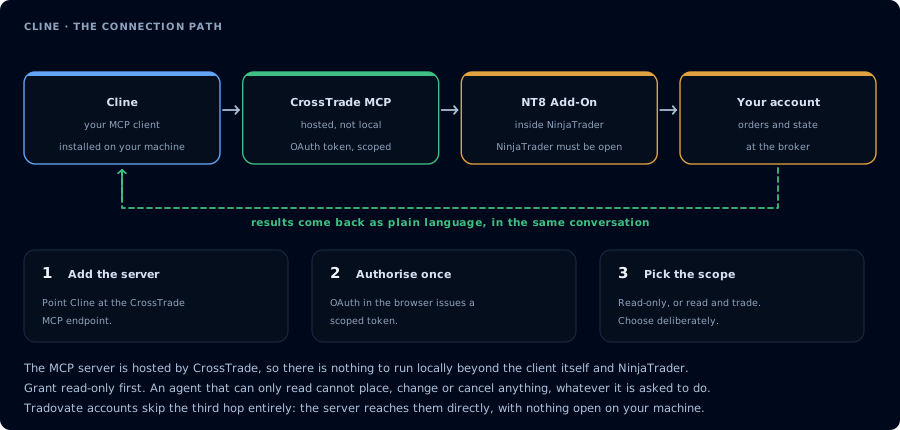
Four hops, authorised once. Read-only is the scope to start with.
- Open VS Code.
- Open the Cline panel.
- Click the MCP Servers icon.
- Switch to the Remote Servers tab.
- Click Add Server.
- Fill in:
- Server Name:
crosstrade - Server URL:
https://app.crosstrade.io/v1/api/mcp - Transport Type: Streamable HTTP (SSE is marked Legacy)
- Server Name:
- Save.
On first tool call, Cline displays an OAuth2 URL. Click to open in browser. Approve mcp:trade. Re-authorization is automatic after the initial setup.
Step 1 (alternative): Edit cline_mcp_settings.json
If you prefer the JSON file (for sync across machines):
{
  "mcpServers": {
    "crosstrade": {
      "type": "streamableHttp",
      "url": "https://app.crosstrade.io/v1/api/mcp",
      "headers": {
        "Authorization": "Bearer YOUR_TOKEN"
      },
      "disabled": false,
      "autoApprove": []
    }
  }
}
File location (VS Code globalStorage):
- macOS:
~/Library/Application Support/Code/User/globalStorage/saoudrizwan.claude-dev/settings/cline_mcp_settings.json - Linux:
~/.config/Code/User/globalStorage/saoudrizwan.claude-dev/settings/cline_mcp_settings.json - Windows:
%APPDATA%\Code\User\globalStorage\saoudrizwan.claude-dev\settings\cline_mcp_settings.json
Cline expects "type": "streamableHttp" in camelCase. Continue and Roo Code use "streamable-http" in kebab-case. Copy-pasting between them silently fails.
Step 2: First read-only workflow
Pull the last 20 closed trades on Sim101. Group by instrument and side. Report
win rate, average win, average loss, and the three biggest losers.
Step 3: NinjaScript compile loop (mcp:trade)
If you reauthorize at mcp:trade, Cline can run the full compile loop:
GetNinjaScriptHelpon every NT8 type and method you plan to use.- Draft the source.
CompileNinjaScript(in_memory: true).- On failure,
LookupNinjaScriptSymboland repair. WriteNinjaScriptFileafter confirmation.RunStrategyBackteston Sim101 with realistic commission and slippage.
See Vibe Code a NinjaScript Strategy for the full sequence.
Model choice
Cline routes to whatever LLM you've configured in its settings. For NinjaScript work, Claude and GPT both produce strong code; DeepSeek is a cheaper option for iteration-heavy work. See the model rail below. The first tool call surfaces an authorization URL. Open it in a browser, approve See CrossTrade MCP OAuth for the full flow, and 403/408 troubleshooting if the handshake fails. Smoke-test before doing anything stateful: If you authorized OAuth handshake
mcp:trade, and return to the harness. The access token is stored by the harness (keychain, config file, or memory depending on the client).Verify the connection
Call GetMcpCapabilities and McpSelfTest. Then ListAccounts and GetConnections.
Report add-on version, NT8 version, and which accounts are linked.mcp:trade, also confirm Sim101 is the default account before any order placement.
mcp:trade scope grants order placement. The scope does not protect a funded account; your prompt and account selection do. Default to Sim101 during setup. For funded accounts, verify the firm's automation policy first.Troubleshooting
| Symptom | Likely cause | Fix |
|---|---|---|
| 403 insufficient_scope | Token authorized at mcp:read but tool requires mcp:trade | Reauthorize the connection and select mcp:trade |
| OAuth callback fails | System browser blocked the redirect or popup | Copy the auth URL manually, complete it, paste the code back |
| Tools list is empty after connect | Server registered but session did not refresh | Restart the harness or trigger a tool list refresh |
| Add-on offline error | NT8 not running, or add-on not loaded | Confirm NT8 is open and the CrossTrade NT8 add-on (v1.13.0+) is installed |
| type: "streamable-http" rejected | Wrong transport-key casing | Cline uses type: "streamableHttp" (camelCase). Roo Code and Continue use the kebab-case form; do not copy between them |
| Re-auth fails with "missing stored state" | Known bug after token expiry (GitHub issue #7964) | Remove the server entry and re-add it; OAuth flow restarts cleanly |