How to Connect OpenAI Codex to NinjaTrader 8 with CrossTrade MCP
The OpenAI Codex CLI is OpenAI's terminal coding agent. It runs GPT models with native tool calling and supports remote HTTP MCP servers via a TOML config. Important: remote MCP support requires Codex CLI 0.134.0 (May 26, 2026) or newer. Older versions are stdio-only.
mcp:tradeSingle-vendor hostPrerequisites
| Requirement | Detail |
|---|---|
| CrossTrade subscription | Elite |
| CrossTrade NT8 Add-On | v1.13.0 or higher |
| NinjaTrader 8 | Running, broker connected |
| Account | Sim101 for first runs |
| OAuth scope | mcp:trade |
| Install command | curl -fsSL https://chatgpt.com/codex/install.sh | sh |
| Config file | ~/.codex/config.toml |
streamable-http. Auth: OAuth 2.1 + PKCE. Request scope mcp:trade. Read plus write. Place/cancel orders, deploy strategies, compile NinjaScript.Why Codex for NinjaScript
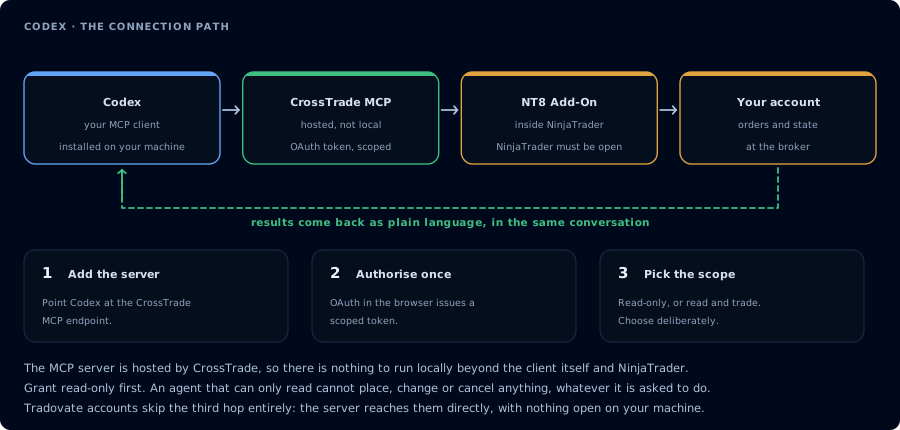
Four hops, authorised once. Read-only is the scope to start with.
Codex is to GPT what Claude Code is to Claude: a terminal coding agent that edits local files and calls tools in the same session. If you prefer GPT models (strict tool-call adherence, fast iteration on errors), Codex is the right harness.
Step 1: Install Codex (need 0.134.0 or newer for remote MCP)
# macOS / Linux (recommended)
curl -fsSL https://chatgpt.com/codex/install.sh | sh

# Windows (PowerShell)
powershell -ExecutionPolicy ByPass -c "irm https://chatgpt.com/codex/install.ps1 | iex"

# Or via npm (requires Node.js 22+)
npm install -g @openai/codex

# Or Homebrew
brew install --cask codex
Verify: codex --version (must be 0.134.0+ for remote HTTP MCP).
Remote Streamable HTTP MCP support landed in Codex CLI 0.134.0 (May 26, 2026). Earlier versions can only register stdio MCP servers and will silently ignore url = "..." in config.toml. Upgrade before configuring.
Step 2: Sign in to OpenAI
codex login
Codex uses your ChatGPT Plus/Pro/Business/Edu/Enterprise subscription, OR an OpenAI API key (export OPENAI_API_KEY=...). The ChatGPT free tier is not supported via the sign-in flow; the API-key path is the fallback.
Step 3: Register CrossTrade via the CLI
The easiest way:
codex mcp add crosstrade --url https://app.crosstrade.io/v1/api/mcp
For bearer-token auth (CrossTrade's OAuth issues a token you can paste):
codex mcp add crosstrade \
  --url https://app.crosstrade.io/v1/api/mcp \
  --bearer-token-env-var CROSSTRADE_TOKEN
Then export CROSSTRADE_TOKEN=... in your shell rc.
Step 3 (alternative): Edit ~/.codex/config.toml directly
[mcp_servers.crosstrade]
url = "https://app.crosstrade.io/v1/api/mcp"
bearer_token_env_var = "CROSSTRADE_TOKEN"
startup_timeout_sec = 10.0
tool_timeout_sec = 60.0
transport fieldCodex infers transport from which field is set: url → Streamable HTTP, command → stdio. There is no transport = "http" key — adding one is ignored.
Step 4: OAuth (for servers that prefer browser flow)
If CrossTrade's MCP server advertises OAuth metadata, you can do:
codex mcp login crosstrade --scopes mcp:trade
This opens a browser, completes OAuth on a local callback port, and stores the token automatically. If your IdP needs a fixed redirect URI, pin the port via mcp_oauth_callback_port in config.toml.
OAuth login only works for Streamable HTTP servers, not stdio.
Step 5: Verify
codex mcp list
codex
In the Codex prompt:
List the CrossTrade MCP tools. Then call GetMcpCapabilities and McpSelfTest.
Report add-on version, NT8 version, and which accounts are connected.
Step 6: NinjaScript compile loop
The pattern from Claude Code transfers:
GetNinjaScriptHelpon every type and method you plan to use.- Draft into a file in the workspace.
CompileNinjaScript(in_memory: true).- On failure,
LookupNinjaScriptSymboland repair. WriteNinjaScriptFileafter confirmation.RunStrategyBackteston Sim101 with realistic commission and slippage.
See Vibe Code a NinjaScript Strategy for the full sequence and prompts.
Managing the MCP connection
| Command | What it does |
|---|---|
codex mcp list | List configured servers |
codex mcp get crosstrade | Show one server's config |
codex mcp login crosstrade | Run OAuth flow |
codex mcp logout crosstrade | Revoke token |
codex mcp remove crosstrade | Delete from config |
Codex-specific tips
- GPT-5 reasoning produces tighter NinjaScript than non-reasoning variants, at higher latency. Use for hard problems, swap to GPT-4.1 for routine iterations.
- Approval mode is per-server (
default_tools_approval_mode = "prompt"in the TOML table) so every write call waits for confirmation — strongly recommended formcp:trade.
FAQ
Codex vs Claude Code: which is better for NinjaScript?
Both work. Claude generally writes cleaner C# on the first attempt; GPT generally fixes errors faster on the second. Try both on the same spec and decide.
Do I need ChatGPT Plus or an API key?
Either works. ChatGPT Plus / Pro / Business / Edu / Enterprise plans work via codex login. Or set OPENAI_API_KEY for the API path.
Can I pair Codex with non-OpenAI models?
Codex is GPT-locked by design. If you want a multi-model harness, use OpenCode, Cline, or Continue and route OpenAI through them. The first tool call surfaces an authorization URL. Open it in a browser, approve See CrossTrade MCP OAuth for the full flow, and 403/408 troubleshooting if the handshake fails. Smoke-test before doing anything stateful: If you authorized OAuth handshake
mcp:trade, and return to the harness. The access token is stored by the harness (keychain, config file, or memory depending on the client).Verify the connection
Call GetMcpCapabilities and McpSelfTest. Then ListAccounts and GetConnections.
Report add-on version, NT8 version, and which accounts are linked.mcp:trade, also confirm Sim101 is the default account before any order placement.
mcp:trade scope grants order placement. The scope does not protect a funded account; your prompt and account selection do. Default to Sim101 during setup. For funded accounts, verify the firm's automation policy first.Troubleshooting
| Symptom | Likely cause | Fix |
|---|---|---|
| 403 insufficient_scope | Token authorized at mcp:read but tool requires mcp:trade | Reauthorize the connection and select mcp:trade |
| OAuth callback fails | System browser blocked the redirect or popup | Copy the auth URL manually, complete it, paste the code back |
| Tools list is empty after connect | Server registered but session did not refresh | Restart the harness or trigger a tool list refresh |
| Add-on offline error | NT8 not running, or add-on not loaded | Confirm NT8 is open and the CrossTrade NT8 add-on (v1.13.0+) is installed |
| url = "..." in config.toml does nothing | Codex CLI below 0.134.0 supports stdio MCP only | Upgrade with npm install -g @openai/codex@latest (verify codex --version >= 0.134.0) |
| Set transport = "http" but Codex ignores it | There is no transport field; Codex infers transport from url vs command | Remove transport; presence of url selects Streamable HTTP automatically |
| Project-scope .codex/config.toml MCP servers ignored | Project not yet trusted | Run codex in the project once and accept the trust prompt; project-scoped MCP servers load only in trusted projects |
| Authorization header contains literal env var name | bearer_token_env_var takes a name (no leading $), not the token itself | Set bearer_token_env_var = "CROSSTRADE_TOKEN" and export the env var in your shell rc |
| codex mcp login fails with "OAuth not supported" | Trying to OAuth a stdio server | codex mcp login only works for Streamable HTTP servers (those defined with url, not command) |