How to Connect Sourcegraph Cody to NinjaTrader 8 with CrossTrade MCP
Cody is Sourcegraph's AI coding assistant. Important caveats: Cody supports LOCAL (stdio) MCP servers only — no native remote HTTP MCP. To connect CrossTrade (a remote server), wrap it with the mcp-remote stdio proxy. Cody also requires Sourcegraph Enterprise with the agentic-context-mcp-enabled feature flag turned on.
mcp:tradeMulti-model harnessPrerequisites
| Requirement | Detail |
|---|---|
| CrossTrade subscription | Elite |
| CrossTrade NT8 Add-On | v1.13.0 or higher |
| NinjaTrader 8 | Running, broker connected |
| Account | Sim101 for first runs |
| OAuth scope | mcp:trade |
| Config file | cody.mcpServers in settings.json (VS Code) or cody_settings.json (JetBrains) |
streamable-http. Auth: OAuth 2.1 + PKCE. Request scope mcp:trade. Read plus write. Place/cancel orders, deploy strategies, compile NinjaScript.Important: Cody is stdio-only
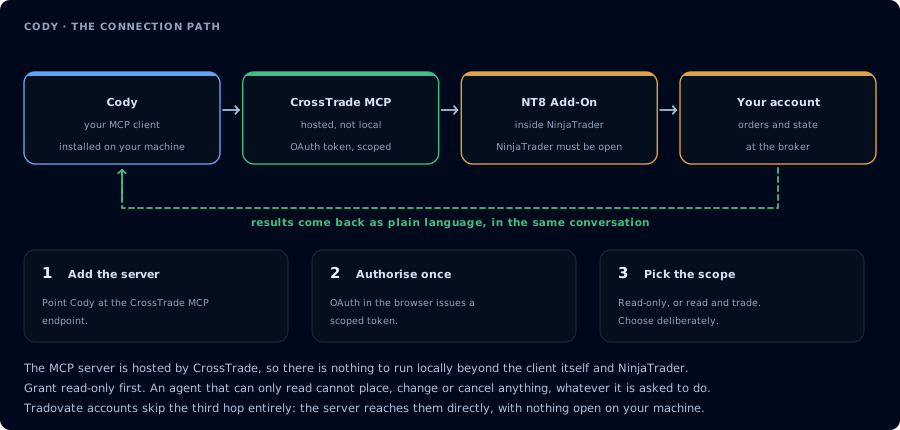
Four hops, authorised once. Read-only is the scope to start with.
Cody's official docs are explicit: "Cody currently supports only local MCP servers." For a remote server like CrossTrade, the supported pattern is to wrap it with the mcp-remote stdio proxy.
Prerequisites
- Cody installed (VS Code Marketplace or JetBrains Marketplace; extension name
Cody AI). - Sourcegraph Enterprise with
agentic-context-mcp-enabledfeature flag turned on by your admin. Cody Free and Pro do not have MCP. npxavailable on PATH (for the mcp-remote proxy).
Step 1: Configure CrossTrade via mcp-remote
In VS Code settings.json (or JetBrains cody_settings.json):
"cody.mcpServers": {
  "crosstrade": {
    "command": "npx",
    "args": ["-y", "mcp-remote", "https://app.crosstrade.io/v1/api/mcp"]
  }
}
For JetBrains, use the absolute path to npx:
"cody.mcpServers": {
  "crosstrade": {
    "command": "/Users/you/.nvm/versions/node/v20.x/bin/npx",
    "args": ["-y", "mcp-remote", "https://app.crosstrade.io/v1/api/mcp"]
  }
}
Find your absolute npx path with which npx in a terminal.
Step 2: OAuth via mcp-remote
On first connection, mcp-remote opens a browser tab. Authorize CrossTrade. The token caches in ~/.mcp-auth/.
Step 3: First prompt
In Cody chat:
@strategies/ Look at SampleEmaCross.cs. Then call CrossTrade RunStrategyBacktest
on Sim101 for the last 30 days. Where does the live spec disagree with the
backtest assumptions in the source comments?
Cody pairs well with repo-wide code intelligence: ask questions that span both your codebase and live MCP state.
Should you use Cody for CrossTrade?
For most CrossTrade workflows, other MCP hosts are easier: Claude Desktop, Cursor, Cline, OpenCode, and Roo Code all support remote HTTP MCP natively without the proxy step. Use Cody specifically when:
- Your team already pays for Sourcegraph Enterprise.
- You want repo-aware retrieval mixed with CrossTrade tool calls in the same chat.
- The
agentic-context-mcp-enabledflag is on.
If none of those apply, see Connect Cline or Connect Cursor.
Related: Sourcegraph Amp (different product)
Sourcegraph's newer Amp product ( The first tool call surfaces an authorization URL. Open it in a browser, approve See CrossTrade MCP OAuth for the full flow, and 403/408 troubleshooting if the handshake fails. Smoke-test before doing anything stateful: If you authorized ampcode.com) DOES support remote HTTP MCP natively, with OAuth + DCR. Amp's config is amp.mcpServers with url + headers directly. If your team is considering Sourcegraph for trading agents, Amp is the better fit; Cody is the older product.OAuth handshake
mcp:trade, and return to the harness. The access token is stored by the harness (keychain, config file, or memory depending on the client).Verify the connection
Call GetMcpCapabilities and McpSelfTest. Then ListAccounts and GetConnections.
Report add-on version, NT8 version, and which accounts are linked.mcp:trade, also confirm Sim101 is the default account before any order placement.
mcp:trade scope grants order placement. The scope does not protect a funded account; your prompt and account selection do. Default to Sim101 during setup. For funded accounts, verify the firm's automation policy first.Troubleshooting
| Symptom | Likely cause | Fix |
|---|---|---|
| 403 insufficient_scope | Token authorized at mcp:read but tool requires mcp:trade | Reauthorize the connection and select mcp:trade |
| OAuth callback fails | System browser blocked the redirect or popup | Copy the auth URL manually, complete it, paste the code back |
| Tools list is empty after connect | Server registered but session did not refresh | Restart the harness or trigger a tool list refresh |
| Add-on offline error | NT8 not running, or add-on not loaded | Confirm NT8 is open and the CrossTrade NT8 add-on (v1.13.0+) is installed |
| MCP section missing entirely | Cody Enterprise feature flag agentic-context-mcp-enabled not enabled on instance | Ask your Sourcegraph admin to enable the flag at the Enterprise instance level |
| Remote URL doesn't connect | Cody supports stdio MCP only | Use the mcp-remote proxy wrapper shown below |
| Stdio command fails in JetBrains | IDE PATH differs from your shell PATH | Use absolute path: which npx and put the full path in command field |
| Resources or prompts from MCP server not visible | Cody supports MCP Tools only, not Resources or Prompts | Stick to Tools; CrossTrade's API is Tool-based |