How to Connect Crush to NinjaTrader 8 with CrossTrade MCP
Crush is Charm's open-source coding agent with a clean TUI. JSON config, type: 'http' for remote MCP. No native OAuth, use a bearer token in headers.
mcp:tradeMulti-model harnessPrerequisites
| Requirement | Detail |
|---|---|
| CrossTrade subscription | Elite |
| CrossTrade NT8 Add-On | v1.13.0 or higher |
| NinjaTrader 8 | Running, broker connected |
| Account | Sim101 for first runs |
| OAuth scope | mcp:trade |
| Install command | brew install charmbracelet/tap/crush |
| Config file | ~/.config/crush/crush.json (global) or .crush.json / crush.json (project root) |
streamable-http. Auth: OAuth 2.1 + PKCE. Request scope mcp:trade. Read plus write. Place/cancel orders, deploy strategies, compile NinjaScript.Step 1: Install Crush
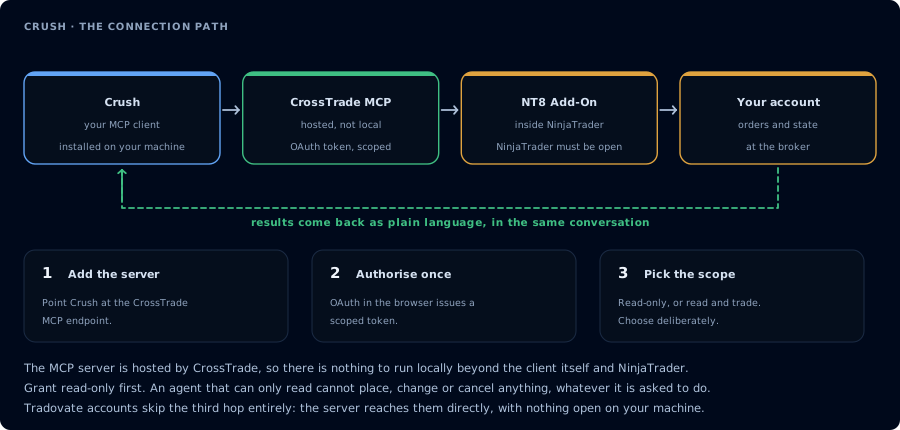
Four hops, authorised once. Read-only is the scope to start with.
# Homebrew
brew install charmbracelet/tap/crush

# npm
npm install -g @charmland/crush

# Go
go install github.com/charmbracelet/crush@latest

# Windows (Winget)
winget install charmbracelet.crush
On first launch Crush prompts for an LLM provider API key, or you can pre-set env vars (ANTHROPIC_API_KEY, OPENAI_API_KEY, etc.).
Step 2: Add CrossTrade MCP
Edit ~/.config/crush/crush.json (or .crush.json / crush.json in your project root — checked in priority order):
{
  "mcp": {
    "crosstrade": {
      "type": "http",
      "url": "https://app.crosstrade.io/v1/api/mcp",
      "timeout": 120,
      "disabled": false,
      "headers": {
        "Authorization": "Bearer $CROSSTRADE_API_KEY"
      }
    }
  }
}
Crush's transport values are "stdio", "http", or "sse". Not "remote" (OpenCode) or "streamable_http" (Goose). Schema fields: type (required), url, headers, timeout, disabled, disabled_tools, enabled_tools, env.
Env var expansion: $VARNAME syntax in header values is supported.
Step 3: Get a bearer token
Crush doesn't have a native browser OAuth flow. To get a token:
- Authorize CrossTrade via Claude Code, Cursor, OpenCode, or any OAuth-capable client.
- Copy the issued token from your AI Clients page.
export CROSSTRADE_API_KEY=...in your shell rc.
Step 4: First prompt
Confirm CrossTrade MCP. ListAccounts, GetConnections. One-line status per account.
FAQ
Why no OAuth?
Crush's MCP client is bearer-only as of this writing. Watch github.com/charmbracelet/crush for updates.
Schema autocomplete?
Crush doesn't auto-generate The first tool call surfaces an authorization URL. Open it in a browser, approve See CrossTrade MCP OAuth for the full flow, and 403/408 troubleshooting if the handshake fails. Smoke-test before doing anything stateful: If you authorized $schema references. Add "$schema": "https://charm.land/crush/schema.json" to the top of crush.json for IDE completion.OAuth handshake
mcp:trade, and return to the harness. The access token is stored by the harness (keychain, config file, or memory depending on the client).Verify the connection
Call GetMcpCapabilities and McpSelfTest. Then ListAccounts and GetConnections.
Report add-on version, NT8 version, and which accounts are linked.mcp:trade, also confirm Sim101 is the default account before any order placement.
mcp:trade scope grants order placement. The scope does not protect a funded account; your prompt and account selection do. Default to Sim101 during setup. For funded accounts, verify the firm's automation policy first.Troubleshooting
| Symptom | Likely cause | Fix |
|---|---|---|
| 403 insufficient_scope | Token authorized at mcp:read but tool requires mcp:trade | Reauthorize the connection and select mcp:trade |
| OAuth callback fails | System browser blocked the redirect or popup | Copy the auth URL manually, complete it, paste the code back |
| Tools list is empty after connect | Server registered but session did not refresh | Restart the harness or trigger a tool list refresh |
| Add-on offline error | NT8 not running, or add-on not loaded | Confirm NT8 is open and the CrossTrade NT8 add-on (v1.13.0+) is installed |
| type: "remote" rejected | Crush uses type: "http" (not "remote" like OpenCode, not "streamable_http" like Goose) | Use type: "http"; valid values are "stdio", "http", "sse" |
| No OAuth flow starts | Crush docs do not describe a native browser OAuth flow | Obtain a CrossTrade token via another client's OAuth flow and paste it in headers as a Bearer token |