How to Connect Cursor to NinjaTrader 8 with CrossTrade MCP
Cursor is a popular AI-coding IDE that supports MCP. With CrossTrade MCP registered, Cursor can draft NinjaScript that compiles against your real NT8 install, run Strategy Analyzer backtests, and keep a strategy in Sim101 until you decide otherwise. Native browser OAuth flow.
mcp:tradeMulti-model harnessPrerequisites
| Requirement | Detail |
|---|---|
| CrossTrade subscription | Elite |
| CrossTrade NT8 Add-On | v1.13.0 or higher |
| NinjaTrader 8 | Running, broker connected |
| Account | Sim101 for first runs |
| OAuth scope | mcp:trade |
| Config file | .cursor/mcp.json (project) or ~/.cursor/mcp.json (global) |
streamable-http. Auth: OAuth 2.1 + PKCE. Request scope mcp:trade. Read plus write. Place/cancel orders, deploy strategies, compile NinjaScript.Why Cursor plus CrossTrade MCP is useful for vibe coding NinjaScript
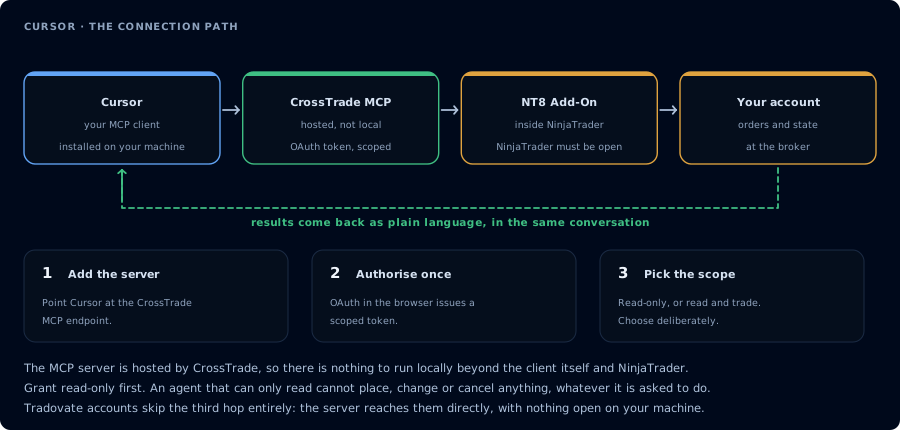
Four hops, authorised once. Read-only is the scope to start with.
Cursor's strength is editor context: it sees your project files and can refactor across them. CrossTrade MCP adds the part Cursor cannot do on its own: it lets the agent look at your actual NT8 install, compile NinjaScript against it, and drive Strategy Analyzer. The pair turns vibe coding into a verified compile-backtest loop.
Step 1: Add the MCP server
Easiest: create .cursor/mcp.json in your workspace (or ~/.cursor/mcp.json for global):
{
  "mcpServers": {
    "crosstrade": {
      "url": "https://app.crosstrade.io/v1/api/mcp"
    }
  }
}
For environment-variable interpolated headers:
{
  "mcpServers": {
    "crosstrade": {
      "url": "https://app.crosstrade.io/v1/api/mcp",
      "headers": {
        "Authorization": "Bearer ${env:CROSSTRADE_TOKEN}"
      }
    }
  }
}
Cursor infers HTTP transport from url. Variable interpolation: ${env:NAME}, ${userHome}, ${workspaceFolder}.
Step 2: Complete OAuth
Reload the MCP servers list (Settings → Features → MCP, or open the chat panel which auto-discovers). On the next tool call, Cursor opens a browser tab. Approve mcp:trade. The token caches locally.
Cursor's OAuth callback URL is cursor://anysphere.cursor-mcp/oauth/callback. You do not configure this yourself. CrossTrade's OAuth server accepts Cursor's fixed callback during dynamic client registration, so the bare url config above is all you need.
Step 3: Confirm tools are available
List the CrossTrade MCP tools you can call. Then GetMcpCapabilities and
McpSelfTest. Report the add-on version, NT8 version, and feature flags.
Step 4: Create a workspace for strategy drafts
mkdir -p ~/crosstrade-strategies/SampleEmaCross
cd ~/crosstrade-strategies/SampleEmaCross
Open the folder in Cursor. The advantage of using Cursor over a chat-only setup is that drafts and notes live alongside the code.
Step 5: Ask Cursor to inspect NinjaScript symbols before writing code
For an MES 5-minute EMA crossover strategy with an ATR-based trailing stop,
call GetNinjaScriptHelp on EMA, ATR, CrossAbove, and SetTrailStop. Restate the
chosen overloads. Do not draft yet.
Step 6: Generate a strategy
Draft SampleEmaCross.cs into this workspace. Long when 9-EMA crosses above
21-EMA. ATR-based trailing stop, multiplier 2.0. One contract. Max two trades
per session. Time filter 09:30 to 11:00 ET. Account Sim101. Do not compile yet.
Step 7: Compile through CrossTrade MCP
CompileNinjaScript(in_memory: true) using the source in SampleEmaCross.cs.
If compile fails, for each error LookupNinjaScriptSymbol on the unresolved
identifier and rewrite the offending line. Recompile until green. Do not call
WriteNinjaScriptFile yet; we will do that explicitly.
Step 8: Backtest and iterate
WriteNinjaScriptFile to Strategies/SampleEmaCross.cs. Then RunStrategyBacktest
on Sim101, last 30 trading days, 5-minute bars, commission $1.27 per round-trip,
slippage 1 tick. Show the metrics block.
Apply your gates: minimum profit factor, max drawdown cap, minimum trade count. If the gates fail, iterate the prompt.
FAQ
Is Cursor required?
No. Claude Desktop, Claude Code, or any MCP client works. Cursor is well-suited to multi-file workspaces.
Does this need mcp:trade?
Yes. Compile, write, and backtest are write-capable tools that require mcp:trade.
What if I need a static Bearer token instead of OAuth?
Put it in The first tool call surfaces an authorization URL. Open it in a browser, approve See CrossTrade MCP OAuth for the full flow, and 403/408 troubleshooting if the handshake fails. Smoke-test before doing anything stateful: If you authorized headers.Authorization (mint a token at My Account, AI Clients tab). Do not use the auth object for a bearer token. That object is for OAuth client credentials (CLIENT_ID, CLIENT_SECRET, scopes), not a static token.OAuth handshake
mcp:trade, and return to the harness. The access token is stored by the harness (keychain, config file, or memory depending on the client).Verify the connection
Call GetMcpCapabilities and McpSelfTest. Then ListAccounts and GetConnections.
Report add-on version, NT8 version, and which accounts are linked.mcp:trade, also confirm Sim101 is the default account before any order placement.
mcp:trade scope grants order placement. The scope does not protect a funded account; your prompt and account selection do. Default to Sim101 during setup. For funded accounts, verify the firm's automation policy first.Troubleshooting
| Symptom | Likely cause | Fix |
|---|---|---|
| 403 insufficient_scope | Token authorized at mcp:read but tool requires mcp:trade | Reauthorize the connection and select mcp:trade |
| OAuth callback fails | System browser blocked the redirect or popup | Copy the auth URL manually, complete it, paste the code back |
| Tools list is empty after connect | Server registered but session did not refresh | Restart the harness or trigger a tool list refresh |
| Add-on offline error | NT8 not running, or add-on not loaded | Confirm NT8 is open and the CrossTrade NT8 add-on (v1.13.0+) is installed |
| Compile keeps failing the same way | Agent not calling LookupNinjaScriptSymbol | Force a fresh lookup before each retry |
| OAuth callback fails with redirect mismatch | auth or redirectUri fields added to mcp.json | Cursor uses a fixed callback (cursor://anysphere.cursor-mcp/oauth/callback) you cannot change, and CrossTrade accepts it automatically. Leave auth, redirectUri, and transport out of mcp.json; only url is needed. |
| Transport falls back to SSE and fails | Cursor's auto-fallback from Streamable HTTP to SSE has known bugs | Stick with the streamable HTTP endpoint; CrossTrade exposes Streamable HTTP natively |