How to Connect Gemini CLI to NinjaTrader 8 with CrossTrade MCP
Gemini CLI is Google's terminal coding agent. It pairs well with CrossTrade MCP for journal-heavy and large-backtest workflows because Gemini's context window is large enough to hold months of trade history in a single prompt. The MCP config requires httpUrl (Streamable HTTP), not url (which is SSE).
mcp:readSingle-vendor hostPrerequisites
| Requirement | Detail |
|---|---|
| CrossTrade subscription | Elite |
| CrossTrade NT8 Add-On | v1.13.0 or higher |
| NinjaTrader 8 | Running, broker connected |
| Account | Sim101 for first runs |
| OAuth scope | mcp:read |
| Install command | npm install -g @google/gemini-cli |
| Config file | ~/.gemini/settings.json |
streamable-http. Auth: OAuth 2.1 + PKCE. Request scope mcp:read. Read-only. Inspect accounts, orders, positions, journal, NinjaScript.Why Gemini CLI for trading
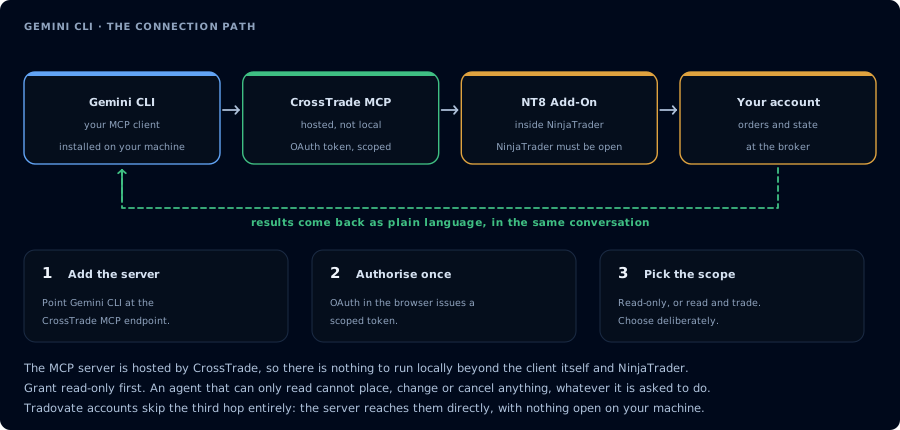
Four hops, authorised once. Read-only is the scope to start with.
Gemini's distinctive strength is context length. A typical use case: dump three months of executed trades plus webhook history plus add-on activity into one prompt, ask for patterns. Where Claude or GPT would force you to summarize first, Gemini can hold the raw data.
Step 1: Install Gemini CLI (Node 20+ required)
# Run once without install
npx @google/gemini-cli

# Install globally
npm install -g @google/gemini-cli

# Or Homebrew
brew install gemini-cli
Sign in:
gemini auth login
Or set GEMINI_API_KEY from aistudio.google.com/apikey.
Personal Google accounts get a free tier (~60 req/min, 1,000 req/day, Gemini 3 with 1M context). Workspace accounts and certain regions require a Gemini Code Assist license.
Step 2: Register CrossTrade MCP in ~/.gemini/settings.json
{
  "mcpServers": {
    "crosstrade": {
      "httpUrl": "https://app.crosstrade.io/v1/api/mcp",
      "headers": {
        "Authorization": "Bearer ${CROSSTRADE_TOKEN}"
      },
      "timeout": 30000,
      "trust": false
    }
  }
}
The httpUrl field selects the modern Streamable HTTP transport. The url field is SSE (legacy). Use httpUrl for CrossTrade — picking the wrong field gives a connection error with no fallback (Google has an open issue tracking this exact gotcha: google-gemini/gemini-cli#15450).
Step 2 (alternative): CLI helper instead of hand-editing JSON
gemini mcp add crosstrade https://app.crosstrade.io/v1/api/mcp -t http
gemini mcp list
Step 3: OAuth (when the server advertises OAuth metadata)
CrossTrade supports browser OAuth via the standard MCP dynamic_discovery flow. Add to the server entry:
{
  "mcpServers": {
    "crosstrade": {
      "httpUrl": "https://app.crosstrade.io/v1/api/mcp",
      "authProviderType": "dynamic_discovery",
      "oauth": {
        "scopes": ["mcp:read"]
      }
    }
  }
}
The first tool call opens a browser, completes OAuth, caches the token.
Other authProviderType values:
google_credentials— reuse your Google sign-in (for Google Cloud-resident MCP servers)service_account_impersonation— for IAP-protected Cloud Run
Step 4: Long-context journal review
GetJournalTrades for Sim101 over the last 90 days, all instruments, full detail.
GetWebhookSignals for the same period.
Correlate signals to trades. Tell me: which strategy bucket performed best by
time of day, which signals chronically fail to fill, three changes that would
most reduce drawdown.
This single prompt loads what would take multiple sessions in a smaller-context model.
Step 5: Daily report
ListAccounts. For each, pull yesterday's closed trades, current watermarks,
and any deployed strategies. One-paragraph status per account.
Inside the REPL
| Command | Purpose |
|---|---|
/mcp | Show registered servers and connection state |
/mcp reload | Reconnect to all MCP servers |
FAQ
Do I need Gemini Pro / Code Assist?
Personal Google accounts get a free tier. Google Workspace accounts and certain regions need a Code Assist license.
Does it support mcp:trade?
Yes. The same caveats apply: default to mcp:read, escalate only when needed, use Sim101.
Three transports — stdio, SSE, Streamable HTTP — how to pick?
For CrossTrade (a hosted remote server), use The first tool call surfaces an authorization URL. Open it in a browser, approve See CrossTrade MCP OAuth for the full flow, and 403/408 troubleshooting if the handshake fails. Smoke-test before doing anything stateful:httpUrl (Streamable HTTP). url is SSE (legacy). command is stdio (local subprocess only).OAuth handshake
mcp:read, and return to the harness. The access token is stored by the harness (keychain, config file, or memory depending on the client).Verify the connection
Call GetMcpCapabilities and McpSelfTest. Then ListAccounts and GetConnections.
Report add-on version, NT8 version, and which accounts are linked.
mcp:read. The agent can inspect state but cannot place orders, deploy strategies, or write NinjaScript files.Troubleshooting
| Symptom | Likely cause | Fix |
|---|---|---|
| 403 insufficient_scope | Token authorized at mcp:read but tool requires mcp:trade | Reauthorize the connection and select mcp:trade |
| OAuth callback fails | System browser blocked the redirect or popup | Copy the auth URL manually, complete it, paste the code back |
| Tools list is empty after connect | Server registered but session did not refresh | Restart the harness or trigger a tool list refresh |
| Add-on offline error | NT8 not running, or add-on not loaded | Confirm NT8 is open and the CrossTrade NT8 add-on (v1.13.0+) is installed |
| Server entry uses url and fails to connect | url selects the SSE transport; CrossTrade serves Streamable HTTP | Use httpUrl (camelCase) for Streamable HTTP servers |
| Gemini CLI installs but errors on first run | Node version below 20 | Upgrade Node to 20 or higher; npm install -g succeeds at 18 but the binary fails at runtime |
| GEMINI_API_KEY not picked up | Exported in current shell only | Add export GEMINI_API_KEY=... to ~/.bashrc / ~/.zshrc / Windows env |