How to Connect GitHub Copilot to NinjaTrader 8 with CrossTrade MCP
GitHub Copilot Chat in VS Code supports MCP through Agent Mode. Native browser OAuth, Dynamic Client Registration, and config in .vscode/mcp.json. MCP became Generally Available in VS Code 1.102 (July 2025); current versions ship with everything you need.
mcp:tradeSingle-vendor hostPrerequisites
| Requirement | Detail |
|---|---|
| CrossTrade subscription | Elite |
| CrossTrade NT8 Add-On | v1.13.0 or higher |
| NinjaTrader 8 | Running, broker connected |
| Account | Sim101 for first runs |
| OAuth scope | mcp:trade |
| Config file | .vscode/mcp.json (workspace) or MCP: Open User Configuration (Command Palette → opens profile-level mcp.json) |
streamable-http. Auth: OAuth 2.1 + PKCE. Request scope mcp:trade. Read plus write. Place/cancel orders, deploy strategies, compile NinjaScript.Step 1: Update VS Code and enable Agent Mode
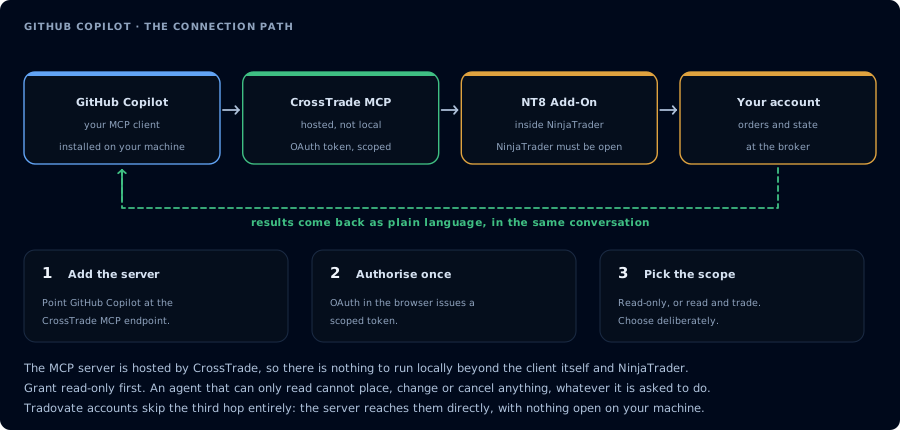
Four hops, authorised once. Read-only is the scope to start with.
- Update VS Code to 1.102 or newer (MCP GA release).
- Install / update GitHub Copilot and GitHub Copilot Chat extensions.
- Sign in with your GitHub account (
GitHub: Sign infrom the Command Palette). - Open the Copilot Chat panel, click the mode dropdown at the bottom of the input, and select Agent.
Step 2: Register CrossTrade MCP
Easiest path: Command Palette → MCP: Add Server → follow the wizard → choose Workspace or Global.
Manual path: create .vscode/mcp.json in your workspace (or use Command Palette → MCP: Open User Configuration for the profile-level file):
{
  "servers": {
    "crosstrade": {
      "type": "http",
      "url": "https://app.crosstrade.io/v1/api/mcp"
    }
  }
}
VS Code uses "servers", not "mcpServers" (which Cursor, Cline, and others use). Pasting a Claude Desktop or Gemini config schema here results in zero registered servers — and no error message.
Step 3: OAuth handshake
On first tool call, VS Code opens a browser window for OAuth. An Auth CodeLens appears above the server entry in mcp.json so you can re-trigger it later.
VS Code supports Dynamic Client Registration and Client Information Metadata Discovery, so CrossTrade's OAuth setup works without any pre-registration on your end.
A trust prompt appears before the server starts the first time and before tools run.
Step 4: First prompt in Agent Mode
In the Agent panel:
Use the crosstrade MCP server. Confirm it's connected. Call ListAccounts and
GetConnections. Report add-on version, NT8 version, and connected accounts.
Step 5: NinjaScript compile loop
Same pattern as Claude Code or Cursor:
GetNinjaScriptHelpon planned types/methods.- Draft into the workspace.
CompileNinjaScript(in_memory: true).- Repair on failure.
WriteNinjaScriptFile.RunStrategyBacktest.
Storing secrets safely
Don't hard-code bearer tokens. Use VS Code's input variables:
{
  "inputs": [
    { "type": "promptString", "id": "ct-token", "description": "CrossTrade token", "password": true }
  ],
  "servers": {
    "crosstrade": {
      "type": "http",
      "url": "https://app.crosstrade.io/v1/api/mcp",
      "headers": { "Authorization": "Bearer ${input:ct-token}" }
    }
  }
}
VS Code prompts on first use and caches the value in OS secret storage.
FAQ
Does Copilot need a paid plan?
GitHub Copilot Free, Pro, Pro+, Business, and Enterprise all support Agent Mode and MCP. Premium-request quotas differ. Business/Enterprise additionally need the org admin to enable the MCP servers in Copilot policy (off by default).
Can I pick the model?
Copilot Chat rotates among Claude, GPT, and Gemini variants depending on tier and time. MCP behavior is consistent across them.
Why don't my MCP tools show up in Ask or Edit mode?
By design. MCP tools are only visible in Agent mode. There's no warning — you just don't see them. The first tool call surfaces an authorization URL. Open it in a browser, approve See CrossTrade MCP OAuth for the full flow, and 403/408 troubleshooting if the handshake fails. Smoke-test before doing anything stateful: If you authorized OAuth handshake
mcp:trade, and return to the harness. The access token is stored by the harness (keychain, config file, or memory depending on the client).Verify the connection
Call GetMcpCapabilities and McpSelfTest. Then ListAccounts and GetConnections.
Report add-on version, NT8 version, and which accounts are linked.mcp:trade, also confirm Sim101 is the default account before any order placement.
mcp:trade scope grants order placement. The scope does not protect a funded account; your prompt and account selection do. Default to Sim101 during setup. For funded accounts, verify the firm's automation policy first.Troubleshooting
| Symptom | Likely cause | Fix |
|---|---|---|
| 403 insufficient_scope | Token authorized at mcp:read but tool requires mcp:trade | Reauthorize the connection and select mcp:trade |
| OAuth callback fails | System browser blocked the redirect or popup | Copy the auth URL manually, complete it, paste the code back |
| Tools list is empty after connect | Server registered but session did not refresh | Restart the harness or trigger a tool list refresh |
| Add-on offline error | NT8 not running, or add-on not loaded | Confirm NT8 is open and the CrossTrade NT8 add-on (v1.13.0+) is installed |
| MCP tools registered but invisible in chat | You are in Ask or Edit mode, not Agent mode | Open the mode dropdown at the bottom of the Copilot Chat input and select Agent |
| Pasted JSON shows zero servers loaded | Used the wrong top-level key | VS Code mcp.json uses "servers" (NOT "mcpServers") |
| MCP unavailable for Business/Enterprise users | Org policy "MCP servers in Copilot" is disabled by default at the org level | Ask your org admin to enable it; Free / Pro / Pro+ are not subject to this policy |
| Auth fails on remote SSH dev container | OAuth prompt opens on the remote host, not local browser | Either use the local VS Code instance, or forward the port to your machine |