How to Connect Goose to NinjaTrader 8 with CrossTrade MCP
Goose is Block's open-source AI agent (now stewarded by the Agentic AI Foundation under the Linux Foundation). MCP-first design. Config gotcha: Goose uses 'extensions:' as the top-level key (not 'mcpServers'), and uses 'uri:' (not 'url:') for remote servers.
mcp:tradeMulti-model harnessPrerequisites
| Requirement | Detail |
|---|---|
| CrossTrade subscription | Elite |
| CrossTrade NT8 Add-On | v1.13.0 or higher |
| NinjaTrader 8 | Running, broker connected |
| Account | Sim101 for first runs |
| OAuth scope | mcp:trade |
| Install command | curl -fsSL https://github.com/aaif-goose/goose/releases/download/stable/download_cli.sh | bash |
| Config file | ~/.config/goose/config.yaml (macOS/Linux), %APPDATA%/Block/goose/config/config.yaml (Windows) |
streamable-http. Auth: OAuth 2.1 + PKCE. Request scope mcp:trade. Read plus write. Place/cancel orders, deploy strategies, compile NinjaScript.Step 1: Install Goose
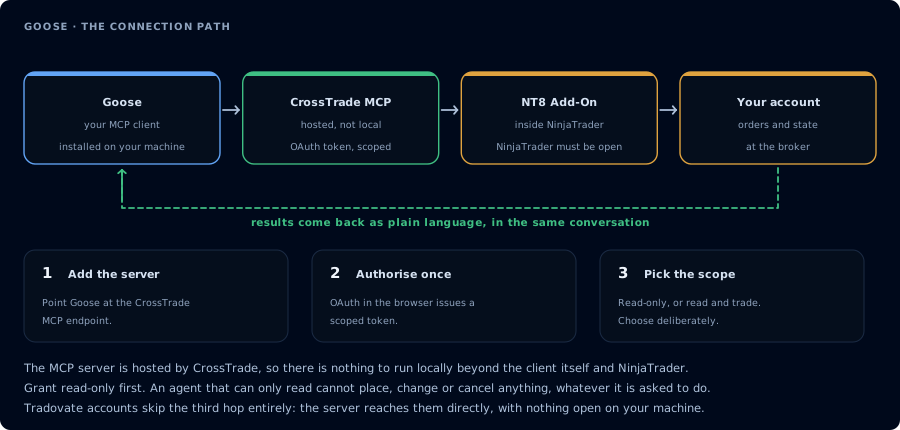
Four hops, authorised once. Read-only is the scope to start with.
# CLI (macOS/Linux)
curl -fsSL https://github.com/aaif-goose/goose/releases/download/stable/download_cli.sh | bash

# CLI (Homebrew)
brew install block-goose-cli

# Desktop (Homebrew)
brew install --cask block-goose
Or download from goose-docs.ai. Linux desktop ships as DEB/RPM/Flatpak. Windows uses PowerShell download_cli.ps1.
Run goose configure to set up your provider (Anthropic / OpenAI / OpenRouter / etc.).
Step 2: Register CrossTrade as an extension
Easiest path: goose configure → Add Extension → Remote Extension (Streamable HTTP) → enter URI, timeout, description.
Or edit ~/.config/goose/config.yaml (Windows: %APPDATA%\Block\goose\config\config.yaml):
extensions:
  crosstrade:
    enabled: true
    type: streamable_http
    name: crosstrade
    uri: https://app.crosstrade.io/v1/api/mcp
    headers:
      Authorization: "Bearer ${CROSSTRADE_API_KEY}"
      Accept: "application/json, text/event-stream"
    timeout: 300
- Top-level key is
extensions:, NOTmcpServers:. - The URL field is
uri:, NOTurl:. - The transport is
streamable_http(snake_case), NOTstreamable-http(kebab) orstreamableHttp(camelCase).
Three different conventions across the MCP-host ecosystem and Goose is unique on all three.
The Accept: "application/json, text/event-stream" header is required for many Streamable HTTP MCP servers including CrossTrade — without it the transport silently doesn't upgrade.
Step 3: OAuth
For MCP servers that return 401 WWW-Authenticate (CrossTrade does), Goose initiates a device-authorization grant automatically. Watch the terminal for the user-code + verification URL, complete in browser, return.
If your server uses a static bearer token, put it in headers: as shown above.
Step 4: First session
goose session
Then:
Confirm CrossTrade MCP is connected. Call ListAccounts and GetConnections.
One-line status per account.
Step 5: NinjaScript work
Goose supports the standard compile loop. Because Goose has tasteful defaults around tool approval, it's particularly good for mcp:trade runs where you want every write paused for confirmation.
FAQ
Why is the project URL different now?
The project moved from block/goose to the Agentic AI Foundation (aaif-goose/goose) under the Linux Foundation. The official docs URL is goose-docs.ai; block.github.io/goose redirects.
SSE or Streamable HTTP?
Use Streamable HTTP ( The first tool call surfaces an authorization URL. Open it in a browser, approve See CrossTrade MCP OAuth for the full flow, and 403/408 troubleshooting if the handshake fails. Smoke-test before doing anything stateful: If you authorized type: streamable_http). SSE is supported but the OAuth and modern features land on streamable_http first.OAuth handshake
mcp:trade, and return to the harness. The access token is stored by the harness (keychain, config file, or memory depending on the client).Verify the connection
Call GetMcpCapabilities and McpSelfTest. Then ListAccounts and GetConnections.
Report add-on version, NT8 version, and which accounts are linked.mcp:trade, also confirm Sim101 is the default account before any order placement.
mcp:trade scope grants order placement. The scope does not protect a funded account; your prompt and account selection do. Default to Sim101 during setup. For funded accounts, verify the firm's automation policy first.Troubleshooting
| Symptom | Likely cause | Fix |
|---|---|---|
| 403 insufficient_scope | Token authorized at mcp:read but tool requires mcp:trade | Reauthorize the connection and select mcp:trade |
| OAuth callback fails | System browser blocked the redirect or popup | Copy the auth URL manually, complete it, paste the code back |
| Tools list is empty after connect | Server registered but session did not refresh | Restart the harness or trigger a tool list refresh |
| Add-on offline error | NT8 not running, or add-on not loaded | Confirm NT8 is open and the CrossTrade NT8 add-on (v1.13.0+) is installed |
| Extension defined but never loads | Used "mcpServers:" or "url:" — wrong keys for Goose | Goose uses top-level "extensions:" and "uri:" (not "mcpServers" and "url"). This is the #1 paste-from-other-tool mistake |
| Streamable HTTP transport never upgrades | Missing Accept header | Add Accept: "application/json, text/event-stream" to the headers block (Goose issue #6576) |
| Brew formula not found | Project moved from "goose" formula to "block-goose-cli" | brew install block-goose-cli (the old "goose" name belongs to an unrelated DB migration tool) |