How to Connect Hermes to NinjaTrader 8 with CrossTrade MCP
Hermes is Nous Research's autonomous agent that lives on your server, remembers what it learns, and connects through chat platforms (Telegram, Discord, Slack, WhatsApp, Email) or CLI. Native OAuth 2.1 for remote MCP servers, with paste-back and SSH port-forwarding workarounds for headless servers.
mcp:readMulti-model harnessPrerequisites
| Requirement | Detail |
|---|---|
| CrossTrade subscription | Elite |
| CrossTrade NT8 Add-On | v1.13.0 or higher |
| NinjaTrader 8 | Running, broker connected |
| Account | Sim101 for first runs |
| OAuth scope | mcp:read |
| Install command | curl -fsSL https://raw.githubusercontent.com/NousResearch/hermes-agent/main/scripts/install.sh | bash |
| Config file | ~/.hermes/config.yaml (non-secret) + ~/.hermes/.env (secrets) |
streamable-http. Auth: OAuth 2.1 + PKCE. Request scope mcp:read. Read-only. Inspect accounts, orders, positions, journal, NinjaScript.Why Hermes is unusual
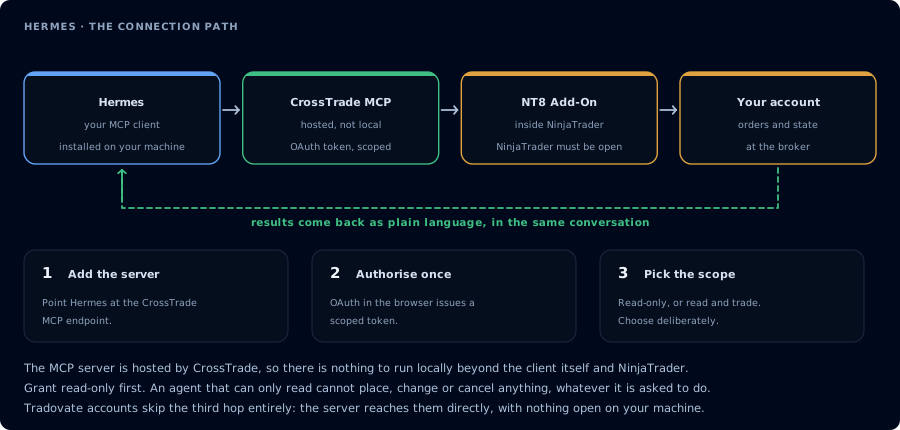
Four hops, authorised once. Read-only is the scope to start with.
Most MCP hosts assume you're sitting at a desktop. Hermes assumes you're not. It runs on a server (local, Docker, SSH, Singularity, or Modal), keeps persistent memory across sessions, and talks to you through whatever chat platform you've already wired up. The trade-off: you do the operations work to run an always-on server, and the OAuth flow needs care because Hermes is typically headless.
Step 1: Install Hermes
Linux / macOS / WSL2 / Termux:
curl -fsSL https://raw.githubusercontent.com/NousResearch/hermes-agent/main/scripts/install.sh | bash
Windows (PowerShell):
iex (irm https://raw.githubusercontent.com/NousResearch/hermes-agent/main/scripts/install.ps1)
Or via pip:
pip install hermes-agent
hermes postinstall
Then:
source ~/.bashrc
hermes setup
hermes model
Requires a model context window of at least 64,000 tokens. Provider keys (OpenAI / Anthropic / OpenRouter / DeepSeek / MiniMax / GitHub Copilot) go in ~/.hermes/.env.
Step 2: Register CrossTrade in ~/.hermes/config.yaml
mcp_servers:
  crosstrade:
    url: "https://app.crosstrade.io/v1/api/mcp"
    auth: oauth
    enabled: true
    timeout: 120
    connect_timeout: 60
    supports_parallel_tool_calls: false
    tools:
      include: []
      exclude: []
      resources: true
      prompts: true
For a pre-issued bearer token instead:
mcp_servers:
  crosstrade:
    url: "https://app.crosstrade.io/v1/api/mcp"
    enabled: true
    headers:
      Authorization: "Bearer ***"
Hermes infers Streamable HTTP from the presence of url: — there's no separate type: key.
CLI alternatives to hand-editing:
hermes mcp add crosstrade --preset oauth
hermes mcp configure crosstrade
hermes mcp login crosstrade
hermes mcp test crosstrade
hermes mcp list
hermes mcp remove crosstrade
Inside an interactive session, /reload-mcp picks up config changes.
Step 3: OAuth (server-friendly workarounds)
Default flow (when Hermes has access to a local browser):
Hermes prints an authorize URL, opens your browser, waits for the OAuth callback on a local loopback port. After approval, the token caches at ~/.hermes/mcp-tokens/crosstrade.json (mode 0o600) and auto-refreshes.
Paste-back flow (no browser on the server):
- On Hermes: trigger the OAuth and grab the printed authorize URL.
- On a workstation with a browser: paste the URL, sign in, copy the final redirect URL from your address bar after consent.
- Back on Hermes: paste the redirect URL at the prompt.
SSH port-forwarding (preferred when SSH is available):
ssh -N -L 8080:127.0.0.1:8080 user@hermes-server
Then run the OAuth flow on Hermes — the loopback callback hits the SSH tunnel and reaches your local browser.
Dedicated guide: "OAuth over SSH / Remote Hosts" in the Hermes docs.
Step 4: Connect a chat platform
Hermes routes incoming messages from Telegram/Discord/Slack/WhatsApp/Signal/Email to the agent. Pick one in hermes setup and follow the prompts. CrossTrade tools become available in any conversation Hermes serves.
Step 5: First read-only prompt over chat
From your chosen platform, message Hermes:
Use read-only CrossTrade tools. List my NinjaTrader accounts, summarize open positions and working orders, and tell me whether the add-on is connected. Do not place anything.
Hermes calls the tools and returns the brief through your chat platform.
A useful Hermes pattern: persistent risk monitor
Because Hermes remembers, you can set a rule once:
Every hour during US futures session, call GetAccountSummary and GetWatermarks for PROP1234. If the distance to the trailing drawdown threshold drops below $150, message me with the current numbers and a flat-everything reminder. Otherwise stay quiet.
Hermes carries that instruction across restarts.
Safety considerations specific to Hermes
- Always-on agents and
mcp:tradeare a dangerous combination. Default tomcp:read. - Chat platform compromise = agent compromise. Lock the chat channel down.
- Token storage at
~/.hermes/mcp-tokens/*.jsonis sensitive. File mode is0o600(owner-only) — don't change it.
FAQ
Does Hermes need to be on the same machine as NinjaTrader 8?
No. Hermes runs anywhere with internet access. CrossTrade's MCP server routes to your add-on regardless.
Which model should Hermes run?
For trading, Claude (refusal behavior) or GPT (fast tool calling). DeepSeek is cheaper for routine inspection.
Can Hermes deploy strategies?
Technically yes with The first tool call surfaces an authorization URL. Open it in a browser, approve See CrossTrade MCP OAuth for the full flow, and 403/408 troubleshooting if the handshake fails. Smoke-test before doing anything stateful:mcp:trade. Don't. The whole point of an autonomous agent is acting without you watching; strategy deployment needs a human gate.OAuth handshake
mcp:read, and return to the harness. The access token is stored by the harness (keychain, config file, or memory depending on the client).Verify the connection
Call GetMcpCapabilities and McpSelfTest. Then ListAccounts and GetConnections.
Report add-on version, NT8 version, and which accounts are linked.
mcp:read. The agent can inspect state but cannot place orders, deploy strategies, or write NinjaScript files.Troubleshooting
| Symptom | Likely cause | Fix |
|---|---|---|
| 403 insufficient_scope | Token authorized at mcp:read but tool requires mcp:trade | Reauthorize the connection and select mcp:trade |
| OAuth callback fails | System browser blocked the redirect or popup | Copy the auth URL manually, complete it, paste the code back |
| Tools list is empty after connect | Server registered but session did not refresh | Restart the harness or trigger a tool list refresh |
| Add-on offline error | NT8 not running, or add-on not loaded | Confirm NT8 is open and the CrossTrade NT8 add-on (v1.13.0+) is installed |
| OAuth flow opens but Hermes is headless and has no browser | Default OAuth needs a local loopback browser | Use paste-back: copy the final redirect URL from a browser on another machine and paste at the Hermes prompt. Or SSH port-forward: ssh -N -L PORT:127.0.0.1:PORT user@host |
| include/exclude tools filter doesn't match | Hermes normalizes hyphens/dots to underscores in registered names, but filters use original names | In include/exclude, use the ORIGINAL MCP tool name (with hyphens/dots); the underscore form is only for internal registration |
| Server appears in catalog but not callable | enabled: true not set (items default to disabled) | Set enabled: true on the entry |