How to Connect JetBrains AI to NinjaTrader 8 with CrossTrade MCP
JetBrains has two products in the AI space: AI Assistant (chat-style, bundled in most JetBrains IDEs) and Junie (agentic, available in AI Pro+). Both support MCP, but with different UX. Junie has documented OAuth for remote MCP; AI Assistant currently does not. For Rider users working on NinjaScript C#, this is the most direct integration path.
mcp:tradeMulti-model harnessPrerequisites
| Requirement | Detail |
|---|---|
| CrossTrade subscription | Elite |
| CrossTrade NT8 Add-On | v1.13.0 or higher |
| NinjaTrader 8 | Running, broker connected |
| Account | Sim101 for first runs |
| OAuth scope | mcp:trade |
| Config file | AI Assistant: Settings → Tools → AI Assistant → Model Context Protocol (MCP). Junie: /mcp slash command in Junie chat (or pre-configured list with Ctrl+A). |
streamable-http. Auth: OAuth 2.1 + PKCE. Request scope mcp:trade. Read plus write. Place/cancel orders, deploy strategies, compile NinjaScript.AI Assistant vs Junie
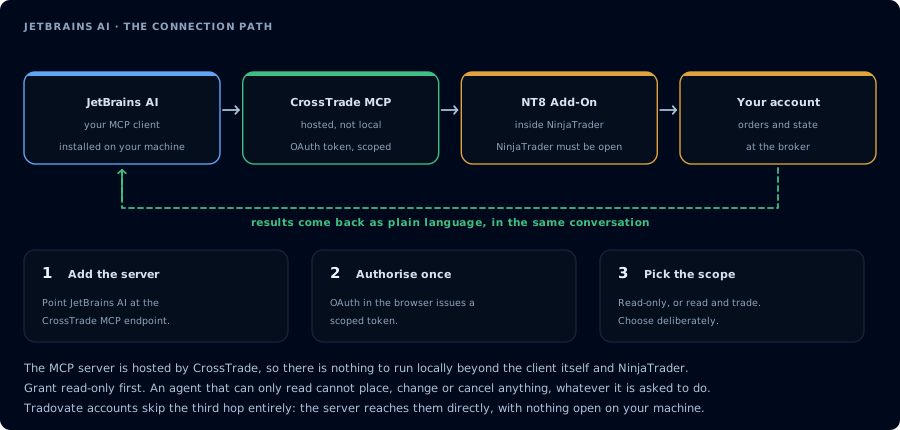
Four hops, authorised once. Read-only is the scope to start with.
JetBrains has two products that both speak MCP:
- AI Assistant is the chat-style coding assistant. Bundled in most JetBrains IDEs since 2024.1. MCP config sits under
Settings → Tools → AI Assistant → Model Context Protocol (MCP). - Junie is the agentic product (multi-step planning, autonomous file edits, terminal use). Reachable inside the AI Chat tool window provided by AI Assistant, OR via the dedicated Junie plugin.
For CrossTrade specifically, Junie's MCP UX is better: it explicitly documents the headers field and the OAuth flow. AI Assistant's current docs cover stdio MCP and HTTP MCP with {"url": "..."}, but do not document headers or OAuth for the HTTP transport.
Step 1 (Junie): Register CrossTrade
In the Junie chat:
/mcp
Then Add server. Provide JSON:
{
  "mcpServers": {
    "crosstrade": {
      "url": "https://app.crosstrade.io/v1/api/mcp",
      "headers": {
        "Authorization": "Bearer YOUR_TOKEN"
      }
    }
  }
}
For OAuth: omit headers and choose Authorize when the server appears with Authorization required status. Browser opens, user signs in, status changes to Active.
Step 1 (AI Assistant): Register CrossTrade
Settings → Tools → AI Assistant → Model Context Protocol (MCP) → Add.
For an HTTP MCP server, the documented JSON is:
{
  "mcpServers": {
    "crosstrade": {
      "url": "https://app.crosstrade.io/v1/api/mcp"
    }
  }
}
The current AI Assistant docs only show the {"url": "..."} shape and do not document a headers field or OAuth for remote MCP. If CrossTrade returns 401 to unauthenticated requests, you have two options:
- Use Junie instead (full headers + OAuth support).
- Wrap CrossTrade with
mcp-remoteas a stdio MCP server:
{
  "mcpServers": {
    "crosstrade": {
      "command": "/absolute/path/to/npx",
      "args": ["mcp-remote", "https://app.crosstrade.io/v1/api/mcp"]
    }
  }
}
JetBrains IDEs need an absolute path to npx (the IDE's PATH usually differs from your shell). Run which npx to get it.
Step 2: First prompt
Open Junie (or AI Assistant chat):
Confirm CrossTrade MCP is connected. ListAccounts. One-line status per account.
Step 3 (Junie): Single-goal NinjaScript prompt
Junie plans multi-step workflows. Give it a single goal:
Build a working MES EMA crossover strategy. Spec: 9/21 EMA, ATR trailing stop,
one contract, 09:30-11:00 ET, Sim101. Use CrossTrade tools to compile against
my install and backtest. Stop at a green backtest; do not deploy.
Plans
- AI Free: 3 credits / 30 days (very limited).
- AI Pro: $10/mo individual.
- AI Ultimate: $30/mo individual.
- AI Enterprise: custom.
Junie usage burns credits (chat + code generation + agent actions). Code completion is free.
FAQ
Why two products?
AI Assistant is the unified entry point. Junie is the agentic product that lives inside (or alongside) AI Assistant. JetBrains is unifying with ACP (Agent Client Protocol) so third-party agents like goose, Augment, Cursor can also coexist in the IDE.
Rider for NinjaScript: worth it?
If you already maintain NinjaScript projects in Rider for C# tooling, having Junie alongside is convenient. Otherwise Claude Code or OpenCode + a lighter editor work fine. The first tool call surfaces an authorization URL. Open it in a browser, approve See CrossTrade MCP OAuth for the full flow, and 403/408 troubleshooting if the handshake fails. Smoke-test before doing anything stateful: If you authorized OAuth handshake
mcp:trade, and return to the harness. The access token is stored by the harness (keychain, config file, or memory depending on the client).Verify the connection
Call GetMcpCapabilities and McpSelfTest. Then ListAccounts and GetConnections.
Report add-on version, NT8 version, and which accounts are linked.mcp:trade, also confirm Sim101 is the default account before any order placement.
mcp:trade scope grants order placement. The scope does not protect a funded account; your prompt and account selection do. Default to Sim101 during setup. For funded accounts, verify the firm's automation policy first.Troubleshooting
| Symptom | Likely cause | Fix |
|---|---|---|
| 403 insufficient_scope | Token authorized at mcp:read but tool requires mcp:trade | Reauthorize the connection and select mcp:trade |
| OAuth callback fails | System browser blocked the redirect or popup | Copy the auth URL manually, complete it, paste the code back |
| Tools list is empty after connect | Server registered but session did not refresh | Restart the harness or trigger a tool list refresh |
| Add-on offline error | NT8 not running, or add-on not loaded | Confirm NT8 is open and the CrossTrade NT8 add-on (v1.13.0+) is installed |
| AI Assistant config shows {"url": "..."} but auth fails | AI Assistant docs do not document a headers field for HTTP MCP; OAuth flow not documented | Use Junie (which does document headers and OAuth), OR wrap CrossTrade with mcp-remote as a stdio proxy in AI Assistant |
| Stdio MCP fails with "command not found" | JetBrains IDE PATH differs from your shell PATH; npx is not on it | Use absolute path: which npx and put the full path in the command field |
| Junie not visible after installing AI Assistant | Junie needs a sufficient IDE version (2024.3.2+ for IntelliJ Ultimate; 2025.1+ for Community) | Update the IDE; Junie is a separate plugin you can also install standalone from JetBrains Marketplace |