How to Connect LibreChat to NinjaTrader 8 with CrossTrade MCP
LibreChat is a self-hosted MIT-licensed ChatGPT-style frontend that supports multiple providers and MCP. Strongest multi-user MCP story: each user gets their own OAuth session per server, so trading accounts stay isolated. Native OAuth 2.1 + PKCE + Dynamic Client Registration.
mcp:readMulti-model harnessPrerequisites
| Requirement | Detail |
|---|---|
| CrossTrade subscription | Elite |
| CrossTrade NT8 Add-On | v1.13.0 or higher |
| NinjaTrader 8 | Running, broker connected |
| Account | Sim101 for first runs |
| OAuth scope | mcp:read |
| Config file | librechat.yaml (in your LibreChat deployment root) |
streamable-http. Auth: OAuth 2.1 + PKCE. Request scope mcp:read. Read-only. Inspect accounts, orders, positions, journal, NinjaScript.Step 1: Deploy LibreChat
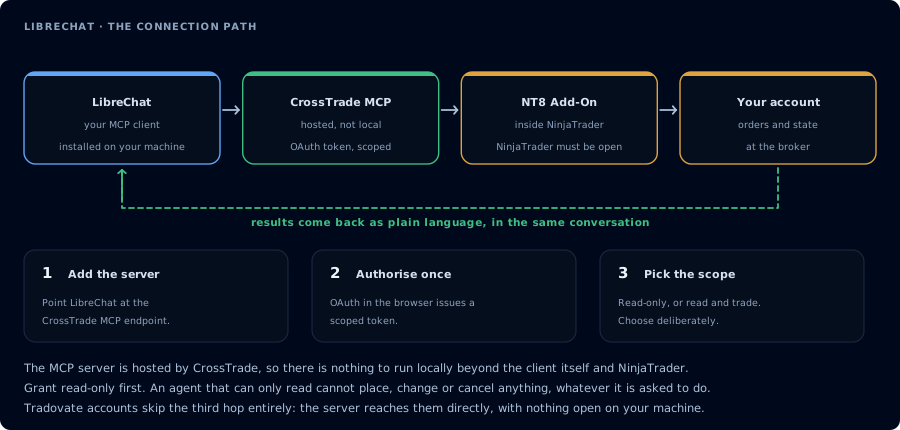
Four hops, authorised once. Read-only is the scope to start with.
git clone https://github.com/danny-avila/LibreChat
cd LibreChat
cp .env.example .env
docker compose up -d
Or follow www.librechat.ai/docs for k8s / standalone deploys.
Step 2: Add CrossTrade to librechat.yaml
mcpServers:
  crosstrade:
    type: streamable-http
    url: https://app.crosstrade.io/v1/api/mcp
    headers:
      Authorization: "Bearer ${API_TOKEN}"
      X-User-ID: "{{LIBRECHAT_USER_ID}}"
    timeout: 30000
    serverInstructions: true
Restart LibreChat. The MCP server appears in the model's tool list.
LibreChat supports ${ENV_VAR} env interpolation AND {{LIBRECHAT_USER_ID}} / {{LIBRECHAT_USER_EMAIL}} user-context placeholders. This means each user's tool calls can carry their own identity to the upstream server.
You can also add MCP servers via the UI now (no restart required), but UI-added servers can only resolve customUserVars placeholders — env vars and OIDC tokens are restricted to the YAML path.
Step 3: OAuth (per-user)
On first chat, each LibreChat user is prompted to authenticate with CrossTrade via OAuth. Browser opens, sign in, return. Tokens are stored per user, per server.
The callback URL pattern is ${baseUrl}/api/mcp/${serverName}/oauth/callback — CrossTrade's OAuth flow supports Dynamic Client Registration, so no pre-registration needed.
Step 4: First chat
Sign in to your LibreChat. Pick a model. Send:
Confirm CrossTrade MCP. ListAccounts and summarize open positions. Read-only.
Multi-user note
This is the cleanest multi-user MCP story among self-hosted options:
| Frontend | MCP credential scope |
|---|---|
| LibreChat | Per-user (each user has their own OAuth grant per server) |
| Open WebUI | Per-connection at admin level (all users share) |
| AnythingLLM | Global (all users share) |
For team trading workflows where each trader should authenticate against their own CrossTrade account, LibreChat is the right choice.
FAQ
Free?
Yes, MIT-licensed.
Which transports?
The first tool call surfaces an authorization URL. Open it in a browser, approve See CrossTrade MCP OAuth for the full flow, and 403/408 troubleshooting if the handshake fails. Smoke-test before doing anything stateful:streamable-http (recommended for production), sse (remote, legacy), stdio (local single-user only).OAuth handshake
mcp:read, and return to the harness. The access token is stored by the harness (keychain, config file, or memory depending on the client).Verify the connection
Call GetMcpCapabilities and McpSelfTest. Then ListAccounts and GetConnections.
Report add-on version, NT8 version, and which accounts are linked.
mcp:read. The agent can inspect state but cannot place orders, deploy strategies, or write NinjaScript files.Troubleshooting
| Symptom | Likely cause | Fix |
|---|---|---|
| 403 insufficient_scope | Token authorized at mcp:read but tool requires mcp:trade | Reauthorize the connection and select mcp:trade |
| OAuth callback fails | System browser blocked the redirect or popup | Copy the auth URL manually, complete it, paste the code back |
| Tools list is empty after connect | Server registered but session did not refresh | Restart the harness or trigger a tool list refresh |
| Add-on offline error | NT8 not running, or add-on not loaded | Confirm NT8 is open and the CrossTrade NT8 add-on (v1.13.0+) is installed |
| YAML changes don't take effect | librechat.yaml edits require a restart | docker compose restart api (or restart your LibreChat process) |
| SSE/streamable connections drop | Reverse-proxy timeouts (nginx/traefik default ~60s) | Bump proxy timeouts to 300s+ for /api/mcp routes |
| startup hangs waiting on user credentials | OAuth flow needs each user to authenticate first | Add startup: false on the server entry so LibreChat doesn't block waiting |