How to Connect Msty to NinjaTrader 8 with CrossTrade MCP
Msty Studio (v2.x) is the desktop AI chat with MCP support — NOT the classic Msty App (v1.x), which has no MCP. The MCP Toolbox ships in the free Desktop edition. Strong side-by-side multi-model comparison.
mcp:readMulti-model harnessPrerequisites
| Requirement | Detail |
|---|---|
| CrossTrade subscription | Elite |
| CrossTrade NT8 Add-On | v1.13.0 or higher |
| NinjaTrader 8 | Running, broker connected |
| Account | Sim101 for first runs |
| OAuth scope | mcp:read |
| Config file | Toolbox (left sidebar) → Tools → Add New Tool → HTTP (no file path; managed in app) |
streamable-http. Auth: OAuth 2.1 + PKCE. Request scope mcp:read. Read-only. Inspect accounts, orders, positions, journal, NinjaScript.Important: Msty Studio (v2.x), not Msty App (v1.x)
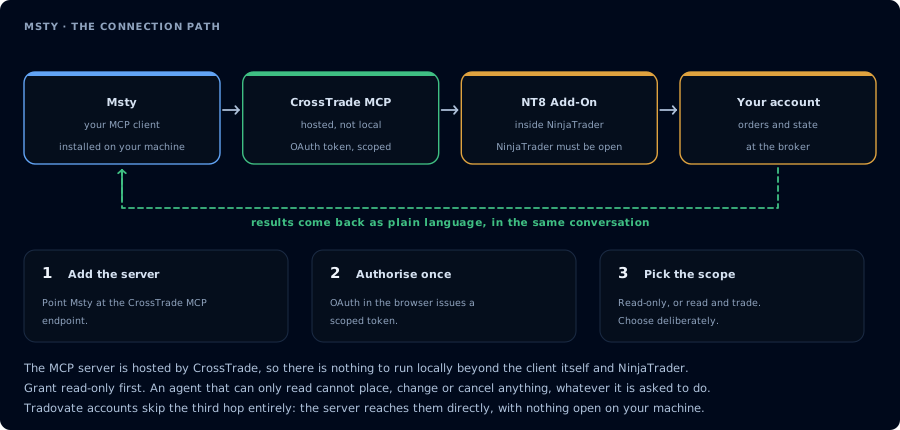
Four hops, authorised once. Read-only is the scope to start with.
The classic Msty App (v1.x) does not support MCP. MCP lives in Msty Studio (v2.x), a separate product. Get the Studio download from msty.ai.
The Free Desktop edition includes the MCP Toolbox. Aurum and Teams tiers add more features (cloud sync, Forge Mode, additional providers) but are not required for MCP.
Step 1: Install Msty Studio
Download from msty.ai. Available for Windows, macOS, Linux. Web version (Aurum tier) also exists.
Step 2: Add CrossTrade via the Toolbox
- Open Toolbox in the left sidebar.
- Click Tools → Add New Tool.
- Select HTTP as the type (for Streamable HTTP MCP).
- Fill in:
- MCP Server URL:
https://app.crosstrade.io/v1/api/mcp - Authentication: OAuth (or paste a pre-issued bearer token)
- Headers (optional): any custom headers
- Name:
CrossTrade
- MCP Server URL:
- Click Add.
OAuth is browser-based; Msty Studio's OAuth status handling was refined in 2.7.3.
Step 3: Side-by-side prompt
Msty Studio's strength is multi-model comparison. Open a split chat. Run the same prompt against two models:
ListPositions on Sim101. Summarize the position structure, the implied risk
exposure, and any concentration issues. Read-only.
Compare the responses. Useful for finding which model gives the highest-quality trading commentary on your data.
Plans
- Free Desktop: MCP Toolbox, Knowledge Stacks (RAG), Personas, Agent Mode.
- Aurum ($149/yr or $349 lifetime): adds web access, Azure/Bedrock providers, Forge Mode.
- Teams ($300/yr, min 5 seats).
FAQ
Will Msty Studio's MCP support get an OAuth UI improvement?
The 2.7.3 changelog called out "improves … MCP OAuth status handling" — assume continued iteration.
Variables in MCP commands?
For local stdio servers, Msty supports The first tool call surfaces an authorization URL. Open it in a browser, approve See CrossTrade MCP OAuth for the full flow, and 403/408 troubleshooting if the handshake fails. Smoke-test before doing anything stateful:{variableName:Display Name:default} mustache syntax for prompting the user.OAuth handshake
mcp:read, and return to the harness. The access token is stored by the harness (keychain, config file, or memory depending on the client).Verify the connection
Call GetMcpCapabilities and McpSelfTest. Then ListAccounts and GetConnections.
Report add-on version, NT8 version, and which accounts are linked.
mcp:read. The agent can inspect state but cannot place orders, deploy strategies, or write NinjaScript files.Troubleshooting
| Symptom | Likely cause | Fix |
|---|---|---|
| 403 insufficient_scope | Token authorized at mcp:read but tool requires mcp:trade | Reauthorize the connection and select mcp:trade |
| OAuth callback fails | System browser blocked the redirect or popup | Copy the auth URL manually, complete it, paste the code back |
| Tools list is empty after connect | Server registered but session did not refresh | Restart the harness or trigger a tool list refresh |
| Add-on offline error | NT8 not running, or add-on not loaded | Confirm NT8 is open and the CrossTrade NT8 add-on (v1.13.0+) is installed |
| No MCP support visible | Installed Msty App (v1.x) instead of Msty Studio (v2.x) | Download Msty Studio from msty.ai — the v1.x classic does NOT have MCP |
| SSE server fails to connect | SSE is deprecated in Msty Studio in favor of Streamable HTTP | Reconfigure CrossTrade as HTTP (Streamable); don't use SSE |