How to Connect n8n to NinjaTrader 8 with CrossTrade MCP
n8n is a self-hostable workflow automation platform. The built-in MCP Client Tool sub-node attaches to an AI Agent and calls CrossTrade tools. OAuth2 with Dynamic Client Registration landed in n8n 1.119.0 (Nov 2025); HTTP Streamable transport landed in 1.104.0 (Jul 2025). For OAuth-protected MCP servers like CrossTrade, you need n8n 1.119.0 or newer.
mcp:readWorkflow / automationPrerequisites
| Requirement | Detail |
|---|---|
| CrossTrade subscription | Elite |
| CrossTrade NT8 Add-On | v1.13.0 or higher |
| NinjaTrader 8 | Running, broker connected |
| Account | Sim101 for first runs |
| OAuth scope | mcp:read |
| Config file | MCP Client Tool sub-node → Credentials → MCP Client Tool (OAuth2 API) |
streamable-http. Auth: OAuth 2.1 + PKCE. Request scope mcp:read. Read-only. Inspect accounts, orders, positions, journal, NinjaScript.Step 1: Self-host or use n8n Cloud (1.119.0+ for OAuth MCP)
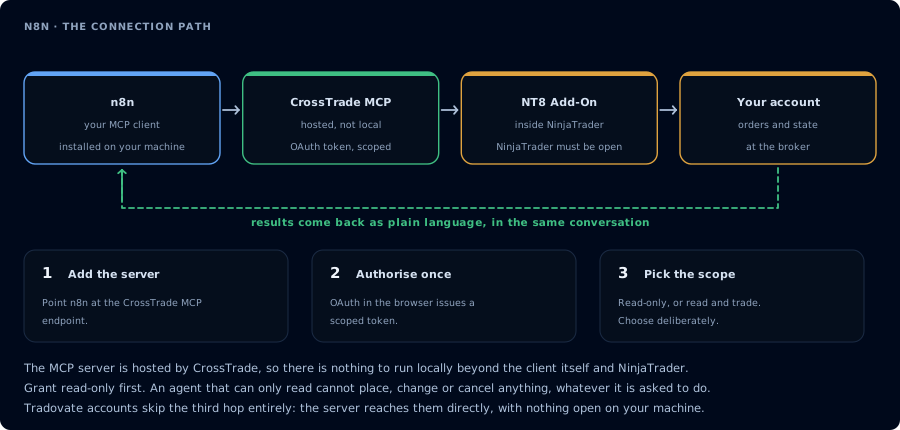
Four hops, authorised once. Read-only is the scope to start with.
Docker:
docker run -it --rm -p 5678:5678 n8nio/n8n
npm:
npx n8n
n8n Cloud: 14-day free trial on Starter/Pro, no credit card.
OAuth2 + Dynamic Client Registration support for MCP arrived in n8n 1.119.0 (Nov 3, 2025). For CrossTrade's OAuth-protected MCP server, you need 1.119.0 or newer. HTTP Streamable transport arrived in 1.104.0 (Jul 21, 2025). The MCP Client Tool / Server Trigger nodes themselves shipped in 1.88.0 (Apr 10, 2025).
Step 2: Build a minimal workflow
[Chat Trigger]  →  [AI Agent]
                       │ ai_tool input
                       ▼
                 [MCP Client Tool]  (CrossTrade endpoint)
                       │
                       │ ai_languageModel input
                       ▼
                 [OpenAI Chat Model] (or Claude / Gemini)
Or replace Chat Trigger with Schedule Trigger (cron) or Webhook for unattended workflows.
Step 3: Configure the MCP Client Tool sub-node
- On the canvas, click + next to your AI Agent's Tool input.
- Search for "MCP Client Tool" (not "MCP Client" — that's a different, older node).
- In the node panel:
- Endpoint:
https://app.crosstrade.io/v1/api/mcp - Server Transport: HTTP Streamable (recommended; SSE is legacy)
- Authentication: OAuth2
- Endpoint:
- Click Create New Credential under the credential picker.
- n8n creates an MCP Client Tool (OAuth2 API) credential (internal type:
mcpClientOAuth2Api). - Because CrossTrade supports Dynamic Client Registration, n8n auto-handles client_id/client_secret. You paste nothing.
- n8n creates an MCP Client Tool (OAuth2 API) credential (internal type:
- Click Connect my account.
- A browser popup opens, redirects to CrossTrade's OAuth consent, you approve
mcp:read, browser redirects back to n8n's callback. - n8n stores access/refresh tokens. Auto-refresh on 401 since 1.119.0.
- Tools to Include: select All (or Selected + pick specific tool names).
Step 4: Wire the AI Agent
- Use the default Tools Agent type (it's the only one that handles MCP correctly).
- For chat-driven: set Source for Prompt to Connected Chat Trigger Node.
- For programmatic / webhook: set Source for Prompt to Define below and bind to
{{ $json.body.message }}or similar. - System Message: "You are a trading assistant. Use the CrossTrade tools to inspect NinjaTrader 8 state."
Example: end-of-day risk email
Cron: 16:30 ET, weekdays
  ↓
AI Agent (Claude / GPT):
  System: "Use CrossTrade tools. For each account, pull yesterday's closed
  trades and current watermarks. Compute distance to trailing drawdown.
  Produce a markdown risk brief with sections per account. Read-only."
  ↓
Send Email: subject "EOD risk brief"
The agent calls ListAccounts, GetJournalTrades, GetWatermarks etc. and returns the markdown body that n8n emails to you.
Headless / unattended note
OAuth setup is interactive — a human must complete the browser popup once. After that, runs are fully unattended; n8n auto-refreshes on 401.
The trap: if CrossTrade's refresh token expires (e.g. 90-day idle), unattended workflows silently fail. Mitigation: ensure the workflow runs at least once inside the refresh-token lifetime, OR document a periodic re-auth cadence.
For pure-headless / no-browser environments:
# On a dev workstation, complete OAuth once
n8n export:credentials --id=<id> --decrypted --output=cred.json

# On the headless instance
n8n import:credentials --input=cred.json
Caution for trade-enabled workflows
n8n workflows run unattended. Default to mcp:read. Do not put mcp:trade actions in a workflow without a human approval step (e.g., a Telegram bot confirmation node, or a Wait node that pings you to approve before continuing).
FAQ
Free / paid?
Built-in MCP nodes work on Community Edition (free, self-hosted) AND on n8n Cloud paid tiers. The MCP nodes are not gated.
MCP Client Tool vs MCP Server Trigger?
- MCP Client Tool: sub-node, attaches to AI Agent, calls an external MCP server. What you want for CrossTrade.
- MCP Server Trigger: exposes an n8n workflow AS an MCP server for other AI clients to call. Not relevant for consuming CrossTrade MCP.
The community n8n-nodes-mcp package?
A third-party package by nerding-io that predates the built-in node. Recommend the built-in node — it's first-party and gets official updates. The first tool call surfaces an authorization URL. Open it in a browser, approve See CrossTrade MCP OAuth for the full flow, and 403/408 troubleshooting if the handshake fails. Smoke-test before doing anything stateful:OAuth handshake
mcp:read, and return to the harness. The access token is stored by the harness (keychain, config file, or memory depending on the client).Verify the connection
Call GetMcpCapabilities and McpSelfTest. Then ListAccounts and GetConnections.
Report add-on version, NT8 version, and which accounts are linked.
mcp:read. The agent can inspect state but cannot place orders, deploy strategies, or write NinjaScript files.Troubleshooting
| Symptom | Likely cause | Fix |
|---|---|---|
| 403 insufficient_scope | Token authorized at mcp:read but tool requires mcp:trade | Reauthorize the connection and select mcp:trade |
| OAuth callback fails | System browser blocked the redirect or popup | Copy the auth URL manually, complete it, paste the code back |
| Tools list is empty after connect | Server registered but session did not refresh | Restart the harness or trigger a tool list refresh |
| Add-on offline error | NT8 not running, or add-on not loaded | Confirm NT8 is open and the CrossTrade NT8 add-on (v1.13.0+) is installed |
| OAuth flow ignored / no popup | n8n below v1.119.0 does not support OAuth2 + DCR for MCP | Upgrade n8n to 1.119.0 or newer |
| redirect_uri_mismatch on n8n Cloud | Open issue #23712 — credential dialog shows oauth.n8n.cloud but actually sends instance-specific URL | Ensure CrossTrade's OAuth issuer accepts both forms, or rely on DCR to handle dynamically |
| Bearer auth dynamic header dropped on tool call | Tools to Include set to Selected breaks dynamic Bearer expressions (issue #23421) | Leave Tools to Include = All, or hard-code the token instead of using an expression |
| MCP Client Tool node has no Execute button | It's a sub-node, not a top-level node | Wire it into an AI Agent's Tool input port — it doesn't run standalone |