How to Connect OpenClaw to NinjaTrader 8 with CrossTrade MCP
OpenClaw is a personal AI assistant framework: CLI, macOS menubar, and chat-platform integrations (WhatsApp, Telegram, Discord, Slack, Signal, iMessage), all driven by a Skills system. Native MCP CLI (openclaw mcp set / list / unset). Bearer-token auth — no native OAuth as of this writing.
mcp:readMulti-model harnessPrerequisites
| Requirement | Detail |
|---|---|
| CrossTrade subscription | Elite |
| CrossTrade NT8 Add-On | v1.13.0 or higher |
| NinjaTrader 8 | Running, broker connected |
| Account | Sim101 for first runs |
| OAuth scope | mcp:read |
| Install command | npm install -g openclaw@latest && openclaw onboard --install-daemon |
| Config file | ~/.openclaw/openclaw.json (workspace: ~/.openclaw/workspace) |
streamable-http. Auth: OAuth 2.1 + PKCE. Request scope mcp:read. Read-only. Inspect accounts, orders, positions, journal, NinjaScript.Why OpenClaw for traders
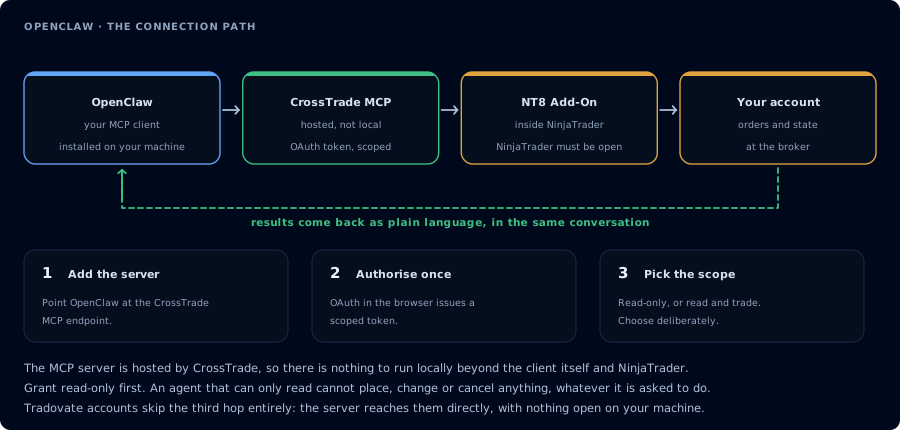
Four hops, authorised once. Read-only is the scope to start with.
OpenClaw's pitch is "personal AI assistant" rather than "coding agent." That fits traders who want to ask quick questions through iMessage about open positions, have the menubar app surface a daily journal summary at market close, or build small Skills that batch CrossTrade tool calls into a single command.
Step 1: Install OpenClaw
npm install -g openclaw@latest
openclaw onboard --install-daemon
Or with pnpm:
pnpm add -g openclaw@latest
openclaw onboard --install-daemon
Node 24 is recommended (22.19+ minimum). The onboard step walks you through model provider keys and which chat platforms to wire up.
Step 2: Register CrossTrade via the CLI
One-liner:
openclaw mcp set crosstrade '{"url":"https://app.crosstrade.io/v1/api/mcp","transport":"streamable-http"}'
With bearer token:
openclaw mcp set crosstrade '{"url":"https://app.crosstrade.io/v1/api/mcp","transport":"streamable-http","headers":{"Authorization":"Bearer YOUR_TOKEN"},"connectionTimeoutMs":10000}'
The underlying JSON shape in ~/.openclaw/openclaw.json:
{
  "mcp": {
    "servers": {
      "crosstrade": {
        "url": "https://app.crosstrade.io/v1/api/mcp",
        "transport": "streamable-http",
        "headers": {
          "Authorization": "Bearer <token>"
        },
        "connectionTimeoutMs": 10000
      }
    }
  }
}
Other useful CLI commands:
openclaw mcp list
openclaw mcp show crosstrade
openclaw mcp unset crosstrade
Step 3: Get a bearer token
OpenClaw's MCP CLI does not implement OAuth. Get a CrossTrade token via Claude Desktop, Cursor, or any OAuth-capable client first, then paste into OpenClaw's headers.
Step 4: Verify from CLI
openclaw "List my CrossTrade tools. Then call ListAccounts and GetConnections. Report add-on version and connected accounts."
OpenClaw routes through your default model and returns the brief in the terminal.
Step 5: Build a Skill for daily brief
OpenClaw's Skills let you save a routine. Create one for trading:
openclaw skill create morning-brief
Inside the Skill, paste the prompt you'd run every morning:
Use read-only CrossTrade tools. For each connected account, report end-of-yesterday
P&L, current watermarks, distance to trailing drawdown, and any open positions
or working orders. Pull the last 10 closed trades from the journal and group
by instrument. Two-paragraph summary, no recommendations.
Then trigger from your phone or menubar: openclaw morning-brief.
Multi-platform note
OpenClaw can route the same Skill to multiple platforms. The morning-brief Skill can be triggered from iMessage on your phone, executed against CrossTrade MCP on your laptop, and the response delivered back to iMessage. The MCP layer sees one authenticated session.
FAQ
Can OpenClaw place trades?
Technically yes with mcp:trade. Treat the same way as Hermes: default to mcp:read, and add a confirmation Skill rather than letting any prompt place orders directly.
Single-operator install?
Yes. OpenClaw is a single-operator self-hosted gateway. No per-user credential split. For shared deployments, use LibreChat instead.
What about the mcporter skill?
OpenClaw also ships a separate skill called The first tool call surfaces an authorization URL. Open it in a browser, approve See CrossTrade MCP OAuth for the full flow, and 403/408 troubleshooting if the handshake fails. Smoke-test before doing anything stateful:mcporter that lets the agent consume MCP servers as tools at runtime (hybrid pattern). For CrossTrade, the native openclaw mcp CLI is the recommended path.OAuth handshake
mcp:read, and return to the harness. The access token is stored by the harness (keychain, config file, or memory depending on the client).Verify the connection
Call GetMcpCapabilities and McpSelfTest. Then ListAccounts and GetConnections.
Report add-on version, NT8 version, and which accounts are linked.
mcp:read. The agent can inspect state but cannot place orders, deploy strategies, or write NinjaScript files.Troubleshooting
| Symptom | Likely cause | Fix |
|---|---|---|
| 403 insufficient_scope | Token authorized at mcp:read but tool requires mcp:trade | Reauthorize the connection and select mcp:trade |
| OAuth callback fails | System browser blocked the redirect or popup | Copy the auth URL manually, complete it, paste the code back |
| Tools list is empty after connect | Server registered but session did not refresh | Restart the harness or trigger a tool list refresh |
| Add-on offline error | NT8 not running, or add-on not loaded | Confirm NT8 is open and the CrossTrade NT8 add-on (v1.13.0+) is installed |
| openclaw mcp set fails on Node version | OpenClaw needs Node 24 recommended (Node 22.19 minimum) | Upgrade Node; nvm install 24 && nvm use 24 |
| No OAuth prompt | OpenClaw's MCP CLI is bearer-token only | Obtain a token via another OAuth-capable client and paste in headers |
| Sensitive values appear redacted in logs | Working as designed — userinfo in url and values in headers are auto-redacted | Don't panic; this is intentional. Use headers (not URL userinfo) for tokens |