How to Connect OpenCode to NinjaTrader 8 with CrossTrade MCP
OpenCode is an open-source AI coding agent for the terminal, IDE, and desktop. It routes to 75+ providers via Models.dev. The MCP config uses type: 'remote' (NOT 'http' or 'streamable-http') and supports native OAuth with Dynamic Client Registration.
mcp:tradeMulti-model harnessPrerequisites
| Requirement | Detail |
|---|---|
| CrossTrade subscription | Elite |
| CrossTrade NT8 Add-On | v1.13.0 or higher |
| NinjaTrader 8 | Running, broker connected |
| Account | Sim101 for first runs |
| OAuth scope | mcp:trade |
| Install command | curl -fsSL https://opencode.ai/install | bash |
| Config file | ~/.config/opencode/opencode.json (global) or opencode.json (project root) |
streamable-http. Auth: OAuth 2.1 + PKCE. Request scope mcp:trade. Read plus write. Place/cancel orders, deploy strategies, compile NinjaScript.Why OpenCode for NinjaTrader work
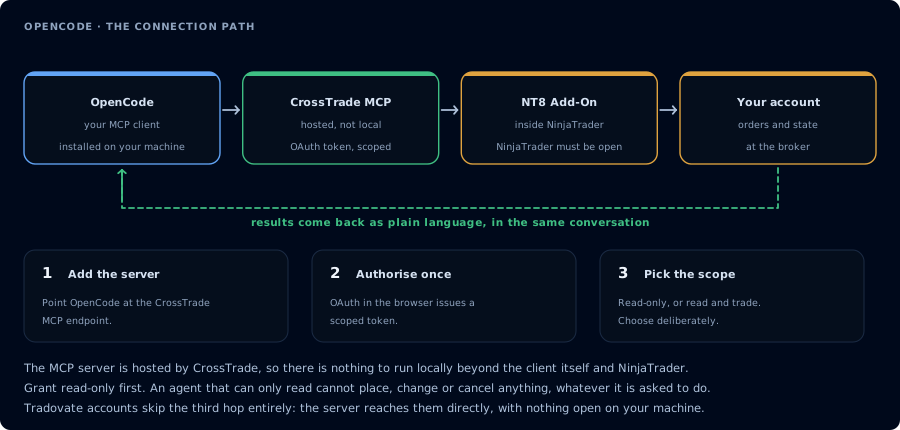
Four hops, authorised once. Read-only is the scope to start with.
OpenCode decouples the harness from the model. You configure CrossTrade MCP once, then swap between Claude (strong NinjaScript), GPT (good tool calling), Gemini (long context for journal review), or DeepSeek (cheap iteration) without re-authenticating. For traders this matters: NinjaScript drafts benefit from Claude or GPT, while overnight journal reviews and backtest sweeps can run on a cheaper model.
Step 1: Install OpenCode
curl -fsSL https://opencode.ai/install | bash
# Or:
npm i -g opencode-ai@latest
brew install opencode
choco install opencode      # Windows
Verify with opencode --version. The CLI launches the agent in your terminal; the desktop and IDE entry points use the same config.
Step 2: Add the CrossTrade MCP server
Edit ~/.config/opencode/opencode.json (global) or opencode.json (project root, found upward from cwd to the nearest git root):
{
  "$schema": "https://opencode.ai/config.json",
  "mcp": {
    "crosstrade": {
      "type": "remote",
      "url": "https://app.crosstrade.io/v1/api/mcp",
      "enabled": true
    }
  }
}
With OAuth client credentials (if CrossTrade's MCP requires pre-registered OAuth):
{
  "mcp": {
    "crosstrade": {
      "type": "remote",
      "url": "https://app.crosstrade.io/v1/api/mcp",
      "enabled": true,
      "oauth": {
        "scope": "mcp:trade"
      }
    }
  }
}
With a static bearer token:
{
  "mcp": {
    "crosstrade": {
      "type": "remote",
      "url": "https://app.crosstrade.io/v1/api/mcp",
      "enabled": true,
      "headers": {
        "Authorization": "Bearer {env:CROSSTRADE_API_KEY}"
      }
    }
  }
}
Most other tools use "http" or "streamable-http". OpenCode uses "remote". The counterpart is "local" (for stdio servers). Pick from those two only.
Restart OpenCode. On the first tool call, OAuth runs in your browser. Approve mcp:trade.
Step 3: Pick the model for the run
OpenCode lets you switch models mid-session with /model. For initial NinjaScript work, Claude or GPT-4.1 both work well. For cost-sensitive backtest sweeps or large journal reviews, DeepSeek V3 is solid. See the model rail below for guidance.
Step 4: First workflow
Use read-only tools only. Confirm CrossTrade MCP is connected. Call ListAccounts,
GetConnections, ListPositions, ListOrders. Report add-on version, NT8 version,
and a one-line status for each account.
If you authorized mcp:trade, also run a Sim101 NinjaScript compile loop. See Vibe Code a NinjaScript Strategy.
Multi-model patterns
A typical OpenCode workflow:
- Inspect with DeepSeek (cheap): "What does my journal say about Tuesday morning trades?"
- Draft NinjaScript with Claude (best at NinjaScript syntax): "Write me a strategy following these specs."
- Compile and repair with whatever model you have available (the agent just runs
CompileNinjaScriptand reads errors). - Backtest sweep with DeepSeek again to run many parameter combinations cheaply.
FAQ
Does OpenCode need API keys for every provider?
No, only for the providers you actually use. OpenCode reads keys from environment variables or its config. You can route everything through OpenRouter if you want a single key.
Can OpenCode run against a local Llama or Qwen?
Yes, via Ollama or LM Studio. The MCP setup is identical; only the model provider changes.
Why use OpenCode instead of Cursor or Cline?
OpenCode runs in the terminal (and now desktop/IDE), which is what most traders want for a quick agent session that doesn't require opening a full IDE. Cline is similar but VS Code-locked; OpenCode is more portable. The first tool call surfaces an authorization URL. Open it in a browser, approve See CrossTrade MCP OAuth for the full flow, and 403/408 troubleshooting if the handshake fails. Smoke-test before doing anything stateful: If you authorized OAuth handshake
mcp:trade, and return to the harness. The access token is stored by the harness (keychain, config file, or memory depending on the client).Verify the connection
Call GetMcpCapabilities and McpSelfTest. Then ListAccounts and GetConnections.
Report add-on version, NT8 version, and which accounts are linked.mcp:trade, also confirm Sim101 is the default account before any order placement.
mcp:trade scope grants order placement. The scope does not protect a funded account; your prompt and account selection do. Default to Sim101 during setup. For funded accounts, verify the firm's automation policy first.Troubleshooting
| Symptom | Likely cause | Fix |
|---|---|---|
| 403 insufficient_scope | Token authorized at mcp:read but tool requires mcp:trade | Reauthorize the connection and select mcp:trade |
| OAuth callback fails | System browser blocked the redirect or popup | Copy the auth URL manually, complete it, paste the code back |
| Tools list is empty after connect | Server registered but session did not refresh | Restart the harness or trigger a tool list refresh |
| Add-on offline error | NT8 not running, or add-on not loaded | Confirm NT8 is open and the CrossTrade NT8 add-on (v1.13.0+) is installed |
| type: "http" or "streamable-http" rejected | OpenCode uses type: "remote" — different from Crush, Cline, Roo Code, etc. | Set "type": "remote" exactly; OpenCode infers Streamable HTTP from this |
| ${env:VAR} expands to literal string | Env var not exported when OpenCode launched | Add the export to your shell rc (.bashrc / .zshrc) and restart OpenCode |
| Tool calls hang on slower models | Model is reasoning but not surfacing progress | Switch via /model to a faster provider for setup |