How to Connect Open WebUI to NinjaTrader 8 with CrossTrade MCP
Open WebUI is the most popular Ollama frontend. Native MCP support landed in v0.6.31. With CrossTrade registered, Open WebUI can call CrossTrade tools from any local model (Llama, Qwen, DeepSeek-distilled) you run on your own hardware. Good for traders who want zero cloud dependency on the LLM side while still using CrossTrade's hosted MCP. Older Open WebUI builds (pre-0.6.31) need the MCPO proxy as a workaround.
mcp:readMulti-model harnessPrerequisites
| Requirement | Detail |
|---|---|
| CrossTrade subscription | Elite |
| CrossTrade NT8 Add-On | v1.13.0 or higher |
| NinjaTrader 8 | Running, broker connected |
| Account | Sim101 for first runs |
| OAuth scope | mcp:read |
| Config file | Admin Settings → External Tools → + (Add Server) |
streamable-http. Auth: OAuth 2.1 + PKCE. Request scope mcp:read. Read-only. Inspect accounts, orders, positions, journal, NinjaScript.Step 1: Deploy Open WebUI (v0.6.31+)
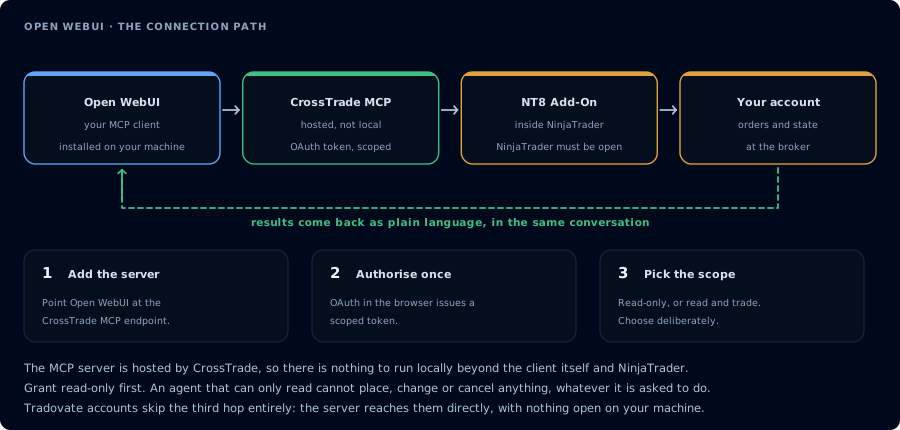
Four hops, authorised once. Read-only is the scope to start with.
docker run -d -p 3000:8080 --add-host=host.docker.internal:host-gateway \
  -v open-webui:/app/backend/data --name open-webui \
  --restart always ghcr.io/open-webui/open-webui:main
Or via pip:
pip install open-webui
open-webui serve
Visit http://localhost:3000, create the admin account.
For OAuth-protected MCP tools to survive restarts, set the WEBUI_SECRET_KEY env var. Otherwise OAuth tokens are re-encrypted on each restart and connections break.
Step 2: Add CrossTrade as a native MCP server (v0.6.31+)
- Admin Settings → External Tools → click + to add.
- Fill in:
- Type: MCP (Streamable HTTP) (do NOT pick OpenAPI; it crashes)
- Server URL:
https://app.crosstrade.io/v1/api/mcp - Auth: choose OAuth 2.1 (Dynamic Client Registration), OAuth 2.1 (Static) (pre-created credentials), or Bearer for a pre-issued token.
- Optional Custom Headers (JSON)
- Save.
On first tool call, Open WebUI runs OAuth in the browser (the admin who registers the server does this once).
Step 2 (alternative): MCPO proxy for older Open WebUI or stdio servers
If you're on Open WebUI before v0.6.31, or you need to expose a stdio MCP server as HTTP, use the MCPO proxy:
pip install mcpo
uvx mcpo --port 8000 --api-key "secret" --config /path/to/config.json --hot-reload
With config.json:
{
  "mcpServers": {
    "crosstrade": {
      "type": "streamable-http",
      "url": "https://app.crosstrade.io/v1/api/mcp",
      "headers": { "Authorization": "Bearer YOUR_TOKEN" }
    }
  }
}
Then point Open WebUI's External Tools at http://localhost:8000.
Step 3: First chat against a local model
Pick a local Ollama model that handles tool calls (Qwen 3 Coder, Llama 3.x, DeepSeek-distilled). Send:
Confirm CrossTrade MCP. ListAccounts and report add-on version.
Local-model tool calling is less reliable than Claude/GPT. If the model produces malformed tool calls, switch to a Qwen 3 Coder variant tuned for tool use, or accept that for trading workflows a cloud model is more reliable.
Multi-user caveat
MCP server credentials in Open WebUI are stored per connection at the admin level, not per end-user. The OAuth grant happens once at registration; all users sharing the Open WebUI instance use the same backend token. This is the opposite of LibreChat (per-user) and matters for trading workflows where account credentials should not be shared.
FAQ
Free?
Yes — but the Open WebUI License preserves branding requirements (not pure MIT). Commercial deployments at scale should review the license.
Will OAuth-protected tools work as "default" tools?
No. OAuth-protected tools cannot be set as default — the chat can't initiate interactive login mid-chat for users who aren't yet authorized. The first tool call surfaces an authorization URL. Open it in a browser, approve See CrossTrade MCP OAuth for the full flow, and 403/408 troubleshooting if the handshake fails. Smoke-test before doing anything stateful:OAuth handshake
mcp:read, and return to the harness. The access token is stored by the harness (keychain, config file, or memory depending on the client).Verify the connection
Call GetMcpCapabilities and McpSelfTest. Then ListAccounts and GetConnections.
Report add-on version, NT8 version, and which accounts are linked.
mcp:read. The agent can inspect state but cannot place orders, deploy strategies, or write NinjaScript files.Troubleshooting
| Symptom | Likely cause | Fix |
|---|---|---|
| 403 insufficient_scope | Token authorized at mcp:read but tool requires mcp:trade | Reauthorize the connection and select mcp:trade |
| OAuth callback fails | System browser blocked the redirect or popup | Copy the auth URL manually, complete it, paste the code back |
| Tools list is empty after connect | Server registered but session did not refresh | Restart the harness or trigger a tool list refresh |
| Add-on offline error | NT8 not running, or add-on not loaded | Confirm NT8 is open and the CrossTrade NT8 add-on (v1.13.0+) is installed |
| Type dropdown crashes the UI | Picked OpenAPI for an MCP URL | Select Type = MCP (Streamable HTTP), not OpenAPI |
| OAuth tokens lost after restart | WEBUI_SECRET_KEY env not set | Set WEBUI_SECRET_KEY in your environment; tokens are encrypted with this key |
| On Open WebUI before v0.6.31 | Native MCP not available | Use the MCPO proxy (pip install mcpo) as a bridge; or upgrade to v0.6.31+ |