How to Connect Roo Code to NinjaTrader 8 with CrossTrade MCP
Roo Code is a Cline fork with additional modes (Architect, Code, Ask, Debug). The MCP integration uses streamable-http in kebab-case — different from upstream Cline's streamableHttp camelCase. Authentication is via headers, not native OAuth.
mcp:tradeMulti-model harnessPrerequisites
| Requirement | Detail |
|---|---|
| CrossTrade subscription | Elite |
| CrossTrade NT8 Add-On | v1.13.0 or higher |
| NinjaTrader 8 | Running, broker connected |
| Account | Sim101 for first runs |
| OAuth scope | mcp:trade |
| Config file | mcp_settings.json in VS Code globalStorage (or .roo/mcp.json in project) |
streamable-http. Auth: OAuth 2.1 + PKCE. Request scope mcp:trade. Read plus write. Place/cancel orders, deploy strategies, compile NinjaScript.Step 1: Add CrossTrade MCP
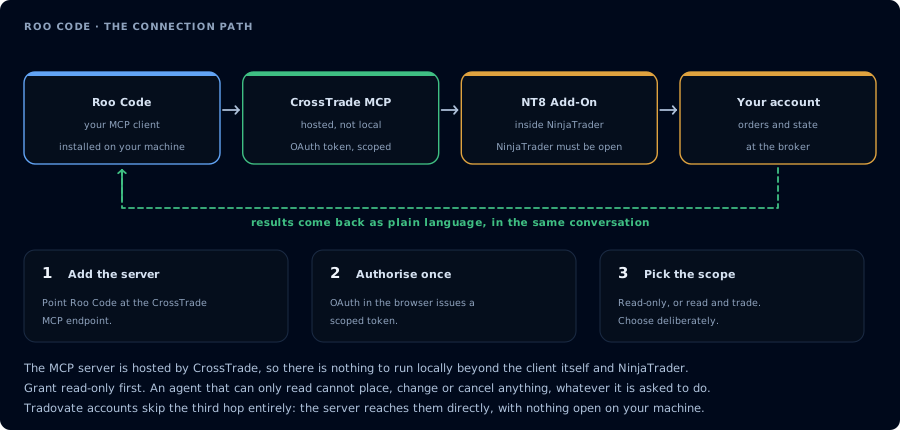
Four hops, authorised once. Read-only is the scope to start with.
Open mcp_settings.json in VS Code globalStorage:
- macOS:
~/Library/Application Support/Code/User/globalStorage/rooveterinaryinc.roo-cline/settings/mcp_settings.json - Linux:
~/.config/Code/User/globalStorage/rooveterinaryinc.roo-cline/settings/mcp_settings.json - Windows:
%APPDATA%\Code\User\globalStorage\rooveterinaryinc.roo-cline\settings\mcp_settings.json
Or for project scope, use .roo/mcp.json in your repo root.
{
  "mcpServers": {
    "crosstrade": {
      "type": "streamable-http",
      "url": "https://app.crosstrade.io/v1/api/mcp",
      "headers": {
        "Authorization": "Bearer YOUR_TOKEN"
      },
      "alwaysAllow": [],
      "disabled": false,
      "timeout": 60
    }
  }
}
Roo Code uses "type": "streamable-http" (kebab-case). Cline (the upstream) uses "streamableHttp" (camelCase). Sharing configs between them requires translation.
Optional fields: alwaysAllow (auto-approve tool names), disabled (boolean), timeout (1-3600 sec, default 60), disabledTools (block specific tools).
Step 2: Pick a mode
Roo Code has these modes:
- Architect mode: useful for planning a strategy spec before writing.
- Code mode: for the actual NinjaScript compile loop.
- Ask mode: read-only Q&A about your codebase plus trading state.
- Debug mode: for "why did this signal not fill" workflows.
Step 3: First prompt
ListAccounts and GetConnections. One-line status per account.
Step 4: NinjaScript compile loop
Same pattern as Cline.
FAQ
Why use Roo Code instead of Cline?
The mode system. Architect mode in particular is useful for planning trading strategies before generating any code.
Marketplace identifier?
The first tool call surfaces an authorization URL. Open it in a browser, approve See CrossTrade MCP OAuth for the full flow, and 403/408 troubleshooting if the handshake fails. Smoke-test before doing anything stateful: If you authorized rooveterinaryinc.roo-cline (the -cline suffix reflects its fork heritage; this is the active Roo Code extension).OAuth handshake
mcp:trade, and return to the harness. The access token is stored by the harness (keychain, config file, or memory depending on the client).Verify the connection
Call GetMcpCapabilities and McpSelfTest. Then ListAccounts and GetConnections.
Report add-on version, NT8 version, and which accounts are linked.mcp:trade, also confirm Sim101 is the default account before any order placement.
mcp:trade scope grants order placement. The scope does not protect a funded account; your prompt and account selection do. Default to Sim101 during setup. For funded accounts, verify the firm's automation policy first.Troubleshooting
| Symptom | Likely cause | Fix |
|---|---|---|
| 403 insufficient_scope | Token authorized at mcp:read but tool requires mcp:trade | Reauthorize the connection and select mcp:trade |
| OAuth callback fails | System browser blocked the redirect or popup | Copy the auth URL manually, complete it, paste the code back |
| Tools list is empty after connect | Server registered but session did not refresh | Restart the harness or trigger a tool list refresh |
| Add-on offline error | NT8 not running, or add-on not loaded | Confirm NT8 is open and the CrossTrade NT8 add-on (v1.13.0+) is installed |
| type: "streamableHttp" silently fails | Wrong casing for Roo Code | Roo Code uses type: "streamable-http" (kebab-case). Cline uses the camelCase form; do not copy between them |
| OAuth flow does not start | Roo Code docs do not describe a native browser OAuth flow for remote MCP | Obtain a token via another OAuth-capable client and paste it as a Bearer header |