How to Connect Warp to NinjaTrader 8 with CrossTrade MCP
Warp is an AI-native terminal. Agent Mode supports remote MCP servers via a UI flow (no config file path; you paste JSON into a settings dialog). Native OAuth for servers that support it. BYOK rolled out to all plans including Free in May 2026.
mcp:tradeMulti-model harnessPrerequisites
| Requirement | Detail |
|---|---|
| CrossTrade subscription | Elite |
| CrossTrade NT8 Add-On | v1.13.0 or higher |
| NinjaTrader 8 | Running, broker connected |
| Account | Sim101 for first runs |
| OAuth scope | mcp:trade |
| Config file | Settings → Agents → MCP servers → Add (GUI dialog; no file path) |
streamable-http. Auth: OAuth 2.1 + PKCE. Request scope mcp:trade. Read plus write. Place/cancel orders, deploy strategies, compile NinjaScript.Step 1: Install Warp and enable Agent Mode
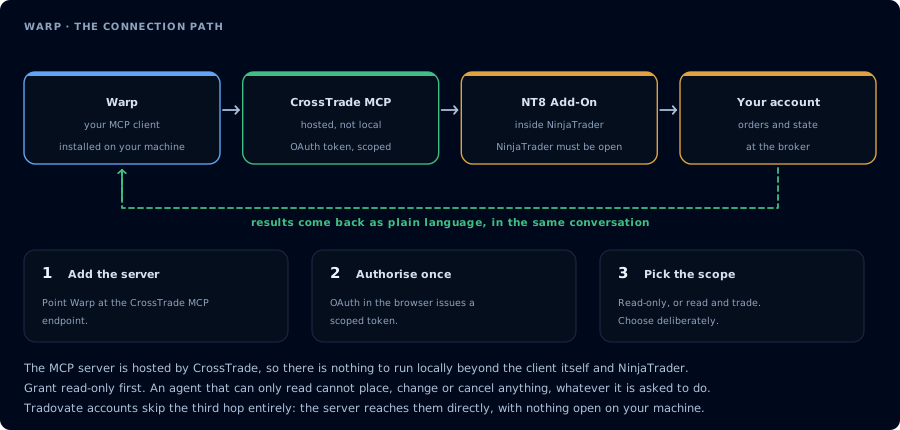
Four hops, authorised once. Read-only is the scope to start with.
Download from warp.dev/download (or brew install --cask warp on macOS). Sign in on first launch.
Agent Mode is on by default. Open the Agents panel from the sidebar or via Command Palette.
Step 2: Add CrossTrade MCP
There is no config file to edit. Use the GUI:
-
Settings → Agents → MCP servers → + Add.
(Alternatively: Command Palette → "Open MCP Servers", or Warp Drive → Personal → MCP Servers.)
-
Paste this JSON into the Add Server dialog:
{
  "CrossTrade": {
    "url": "https://app.crosstrade.io/v1/api/mcp",
    "headers": {
      "Authorization": "Bearer YOUR_TOKEN"
    }
  }
}
The JSON object key (CrossTrade) becomes the server display name.
- Click Add.
Warp stores MCP server configs internally — they're not in a user-editable file. Warp picks transport (HTTP/SSE) automatically; there is no type or transport key in the JSON.
Step 3: OAuth (when supported)
For servers that advertise OAuth, Warp opens the system browser, handles the callback, and stores credentials securely. CrossTrade's OAuth setup works here.
Fallback for non-OAuth: a static bearer token in headers.Authorization.
Step 4: First prompt
In the Warp prompt, type a natural-language line:
# List my CrossTrade accounts. Then show open positions on Sim101.
Warp routes to the agent, calls the tools, and returns the result inline. Useful when you're already in a shell working on something else and want a quick status check without switching apps.
Plans + BYOK (matters for MCP cost)
| Plan | Price | AI credits | BYOK |
|---|---|---|---|
| Free | $0/mo | 75/mo | Yes (since May 21, 2026) |
| Build | $20/mo | 1,500/mo | Yes |
| Business | $50/mo/seat | Higher | Yes |
| Enterprise | Custom | Unlimited | Yes |
Recommendation for traders: enable BYOK with your own Anthropic/OpenAI key so MCP-heavy sessions don't eat the credit allowance.
FAQ
Can I use Warp on Windows / Linux?
Warp supports macOS, Linux, and Windows.
Why no config file?
Warp is a managed terminal app; settings live in its internal store. The trade-off is no version-control of MCP server lists, but you can copy/paste between machines. The first tool call surfaces an authorization URL. Open it in a browser, approve See CrossTrade MCP OAuth for the full flow, and 403/408 troubleshooting if the handshake fails. Smoke-test before doing anything stateful: If you authorized OAuth handshake
mcp:trade, and return to the harness. The access token is stored by the harness (keychain, config file, or memory depending on the client).Verify the connection
Call GetMcpCapabilities and McpSelfTest. Then ListAccounts and GetConnections.
Report add-on version, NT8 version, and which accounts are linked.mcp:trade, also confirm Sim101 is the default account before any order placement.
mcp:trade scope grants order placement. The scope does not protect a funded account; your prompt and account selection do. Default to Sim101 during setup. For funded accounts, verify the firm's automation policy first.Troubleshooting
| Symptom | Likely cause | Fix |
|---|---|---|
| 403 insufficient_scope | Token authorized at mcp:read but tool requires mcp:trade | Reauthorize the connection and select mcp:trade |
| OAuth callback fails | System browser blocked the redirect or popup | Copy the auth URL manually, complete it, paste the code back |
| Tools list is empty after connect | Server registered but session did not refresh | Restart the harness or trigger a tool list refresh |
| Add-on offline error | NT8 not running, or add-on not loaded | Confirm NT8 is open and the CrossTrade NT8 add-on (v1.13.0+) is installed |
| MCP tool calls eat AI credits fast | Heavy MCP usage on Free (75 credits/mo) or Build (1,500 credits/mo) | Add a BYOK API key (Anthropic / OpenAI / Google) — BYOK bypasses Warp credits since May 21, 2026 |
| Settings location moved | Warp reorganized "AI" settings to "Agents" in 2026 | Look under Settings → Agents → MCP Servers |
| Transport hangs (HTTP vs SSE picked wrong) | Warp infers transport from the server's response and there is no JSON override | Ensure CrossTrade is reachable; if forced to disambiguate, expose distinct URLs for HTTP vs SSE on the server side |