How to Connect Windsurf to NinjaTrader 8 with CrossTrade MCP
Windsurf is Codeium's AI-native IDE. Its Cascade Agent supports MCP servers, which means CrossTrade tools become available alongside your normal code completion in a single editor. The config uses serverUrl (or url) — both accepted, but stick with serverUrl to match Windsurf's official examples.
mcp:tradeMulti-model harnessPrerequisites
| Requirement | Detail |
|---|---|
| CrossTrade subscription | Elite |
| CrossTrade NT8 Add-On | v1.13.0 or higher |
| NinjaTrader 8 | Running, broker connected |
| Account | Sim101 for first runs |
| OAuth scope | mcp:trade |
| Config file | ~/.codeium/windsurf/mcp_config.json |
streamable-http. Auth: OAuth 2.1 + PKCE. Request scope mcp:trade. Read plus write. Place/cancel orders, deploy strategies, compile NinjaScript.Step 1: Open Cascade settings
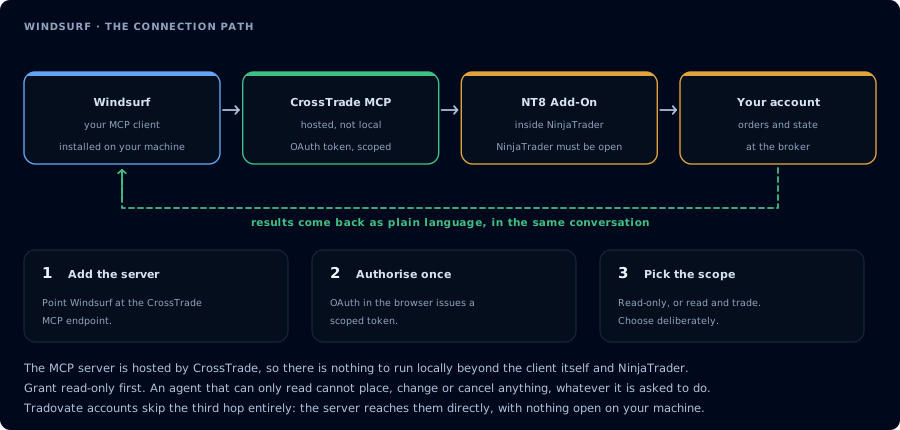
Four hops, authorised once. Read-only is the scope to start with.
Open Windsurf → Cascade panel → MCP Servers → Add server.
Or edit ~/.codeium/windsurf/mcp_config.json directly:
{
  "mcpServers": {
    "crosstrade": {
      "serverUrl": "https://app.crosstrade.io/v1/api/mcp",
      "headers": {
        "Authorization": "Bearer ${env:CROSSTRADE_TOKEN}"
      }
    }
  }
}
Windsurf accepts both serverUrl and url. The official docs example uses serverUrl — use that to avoid surprises if Windsurf ever drops the alias. Variable interpolation: ${env:VAR_NAME}, ${file:/path/to/file}.
Step 2: OAuth
Per Windsurf's docs: "Windsurf supports OAuth for each transport type." Reload Cascade. First tool call triggers the browser OAuth flow.
Step 3: NinjaScript loop
Same compile-loop pattern as Cursor:
GetNinjaScriptHelpon planned types.- Draft into the workspace file.
CompileNinjaScript(in_memory: true).- Repair.
WriteNinjaScriptFile.RunStrategyBacktest.
Windsurf's strength is multi-step task planning. Phrase the prompt as a single goal ("Build, compile, and backtest a working MES EMA cross strategy on Sim101") and let Cascade plan the steps.
FAQ
Plan requirements?
Windsurf has Free, Pro, Max, Teams, and Enterprise tiers. MCP support is available across them; provider model access scales with tier.
Which transports work?
stdio, SSE, and Streamable HTTP. For CrossTrade, just provide The first tool call surfaces an authorization URL. Open it in a browser, approve See CrossTrade MCP OAuth for the full flow, and 403/408 troubleshooting if the handshake fails. Smoke-test before doing anything stateful: If you authorized serverUrl and Windsurf auto-detects.OAuth handshake
mcp:trade, and return to the harness. The access token is stored by the harness (keychain, config file, or memory depending on the client).Verify the connection
Call GetMcpCapabilities and McpSelfTest. Then ListAccounts and GetConnections.
Report add-on version, NT8 version, and which accounts are linked.mcp:trade, also confirm Sim101 is the default account before any order placement.
mcp:trade scope grants order placement. The scope does not protect a funded account; your prompt and account selection do. Default to Sim101 during setup. For funded accounts, verify the firm's automation policy first.Troubleshooting
| Symptom | Likely cause | Fix |
|---|---|---|
| 403 insufficient_scope | Token authorized at mcp:read but tool requires mcp:trade | Reauthorize the connection and select mcp:trade |
| OAuth callback fails | System browser blocked the redirect or popup | Copy the auth URL manually, complete it, paste the code back |
| Tools list is empty after connect | Server registered but session did not refresh | Restart the harness or trigger a tool list refresh |
| Add-on offline error | NT8 not running, or add-on not loaded | Confirm NT8 is open and the CrossTrade NT8 add-on (v1.13.0+) is installed |
| Re-auth fails after token expiry | Browser auth state stuck | Restart Windsurf to reset state, then re-authorize |
| serverUrl ignored | Older Windsurf build | Update Windsurf to current 1.x release; both serverUrl and url are accepted in current versions |