How to Connect Zed to NinjaTrader 8 with CrossTrade MCP
Zed is a fast Rust-based editor with a built-in AI panel. Zed calls MCP servers 'context servers' in its config — important detail because pasting an mcpServers block from another tool will silently fail to register. Zed prompts for OAuth automatically when the Authorization header is omitted.
mcp:tradeMulti-model harnessPrerequisites
| Requirement | Detail |
|---|---|
| CrossTrade subscription | Elite |
| CrossTrade NT8 Add-On | v1.13.0 or higher |
| NinjaTrader 8 | Running, broker connected |
| Account | Sim101 for first runs |
| OAuth scope | mcp:trade |
| Config file | ~/.config/zed/settings.json |
streamable-http. Auth: OAuth 2.1 + PKCE. Request scope mcp:trade. Read plus write. Place/cancel orders, deploy strategies, compile NinjaScript.Step 1: Register CrossTrade as a context server
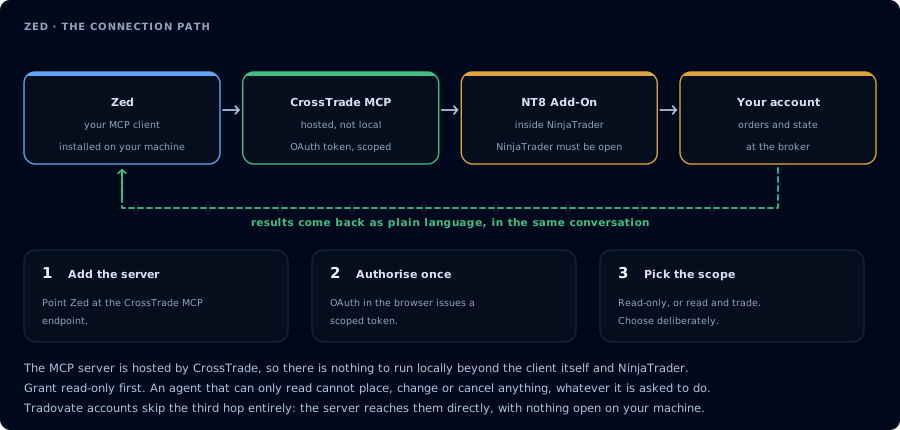
Four hops, authorised once. Read-only is the scope to start with.
Open ~/.config/zed/settings.json (or run the agent: open settings command) and add:
{
  "context_servers": {
    "crosstrade": {
      "url": "https://app.crosstrade.io/v1/api/mcp"
    }
  }
}
context_servers, not mcpServersZed uses context_servers (snake_case). Pasting mcpServers from a Cursor/Cline/Claude Desktop config will silently fail — Zed simply won't see the server.
For a pre-issued bearer token instead of OAuth:
{
  "context_servers": {
    "crosstrade": {
      "url": "https://app.crosstrade.io/v1/api/mcp",
      "headers": {
        "Authorization": "Bearer YOUR_TOKEN"
      }
    }
  }
}
Restart Zed.
Step 2: OAuth (omit Authorization header to trigger)
Per Zed's docs: "When a remote MCP server has no configured 'Authorization' header, Zed will prompt you to authenticate yourself against the MCP server using the standard MCP OAuth flow."
So if you want browser OAuth, leave the headers block out entirely.
Step 3: Open the Assistant
Cmd/Ctrl+? (or whichever shortcut your Zed maps to the Assistant). CrossTrade tools appear in the available tool list.
Step 4: First read-only
Confirm CrossTrade MCP is connected. List my accounts and summarize open
positions. Read-only.
Step 5: NinjaScript work
Same compile loop as Cursor. Zed's smaller footprint makes it pleasant for quick agent sessions over a NinjaScript file without booting a heavier IDE.
FAQ
What about the Zed extension registry?
Zed distinguishes "Extensions" (pre-packaged MCP servers from the Zed extension registry) from "Custom Servers" (manual JSON config). Both share the context_servers block — extensions are configured via UI, custom remote ones via the JSON above.
Plan requirements?
Zed Personal is free with 2,000 accepted edit predictions/month. Pro is $10/mo. Business is $30/seat/mo. BYOK is fully supported on free tier — you can bring API keys for any provider. The first tool call surfaces an authorization URL. Open it in a browser, approve See CrossTrade MCP OAuth for the full flow, and 403/408 troubleshooting if the handshake fails. Smoke-test before doing anything stateful: If you authorized OAuth handshake
mcp:trade, and return to the harness. The access token is stored by the harness (keychain, config file, or memory depending on the client).Verify the connection
Call GetMcpCapabilities and McpSelfTest. Then ListAccounts and GetConnections.
Report add-on version, NT8 version, and which accounts are linked.mcp:trade, also confirm Sim101 is the default account before any order placement.
mcp:trade scope grants order placement. The scope does not protect a funded account; your prompt and account selection do. Default to Sim101 during setup. For funded accounts, verify the firm's automation policy first.Troubleshooting
| Symptom | Likely cause | Fix |
|---|---|---|
| 403 insufficient_scope | Token authorized at mcp:read but tool requires mcp:trade | Reauthorize the connection and select mcp:trade |
| OAuth callback fails | System browser blocked the redirect or popup | Copy the auth URL manually, complete it, paste the code back |
| Tools list is empty after connect | Server registered but session did not refresh | Restart the harness or trigger a tool list refresh |
| Add-on offline error | NT8 not running, or add-on not loaded | Confirm NT8 is open and the CrossTrade NT8 add-on (v1.13.0+) is installed |
| Zed shows no MCP tools | Used mcpServers as the top-level key | Rename the top-level key to context_servers — Zed uses this naming exclusively |
| OAuth prompt never appears | Authorization header was set, so Zed assumes static auth | Remove the Authorization header to trigger Zed's OAuth prompt |