How to Debug NinjaScript Compile Errors with AI
Pasting compile errors into a chat window almost never converges. The model loses context, fixes the immediate error, breaks something else. With CrossTrade MCP, the agent compiles against the running NT8 AppDomain and reads the structured diagnostic in the same context as the source. Repairs land in two or three iterations.
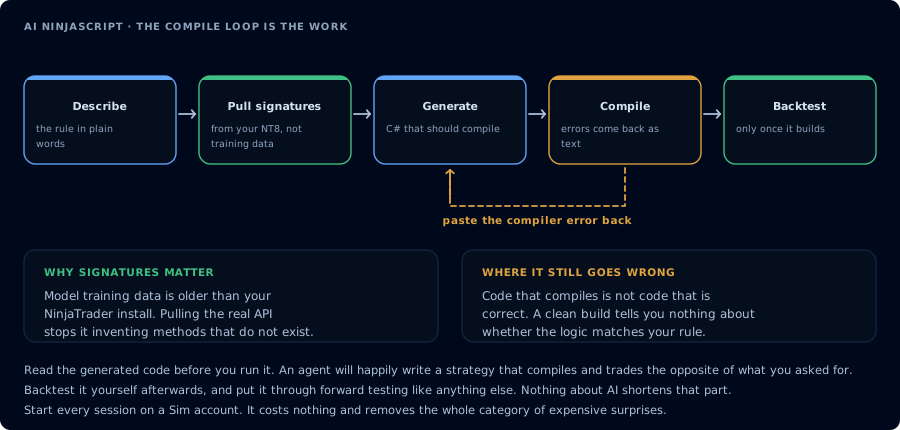
The first attempt rarely compiles. Feeding the error back is the loop that does the work.
Direct answer
To repair a compile error with AI through CrossTrade MCP:
- The agent calls
CompileNinjaScript(in_memory: true). - Read the diagnostic. Identify the unresolved or mistyped symbol.
- The agent calls
LookupNinjaScriptSymbolon that symbol and rewrites the offending line. - Recompile. Repeat until green.
The loop converges because the agent looks at your actual NT8 install, not at training data that may be out of date.
Prerequisites
| Requirement | Detail |
|---|---|
| CrossTrade subscription | Elite |
| CrossTrade NT8 Add-On | v1.13.0 or higher |
| NinjaTrader 8 | Running |
| MCP client | Claude Code, Cursor, or another client with mcp:trade |
| Scope | mcp:trade |
Common NinjaScript compile errors and the fix pattern
| Error | Likely cause | Repair |
|---|---|---|
CS0103 The name 'X' does not exist in the current context | The model invented a symbol or used a removed name | LookupNinjaScriptSymbol(X); rewrite to the correct call |
CS1503 Argument N: cannot convert from 'A' to 'B' | Wrong overload chosen | GetNinjaScriptHelp on the method; pick the matching overload |
CS1061 'Type' does not contain a definition for 'Member' | Member was renamed or never existed | SearchNinjaScriptSymbols("<member-keyword>"); rewrite |
CS0119 'X' is a type, which is not valid in the given context | Type referenced where an instance is needed | Fix the call site; for indicators, instantiate via the helper |
CS0246 The type or namespace name 'X' could not be found | Missing using or invented namespace | LookupNinjaScriptSymbol(X) to confirm; if it does not exist, replace with a real type |
CS0029 Cannot implicitly convert type 'A' to 'B' | Series vs scalar mismatch | Use [0] to read the current value of a series, or pass the series itself where required |
Step 1: Reproduce the error in memory
CompileNinjaScript(in_memory: true) on the current source. Do not write to disk
yet. Report all errors verbatim.
In-memory compile does not affect any file. You can iterate freely.
Step 2: Force a symbol lookup for every unresolved identifier
For every unresolved identifier in the error list, call LookupNinjaScriptSymbol
and tell me the correct shape. Do not rewrite yet.
This is the step that pasted-code workflows skip. Forcing the lookup eliminates guessing.
Step 3: Rewrite the offending lines
Rewrite the offending lines using the overloads you just confirmed. Show me the
diff before recompiling.
Read the diff. If the rewrite changes behavior beyond fixing the compile, push back.
Step 4: Recompile
CompileNinjaScript(in_memory: true). Report success or errors. Do not stop on
warnings; treat warnings as informational.
Repeat steps 2 to 4 until green. Two or three iterations is normal. Persistent failure usually means the spec is ambiguous (the model is guessing at intent), not that it cannot code.
Step 5: Persist the file
Only after a green in-memory compile:
After I confirm, WriteNinjaScriptFile to the same path. Run one more
CompileNinjaScript without in_memory to confirm the disk version compiles too.
When the loop does not converge
If the same identifier keeps failing:
- Force a
SearchNinjaScriptSymbolson a synonym. - Pull a known-good sample (for example,
Strategies/SampleMACrossOver.cs) withReadNinjaScriptFileand have the agent reference the style. - Re-read the spec with the agent and ask it to restate the intent before rewriting.
If two methods conflict (one fix breaks another file), back up and read the broader context with the agent before continuing.
Troubleshooting
| Symptom | Fix |
|---|---|
403 insufficient_scope | The compile and write tools need mcp:trade. Reauthorize. |
| 408 timeout | NT8 closed or add-on disconnected. Open NT8. |
| Same compile error after rewrite | The agent did not actually call LookupNinjaScriptSymbol. Force the lookup. |
Related
- Learn: Vibe Code a NinjaScript Strategy
- Learn: Backtest AI-Generated NinjaScript
- Learn: Connect Claude Code
- Docs: CompileNinjaScript
- Docs: LookupNinjaScriptSymbol