How to Debug TradingView Webhook Signals with AI in NinjaTrader 8
A TradingView alert fired. NinjaTrader did not produce the expected trade. The broker UI shows nothing rejected. With CrossTrade MCP, an AI agent reads the webhook signal history, the CrossTrade NT8 Add-On activity log, the order list, and the executions in a single conversation and points at the gap.
Direct answer
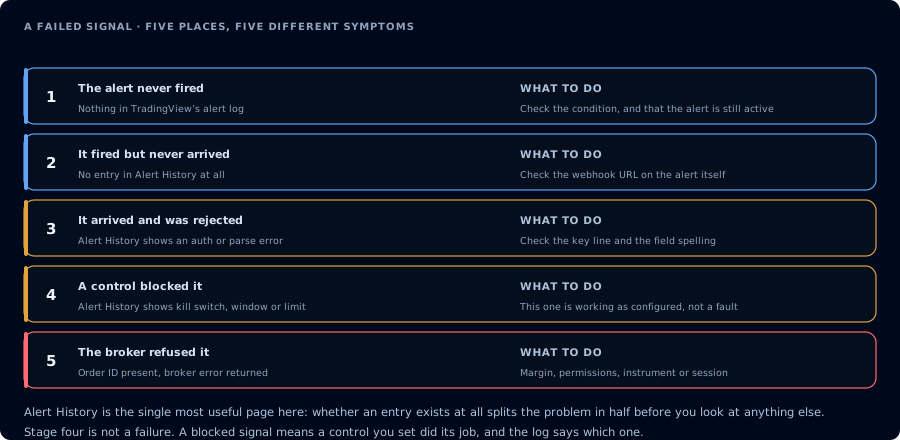
Five places a signal can die, each with the evidence that identifies which one it was.
Authenticate with mcp:read. Run this prompt with the time window you care about:
Pull TradingView webhook signals on <account> between <start> and <end>. For
each signal, find the matching add-on activity entry and any order or
execution. Tell me which signals filled, which were rejected, which produced
no order. Group non-fills by likely cause.
The agent calls GetSignalHistory, GetActivityLog, ListOrders, and ListExecutions. The response is a chain-by-chain analysis.
Common reasons signals do not fill
| Pattern | Cause |
|---|---|
| Signal present, no add-on activity | Account mismatch in payload |
| Signal present, activity warns "missing instrument" | Payload sent root symbol instead of contract month (MES vs MES 12-26) |
| Signal present, order created, broker rejected | Max contracts, daily loss lockout, instrument expired |
| Signal present, position-state mismatch | Payload assumed flat but account already holds the position |
| Duplicate signals within seconds | Trigger logic in Pine Script firing repeatedly |
| Signal present, no order, no activity | Webhook URL wrong or payload malformed |
Prerequisites
| Requirement | Detail |
|---|---|
| CrossTrade subscription | Elite |
| CrossTrade NT8 Add-On | v1.13.0 or higher |
| MCP client | Any |
| Scope | mcp:read |
Step 1: Pinpoint the time window
A 5-minute window around the alert is usually enough.
Step 2: Run the diagnostic prompt
For account <account>, between <start> and <end>:
1. GetSignalHistory.
2. GetActivityLog for the same window.
3. ListOrders and ListExecutions for the same window.
4. Build a chronological timeline.
5. For each signal, tell me whether it produced an order, whether the order
   filled, and the verbatim rejection reason if any.
Do not place or modify anything.
Step 3: Read the timeline
The agent returns events in time order. Look for the gap: signal → no activity, or signal → activity → no order, or order → rejection.
Step 4: Fix the underlying problem in TradingView or CrossTrade
| Cause | Fix |
|---|---|
| Payload missing instrument month | Update the Pine Script alert message to include the contract month |
| Account mismatch | Correct the account name in the alert message |
| Position-state mismatch | Add a position-aware action (flatten_and_reverse vs reverse) |
| Broker rejection (max contracts, daily loss) | Reduce size or stop trading for the session |
| Duplicate signals | Add a "once per bar" guard in Pine Script |
Step 5: Verify the next alert
Fire a test alert from TradingView's "Send test webhook" action and re-pull the signal history. The agent should report it as filled (or correctly rejected for a stated reason).
Related
- Main site: Webhook Analysis
- Learn: TradingView Webhook AI Analysis (conceptual overview)
- Learn: Fix a TradingView Alert Message with AI
- Docs: GetSignalHistory
- Docs: GetActivityLog
- Tool: TradingView Webhook Signal Analyzer