NinjaScript Authoring and Deployment Prompts for AI Trading Agents
This is where MCP earns its keep. An AI trading agent can inspect NinjaTrader symbols, write NinjaScript, compile it against your real install, write the file, backtest through Strategy Analyzer, optimize parameters, deploy the winner, and verify whether it is actually running.
That power needs gates. A good prompt says what to build, what not to build, when to stop, and what must be true before deployment.
Related references: NinjaScript and Strategies, Backtesting and Optimization, Workflows and Safety, Backtesting Best Practices, and Max Drawdown.
Force the agent to inspect first
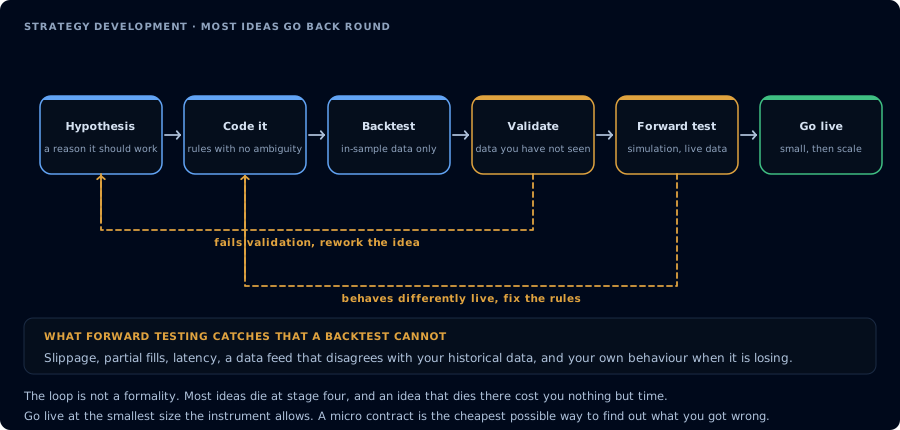
An agent can write and backtest it. It still has to survive validation and forward testing.
Before writing any NinjaScript, inspect the CrossTrade NinjaScript help and the actual NinjaTrader symbols for Strategy, EnterLong, EnterShort, EMA, RSI, ATR, and SetStopLoss.
Use this NT8 install as the source of truth. If a method signature differs from examples in your training data, follow the local signature. Do not generate code until you summarize the constraints.
Expected behavior: the agent should use GetNinjaScriptHelp, SearchNinjaScriptSymbols, and LookupNinjaScriptSymbol before writing code.
Draft a conservative strategy, but do not write the file yet
Draft a NinjaScript strategy named CtMorningRiskGuard for MES.
Rules:
- Trade only from 9:45 to 11:30 ET.
- One contract.
- No averaging down.
- Max two trades per session.
- ATR-based stop.
- Target no larger than 1.5R.
- Stop trading after two losses or after the strategy is down $150 on the day.
- Flatten before the session close.
Compile it in memory first with CompileNinjaScript(in_memory:true). If compile fails, fix the source and recompile. Do not write the file to disk until compile succeeds.
The important phrase is "compile it in memory first." That keeps half-written source out of the user's NinjaTrader folder.
Safe edit to an existing strategy
Read my existing CtMorningRiskGuard strategy with ReadNinjaScriptFile.
Change only the default stop multiplier from 2.0 ATR to 2.5 ATR. Preserve every other line unless the compile check requires a minimal fix. Compile in memory, show me the diff in plain English, then ask before overwriting the file with WriteNinjaScriptFile.
Use this pattern when you want a small edit instead of a rewrite. Agents love to rewrite. Tell them not to.
Backtest-gated deployment
I want to test CtMorningRiskGuard on Sim101 before I trust it.
Run RunStrategyBacktest on MES 5-minute bars for the last 60 days with the strategy's default parameters. My minimum gate is profit factor above 1.25, max drawdown below $350, and at least 40 trades. If it fails any gate, stop and show me the failed metric. If it passes, ask me for final confirmation before deploying with DeployStrategy.
RunStrategyBacktest drives NT8's actual Strategy Analyzer engine, so the numbers you gate against are the same numbers you would see in NT8's UI. This keeps the agent from treating "profitable once" as a deployment signal.
Parameter sweep before deploying
Before I deploy CtMorningRiskGuard, sweep its stop multiplier and target ratio.
Run RunStrategyBacktest with optimization: fitness MaxNetProfit, parameters_sweep over StopAtrMultiplier from 1.5 to 3.0 step 0.25 and TargetRatio from 1.0 to 2.0 step 0.25. After it finishes, show me the top three results by NetProfit including drawdown, profit factor, Sharpe, and trade count. Then run a single full-detail backtest with the best parameters so I can see every trade before I decide to deploy.
Note the two-step pattern: the sweep returns condensed summaries, then a follow-up single backtest with the winning parameters returns full trade detail. The MCP sweep enumerates every combination. It does not currently honor genetic-optimizer or StrategyGenerator semantics, so a 6 × 5 sweep is exactly 30 backtests.
Deploy headless and verify live state
Deploy CtMorningRiskGuard headless on Sim101 using MES 5-minute bars with mode:"account".
After deployment, call GetDeployedStrategyState. Tell me whether it reached active or realtime state, current position, active orders, current bar count, and whether is_trading is true. If trade count is zero, do not call that a failure unless the strategy is stopped, faulted, or past its entry window.
Expected behavior: deploy, then verify live state. Trust the live block over cached deployment response fields.
Deploy to a chart for visual review
Open a 5-minute MES chart if one is not visible, then deploy CtMorningRiskGuard in chart mode so I can review plots and behavior.
If the chart cannot be opened or the strategy cannot attach, give me the visible chart list and the exact reason. Do not claim it is running until live state confirms it.
Stop cleanly
Stop CtMorningRiskGuard on Sim101 with StopStrategy and remove it from the deployment registry. Then show ListDeployedStrategies, live NT8 strategies, current MES position, and active MES orders so I can confirm nothing is left running.
End-to-end: write, backtest, optimize, deploy
This is the agent prompt that demonstrates the full loop in one go. It is long because the gates are spelled out.
I want a complete idea-to-live loop on Sim101 for a strategy I'm calling EmaPullback. Hypothesis: on MES 5-minute bars, go long when price pulls back to the 20-EMA after a higher high, with RSI above 50 and ATR contracting. Stop at recent swing low; target 1.5R. One contract.
- Inspect NinjaScript symbols for Strategy, EnterLong, EnterLongLimit, EMA, RSI, ATR, SetStopLoss, SetProfitTarget. Summarize the local signatures.
- Write the strategy. CompileNinjaScript(in_memory:true). If compile fails, fix and recompile. Do not WriteNinjaScriptFile yet.
- Once compile is green, WriteNinjaScriptFile.
- Run a baseline RunStrategyBacktest on the last 60 days of MES 5-minute bars with default parameters. Report metrics.
- Run an optimization sweep across two parameters of your choosing. Show the top three iterations.
- Re-run a single full-detail backtest with the winning parameters. Show me the equity curve summary and the three worst trades.
- Gate: profit factor > 1.3, max drawdown < $400, trade count > 30. If any gate fails, stop.
- If all gates pass, ask me to confirm before DeployStrategy with the winning parameters in mode:"account". After deploy, GetDeployedStrategyState and tell me is_trading.
- EmitMcpAlert with subtype deployment_started summarizing the deployment.
This is the kind of prompt that makes "AI trading agent" mean something concrete: dozens of tool calls, every gate visible, every artifact (source, compile result, backtest report, optimization grid, deployment ID, alert) recoverable from the conversation.