OAuth Scopes for AI Trading Agents
OAuth scope is the boundary the agent cannot cross no matter what it decides. For a trading workflow, this is the single most important thing to get right.
Why scopes matter in trading
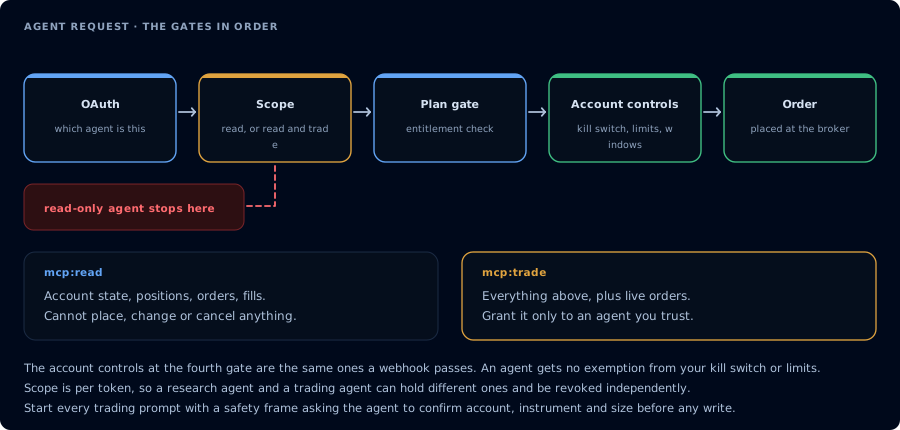
Four gates before an order. A read-only agent never reaches the third.
An AI model can sequence many tool calls in a conversation. The prompt and the model decide which tool to call. Scope decides which tools the agent is allowed to call. If the model gets confused, prompt-injected, or wrong, scope is the last line of defense.
CrossTrade MCP issues tokens with one of two scopes: mcp:read or mcp:trade. Match the scope to the workflow.
Read scope (mcp:read)
Allows the agent to inspect:
- Accounts, connections, positions, orders, executions.
- Quotes, bars, market info, volume profile, order flow.
- TradingView webhook signal history.
- Add-on activity log.
- Matched-trade journal.
- Watermarks, account summary.
- NinjaScript symbols and source files.
- Backtest results from prior jobs.
- Deployed strategy state.
Does not allow any write tool.
Trade scope (mcp:trade)
Allows everything in mcp:read plus:
- Order placement, modification, cancellation, replacement, brackets.
- Flatten and reverse.
- Strategy deployment, stop, start.
- NinjaScript compile, write, delete-snippet.
- Backtest job creation.
- Drawing CRUD.
- Workspace save/load and chart open.
- Alert emission.
- Configuration updates.
Consent and revocation
The scope is selected on the OAuth consent screen at first authorization. To change scope, revoke and re-consent.
The consent screen shows:
- The client name.
- The scope requested.
- The CrossTrade account being authorized.
Revoke at any time from the AI Clients page. Revocation is immediate.
Workflow examples
| Workflow | Recommended scope |
|---|---|
| Journal review | mcp:read |
| Pre-session risk brief | mcp:read |
| Webhook diagnostics | mcp:read |
| Trade copier diagnostics | mcp:read |
| Strategy decay review | mcp:read |
| NinjaScript compile loop (no deploy) | mcp:read for research, mcp:trade for the compile/write step |
| Strategy backtest only | mcp:trade (backtest creates a job) |
| Order placement with confirmation | mcp:trade |
| Strategy deployment | mcp:trade with strict gates |
| Funded account autonomous trading | Not recommended at any scope |
Practical advice
- Default to
mcp:read. Upgrade only when needed. Revoke when done. - Use different clients for different scopes. For example, Claude Desktop at
mcp:readfor journal review, and Claude Code atmcp:tradeonly for compile/deploy sessions. - After granting
mcp:trade, write the prompt that gates the writes. Scope alone is not enough. - Treat scope as auditable. The CrossTrade AI Clients page is the source of truth.
FAQ
Can I limit scope to a specific account?
OAuth scope is per token, not per account. Account-level restriction lives in your prompt and in firm-specific rules.
Can a token be both mcp:read and mcp:trade?
A token has one scope. mcp:trade is the superset; if you grant it, the token has both read and write capability. The "read-only" property is enforced by granting only mcp:read.
Does the scope appear in the tools list?
Tools that require mcp:trade are not advertised to a mcp:read token. The client sees a smaller tool inventory and the agent does not "know" about write tools.
What if I want a longer-lived read token and a short-lived write token?
Use two clients. Authorize the read client once and leave it. Authorize the write client only when you have a session that needs it, then revoke at the end.