Pine Script for Beginners
Pine Script is TradingView's domain-specific language for building indicators and strategies that run on its servers. It's lightweight, runs on every chart, and produces alerts that can drive automated trades through CrossTrade. The current version is Pine Script v6 — always start new scripts with //@version=6.
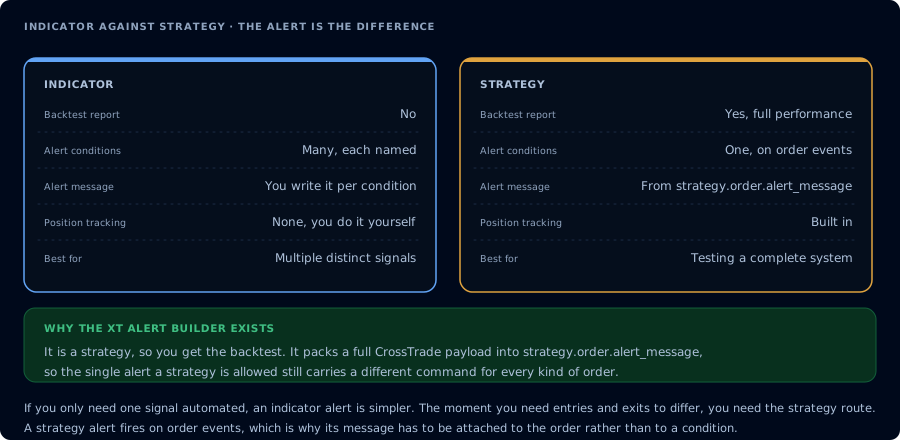
Which of the two you write decides what kind of alert you can fire.
What Pine Script is — and isn't
Pine Script is:
- A scripting language specifically for financial chart analysis and strategy testing
- Cloud-executed on TradingView's servers (your computer doesn't run it)
- Designed to operate bar-by-bar across a chart's history
Pine Script is not:
- A general-purpose programming language
- Capable of placing orders directly (it triggers alerts; CrossTrade/brokers handle execution)
- Able to read files, make arbitrary HTTP requests, or persist state outside the chart
That last point matters. Every Pine Script runs in a sandbox. The only way out is via alerts/webhooks — which is where CrossTrade comes in.
The editor
On TradingView:
- Open a chart
- Click Pine Editor at the bottom of the screen
- You'll see a blank editor with a big green "Add to chart" button
Every change to the script requires a recompile. Click Save (Ctrl+S / Cmd+S), then Add to chart to see the updated result.
Your first script — "Hello, chart"
//@version=6
indicator("My First Script", overlay=true)

plot(close, color=color.blue, linewidth=2, title="Close price")
Copy that into the Pine Editor. Click Save, then "Add to chart." You should see a blue line overlaid on your chart — the closing price of every bar.
That's the minimum viable Pine Script. Let's break it down:
//@version=6— declares Pine Script v6. Required on line 1.indicator(...)— says "this script is an indicator." Alternatives:strategy()(backtestable),library()(reusable code).overlay=true— render on the main price chart.falsewould put it in a separate pane.plot(close, ...)— draw theclosevalue on the chart.
Built-in variables
Pine Script gives you access to per-bar data through built-in variables:
| Variable | Meaning |
|---|---|
open | Open price of the current bar |
high | High price |
low | Low price |
close | Close price |
volume | Volume |
time | Bar's UTC timestamp (ms) |
bar_index | Integer index of the current bar, 0 = first bar |
syminfo.ticker | Symbol name, e.g. "ES" |
hour, minute | Components of the bar's time |
Accessing a prior bar: close[1] is the previous bar's close. close[2] is two bars ago. Etc.
Simple moving average, built from scratch
//@version=6
indicator("Simple 20-SMA", overlay=true)

length = input.int(20, title="SMA Length")
smaValue = ta.sma(close, length)

plot(smaValue, color=color.orange, linewidth=2, title="SMA")
New concepts:
input.int(...)— user-configurable input field. Appears in the indicator's settings dialog.ta.sma(source, length)— a built-in technical analysis function.ta.is the namespace for all indicator math.
Conditional logic and if
//@version=6
indicator("Highlight High-Volume Bars", overlay=true)

volMult   = input.float(1.5, "Volume threshold (× SMA)")
avgVol    = ta.sma(volume, 20)

highVol = volume > avgVol * volMult

bgcolor(highVol ? color.new(color.yellow, 80) : na, title="High-vol highlight")
? :— ternary.highVol ? yellowTransparent : nameans "if highVol is true, draw transparent yellow; else draw nothing."bgcolor()— paints the chart background. Useful for highlighting conditions.
Alerts — the gateway to automation
This is where Pine Script becomes useful for CrossTrade users.
//@version=6
indicator("Alert When Price Crosses 50 SMA", overlay=true)

smaLen   = input.int(50, "SMA length")
smaValue = ta.sma(close, smaLen)

plot(smaValue, color=color.orange, linewidth=2)

bullCross = ta.crossover(close, smaValue)
bearCross = ta.crossunder(close, smaValue)

if bullCross
    alert("Price crossed above the 50-SMA on " + syminfo.ticker, alert.freq_once_per_bar_close)
if bearCross
    alert("Price crossed below the 50-SMA on " + syminfo.ticker, alert.freq_once_per_bar_close)
Key functions:
ta.crossover(a, b)— returns true whenacrosses abovebon this barta.crossunder(a, b)— returns true whenacrosses belowbalert(message, frequency)— fires a TradingView alert. The message is whatever text gets delivered to the alert notification (including the webhook).
After adding the script to a chart, click Alerts (Alarm clock icon) → Create Alert → Condition: your indicator → Any alert() function call. Now every time the script calls alert(), TradingView fires.
For CrossTrade, put your webhook URL in the alert's Notifications tab and the alert() message in the CrossTrade payload format. See Pine Script webhook alerts.
Common beginner mistakes
1. Forgetting //@version=6. Without it, you get legacy behaviors from v4/v5 that no longer apply. Always start with it.
2. Confusing indicator() and strategy(). Indicators display info and fire alerts. Strategies backtest trades. You need strategy() to use strategy.entry(), strategy.exit(), and {{strategy.*}} variables. See strategy vs indicator.
3. Referencing future bars. close[−1] does not exist. You can only look at the current bar and earlier.
4. Expecting realtime tick-by-tick logic. Pine scripts run once per bar close (mostly). Intra-bar updates are limited. For tick-accuracy, you need NinjaScript or a different platform.
5. Storing state between sessions. Pine can't persist state when you close the browser. Use var for within-session persistence, and know it resets on every chart reload.
Next steps
Once you can write a basic indicator, the next skills are:
- Inputs and user configuration — let users customize without editing code
strategy()scripts — build backtestable strategies- Alerts formatted for CrossTrade webhooks — the bridge to NinjaTrader execution
The full Pine Script v6 reference manual is worth bookmarking. We also mirror a full scrape of it at /assets/pine-script-docs.md for reference.
Frequently Asked Questions
Is Pine Script hard to learn?
For anyone with any programming background, Pine Script is one of the easiest trading languages. It's declarative, has a narrow API, and runs in a sandbox so you can't break anything. A complete beginner with no coding experience can write useful indicators within a few days.
What version of Pine Script should I use?
Pine Script v6, the current version. Start every new script with '//@version=6' on line 1. Older versions (v4, v5) still work on existing scripts but lack newer features like the improved type system and built-in libraries.
Can Pine Script place trades?
Not directly — Pine runs in TradingView's sandbox and cannot send orders to a broker. What it can do is fire alerts with webhook payloads, which are then received by systems like CrossTrade that route them to NinjaTrader for execution.
Indicator or strategy — which should I write?
Indicators for analysis and alert-only flows. Strategies when you want to backtest trades with entry/exit logic and P&L tracking. For automation through CrossTrade, strategy() is usually what you want because it gives you access to {{strategy.order.action}} and other built-in variables.