Pine Script strategy() vs indicator()
Use indicator() to display values on the chart and fire alerts based on conditions. Use strategy() when you want to simulate trades, see a P&L curve, backtest, and access the built-in {{strategy.*}} variables for webhook payloads. For CrossTrade automation of entry/exit logic, strategy() is almost always the right choice.
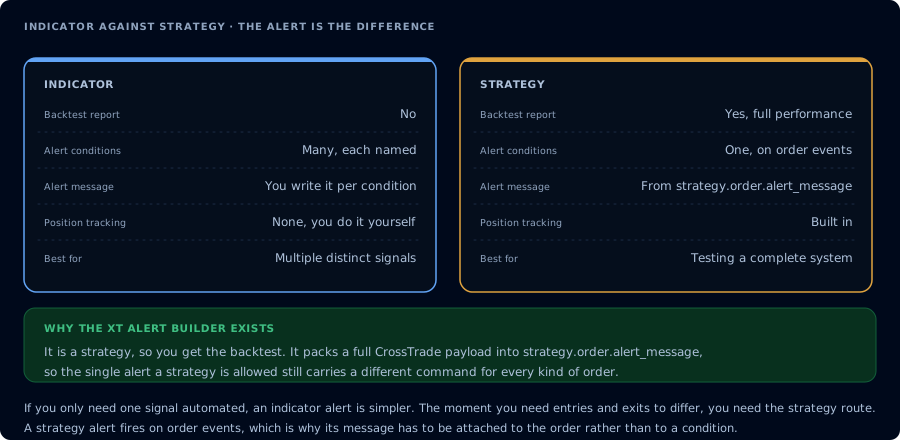
One gets a backtest, the other gets many alerts. That is the whole trade-off.
Side-by-side
| Feature | indicator() | strategy() |
|---|---|---|
| Displays values on chart | ✓ | ✓ |
| Fires alerts | ✓ | ✓ |
Access to {{strategy.order.action}} and related | ✗ | ✓ |
| Backtest P&L, drawdown, win rate | ✗ | ✓ |
| Simulates trade execution | ✗ | ✓ |
Declarative strategy.entry() / strategy.exit() | ✗ | ✓ |
| Multiple strategies visible at once | ✓ | Limited to 1 per chart |
| Ideal for pure signal scripts | ✓ | Overkill |
When to use each
Use indicator() when:
- You just want to display a value (moving average, custom oscillator)
- You want to fire alerts without tracking P&L
- You're building visualization-only tools (volume profile overlays, levels, zones)
Use strategy() when:
- You want to backtest performance
- You want to use
{{strategy.order.action}},{{strategy.order.contracts}},{{strategy.market_position}}in your webhook payload - You want Pine Script to manage stops/targets via
strategy.exit() - You want to see the equity curve, drawdown, and performance metrics in the Strategy Tester panel
The critical difference for CrossTrade users
CrossTrade's webhook payloads often reference TradingView placeholders like {{strategy.order.action}} and {{strategy.market_position}}. These placeholders only work in scripts declared with strategy(). An indicator() script cannot use them.
If your payload contains any {{strategy.*}} variable and your Pine Script starts with indicator(...), the alert will fail to substitute the placeholder and you'll get a literal {{strategy.order.action}} string in the webhook — which CrossTrade will reject.
When in doubt for automation: use strategy().
Converting an indicator to a strategy
Suppose you wrote this indicator:
//@version=6
indicator("9/21 EMA Alerts", overlay=true)

fast = ta.ema(close, 9)
slow = ta.ema(close, 21)

plot(fast, color=color.yellow)
plot(slow, color=color.blue)

if ta.crossover(fast, slow)
    alert("Bull cross", alert.freq_once_per_bar_close)
if ta.crossunder(fast, slow)
    alert("Bear cross", alert.freq_once_per_bar_close)
Convert it to a strategy by:
- Changing
indicator(...)→strategy(...) - Replacing
alert()calls withstrategy.entry()/strategy.exit()for the backtested trades - Wiring the entries to fire a CrossTrade webhook (two equivalent approaches — see next section)
//@version=6
strategy("9/21 EMA Strategy", overlay=true, initial_capital=50000, default_qty_type=strategy.fixed, default_qty_value=1)

fast = ta.ema(close, 9)
slow = ta.ema(close, 21)

plot(fast, color=color.yellow)
plot(slow, color=color.blue)

if ta.crossover(fast, slow)
    strategy.entry("Long",  strategy.long)
if ta.crossunder(fast, slow)
    strategy.entry("Short", strategy.short)
Firing the CrossTrade webhook from your strategy
There are two ways to wire a strategy() script to a CrossTrade webhook. If you're authoring the Pine yourself (the case above), use the alert_message= pattern — it's the only one that lets you compute per-signal values like calculated SL/TP or asymmetric long/short payloads. Build the payload string in Pine and pass it on each strategy.entry() call:
if ta.crossover(fast, slow)
    msg  = "key=YOUR-SECRET-KEY;command=PLACE;account=Sim101;"
    msg := msg + "instrument={{ticker}};action=BUY;qty=1;"
    msg := msg + "order_type=MARKET;tif=DAY;sync_strategy=true;"
    strategy.entry("Long", strategy.long, alert_message=msg)
In the TradingView alert dialog: Condition = Order fills only, Message = {{strategy.order.alert_message}}.
If you're using a strategy you didn't write (third-party script, built-in TV strategy), build the payload directly in the alert dialog with TradingView's placeholders — that's the only path when you can't edit the Pine source:
key=YOUR-SECRET-KEY;
command=place;
account=Sim101;
instrument=ES 12-26;
action={{strategy.order.action}};
qty={{strategy.order.contracts}};
order_type=market;
tif=day;
sync_strategy=true;
market_position={{strategy.market_position}};
prev_market_position={{strategy.prev_market_position}};
target_quantity={{strategy.position_size}};
out_of_sync=resync;
TradingView substitutes the {{...}} values at alert fire time. CrossTrade parses the payload and translates it into an order for NinjaTrader. See Pine Script webhook alerts for the full breakdown of both approaches.
The "one strategy per chart" limitation
TradingView allows only one strategy() script per chart. If you want to run multiple strategies simultaneously, you can:
- Open multiple chart tabs, each with its own strategy
- Combine the logic into a single strategy with multiple rule sets (complex)
- Use indicators with alerts for auxiliary signals and one
strategy()for the primary logic
For CrossTrade users running 3–5 different strategies, opening 3–5 TradingView tabs — each with one strategy — is usually the cleanest setup.
Alerts: alert() vs strategy order alerts
When using strategy(), you have two distinct alert mechanisms:
1. alert() calls inside your script — identical to indicator alerts. Fire explicit messages at conditions you define.
2. Strategy order alerts — TradingView automatically fires an alert whenever the strategy executes an entry/exit. You configure the payload template once; it fires on every order. This is usually simpler for CrossTrade automation.
For strategy order alerts: Alerts → Create Alert → Condition: your strategy → "Order fills only" → paste the payload in the message.
Common mistakes
- Using
indicator()and then trying to use{{strategy.order.action}}in the payload. Won't work. Convert tostrategy(). - Firing multiple
strategy.entry()calls per bar. The second one replaces the first. Usestrategy.close()+strategy.entry()orstrategy.entry(..., oca_name=...)to manage this properly. - Forgetting
pyramiding=0and accidentally stacking positions. If your strategy fires repeatedly on a continuing condition, make surepyramidingis set appropriately. - Not setting
commission_typeandcommission_value. Backtests without commissions wildly overstate profitability. Model them.
Frequently Asked Questions
Do I need strategy() for CrossTrade to work?
Not strictly — indicator() scripts can also fire CrossTrade webhooks with hardcoded action/qty values. But most multi-condition, multi-direction strategies benefit from strategy() because the built-in TradingView variables ({{strategy.order.action}}, etc.) make payloads dynamic without hardcoding.
Can I backtest an indicator?
Not through TradingView's Strategy Tester — that's strategy()-only. You can observe alert fires on historical bars with indicator() but won't get P&L, drawdown, or win rate statistics. Convert to strategy() for backtest analytics.
Can one script do both — show levels AND fire strategy trades?
Yes. A strategy() script can plot indicators, bands, levels, anything an indicator() could. The only thing strategy() can't do is be one of multiple overlays — TradingView allows one strategy per chart. Consolidate everything into one strategy if you want both.
What's the difference between alert() and strategy order alerts?
alert() fires a user-defined message when you explicitly call it. Strategy order alerts fire automatically on every strategy.entry() or strategy.exit() execution, using a payload template you define once on the alert. Both work with CrossTrade; strategy order alerts are usually simpler for automation.