NinjaTrader 101
NinjaTrader 8 is the execution platform where your trades actually happen. CrossTrade sends commands to NinjaTrader, and NinjaTrader places orders with your broker.
Key Concepts
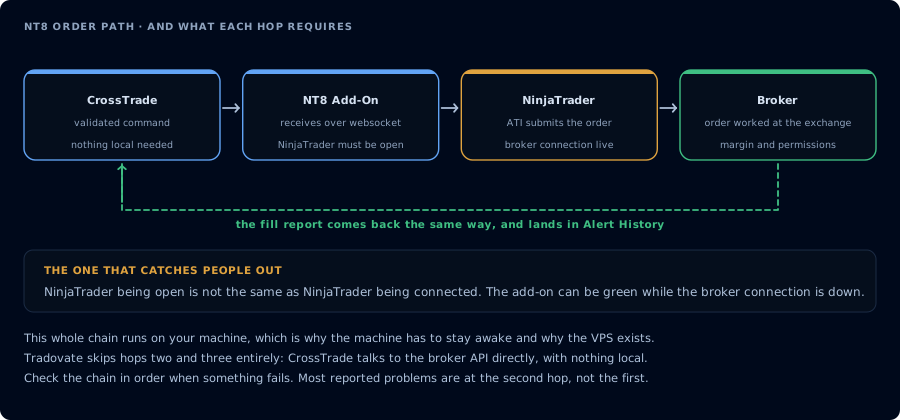
Four hops, each with a requirement. Open and connected are not the same thing.
Connections and Data Feeds
NinjaTrader needs a data feed connection to function. This can be:
- NinjaTrader's own data feed (purchased subscription)
- A broker-provided feed (like your prop firm's evaluation account)
- Playback data (for testing/replay)
You only need Level 1 data for CrossTrade orders — Level 2 is not required.
The ATI (Automated Trading Interface)
The ATI is NinjaTrader's built-in interface for accepting external commands. CrossTrade communicates through the ATI, which is why you need to enable it during setup. Without it enabled, NinjaTrader won't accept any external orders.
Accounts
NinjaTrader can connect to multiple accounts simultaneously — sim accounts, live accounts, prop firm accounts. Each account has a name (like Sim101 or Apex12345) that you reference in your CrossTrade commands.
ATM Strategies
Advanced Trade Management (ATM) strategies are NinjaTrader's built-in bracket order system. You can define stop loss, profit target, and trailing stop templates, then reference them in your CrossTrade webhooks.
Multi-Provider Mode
If you trade multiple accounts from different brokers simultaneously, enable Multi-Provider Mode in NinjaTrader. This allows NinjaTrader to maintain separate data feed connections for each broker.