TradingView 101
TradingView is a web-based charting platform used by millions of traders. It's where you'll create the alerts that trigger your automated trades through CrossTrade.
What You Need to Know
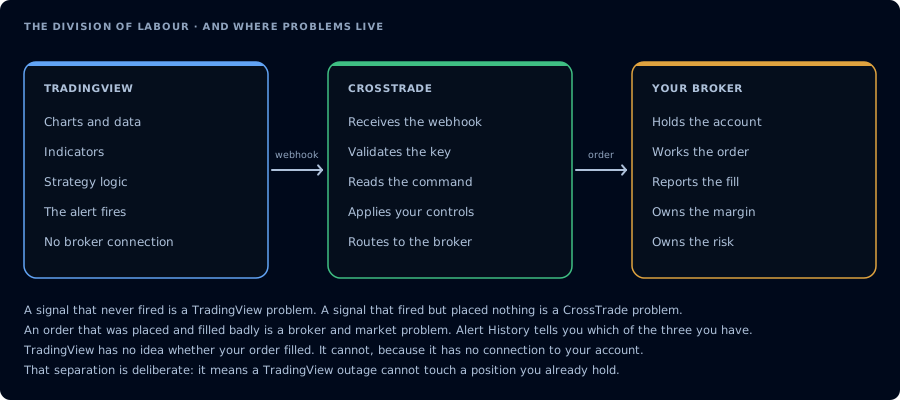
TradingView never touches your account. Knowing which side a fault is on is most of the fix.
Charts and Indicators
TradingView's Supercharts give you access to hundreds of built-in indicators and thousands of community-built ones. You can apply indicators to any market — futures, stocks, forex, crypto — and use them as the basis for your automated alerts.
Indicators vs. Strategies
This distinction matters for automation:
Indicators display information on the chart (moving averages, RSI, MACD). To automate from an indicator, you create an alert tied to one of its conditions — like "RSI crosses above 30."
Strategies are backtestable scripts that generate buy/sell signals. They provide dynamic variables like {{strategy.order.action}} and {{strategy.order.contracts}} that you can use in your CrossTrade webhook messages.
Alerts
Alerts are the engine of automation on TradingView. When a condition you define is met, TradingView can send a webhook — a message to a URL — containing whatever payload you specify.
Key things to know about alerts:
- Alerts run on TradingView's servers, not your computer — they fire 24/7
- Each alert has an expiration date (varies by plan tier)
- Alerts do not auto-update when you change indicator settings — you need to manually update them
- Webhooks require 2FA enabled on your TradingView account
TradingView Plans
Free accounts can create a limited number of alerts. Paid plans (Essential, Plus, Premium) increase the limit significantly. If you're running multiple strategies, you'll likely need a paid plan.