Read-Only AI Agent Workflows for NinjaTrader
Read-only is where every trader should start. The agent's token is mcp:read. It cannot place, cancel, flatten, deploy, write, or modify anything. What it can do is inspect, analyze, and explain. That is more useful than it sounds.
Why read-only comes first
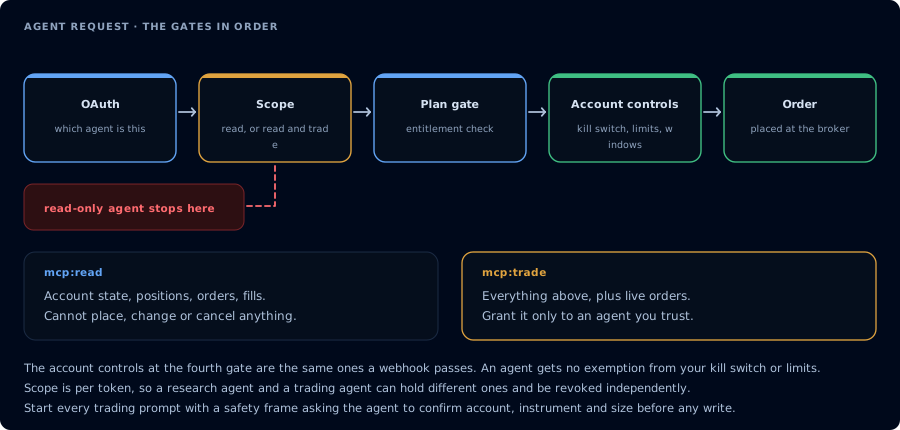
Four gates before an order. A read-only agent never reaches the third.
Two reasons:
- The risk of a wrong tool call drops to near zero. A read-only token simply cannot execute writes.
- Read-only forces the agent into the workflows that matter most: explaining what happened, computing remaining risk, finding the patterns you missed.
Most traders find that 80% of the AI value they wanted is read-only.
What read-only can inspect
- Accounts, connections, positions, working orders.
- Executions and matched-trade journal entries.
- TradingView webhook signal history.
- CrossTrade NT8 Add-On activity log.
- Watermarks and account summary.
- Quote, bars, market info, volume profile, order flow.
- NinjaScript symbols and source files.
- Backtest results from prior runs.
- Deployment registry (state of running strategies).
What read-only cannot do
- Place, cancel, replace, or modify any order.
- Flatten or reverse any position.
- Deploy or stop a strategy.
- Compile or write NinjaScript files.
- Save or load workspaces.
- Add or remove drawings.
- Emit alerts (with full write scope).
- Update account configuration.
If you find yourself wanting any of these, evaluate whether you actually need them or whether read-only plus a manual step is enough.
Five read-only workflows
1. Morning brief
Pre-session brief on PROP1234: ListAccounts, GetConnections, ListPositions, ListOrders, GetAccountSummary, GetWatermarks. Compute remaining trailing drawdown room against $1,500 using high watermark and current balance. Tell me what to watch today.
2. Post-session audit
On PROP1234, pull today's matched trades, GetWatermarks, GetActivityLog. Report total realized P&L, the lowest watermark today, drawdown room at the worst moment, and any rejected orders. Group losing trades by setup or instrument.
3. Weekly journal review
Pull the last seven trading days of matched trades on PROP1234. Group by setup if tagged, else instrument. Report expectancy, win rate, average win, average loss, biggest losers. Flag any setup with negative expectancy and at least 10 trades.
4. Webhook audit
Pull TradingView webhook signals for the last 24 hours on Sim101. For each, find the matching add-on activity entry and the order/execution. Tell me which signals filled, which produced rejected orders, and which produced no order at all. Group by cause.
5. Copier reconciliation
List positions on PROP1234, PROP1235, PROP1236. Tell me which accounts are in sync and which are not. Pull GetActivityLog for the last hour and identify the most recent divergence.
Funded account examples
Read-only on a funded account is the highest-value baseline.
Approaching the daily loss limit
On PROP1234, every 15 minutes, re-read account summary and watermarks. Tell me drawdown room remaining. If room drops below $200, alert me via in_app and Discord (EmitMcpAlert is unavailable in read-only; just message me in chat). Do not place anything.
Note: in pure read-only mcp:read, EmitMcpAlert is not available. The agent can still flag the condition in chat. If you want push alerts, you need write scope for that single tool, which is a real reason to consider mixing scopes carefully.
"Did I revenge trade?"
Pull today's matched trades on PROP1234. Find any trade whose entry timestamp is within 90 seconds of a prior losing trade exit timestamp in the same instrument. Report them. Tell me how much of today's P&L came from those trades.
"Am I close to the consistency rule?"
Pull the last 14 days of matched trades. Tell me my best single day's P&L and whether any other day comes within a consistency-rule percentage of it. (Note: enforce my firm's specific consistency rule with the percentage I provide.)
Prompt library
Many read-only prompt examples live in Account and Risk Prompts, Market Research Prompts, and Operations and Safety Prompts.
FAQ
Can read-only place an order by accident?
No. The OAuth scope simply does not include write tools. The MCP server will refuse PlaceOrder with an insufficient_scope error.
When should I upgrade to mcp:trade?
Only when you have a specific workflow that needs writes, and only after writing the prompt that gates those writes with confirmation. Treat scope as an upgrade you can revert.
Does the agent see real account data?
Yes, scoped to your account. Read-only is not "synthetic" data; it is your real fills.
Can I share the agent's output?
Yes, but redact account identifiers and broker names first. The agent can do this if you instruct it.