Your First Strategy
This guide walks you through the process of going from zero to a running automated strategy. No coding required.
The Game Plan
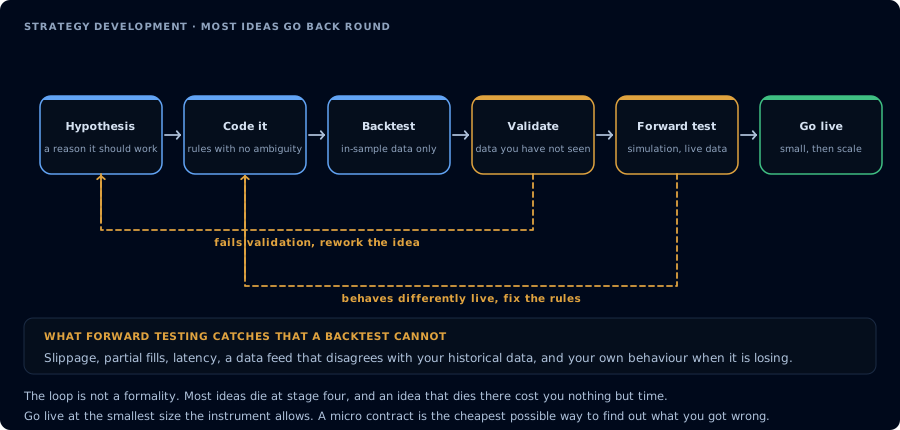
Most ideas go back round at validation. The gate before live cannot be skipped.
- Pick a simple strategy idea
- Set it up on TradingView
- Connect it to CrossTrade
- Test on a sim account
- Go live (when ready)
Step 1 — Pick a Strategy
Start simple. A moving average crossover is the classic first strategy:
- Buy when a fast moving average crosses above a slow moving average
- Sell when it crosses below
This isn't about finding the perfect strategy — it's about learning the automation pipeline. You can refine later.
Step 2 — Set Up on TradingView
- Open a chart for the instrument you want to trade (e.g., ES futures)
- Add an SMA crossover indicator or use TradingView's built-in strategy
- Configure the parameters (e.g., 9-period fast, 21-period slow)
- Verify the signals look reasonable on the chart
Step 3 — Create the Webhook Alert
Create an alert in TradingView with your CrossTrade webhook payload:
key=your-secret-key;
command=place;
account=Sim101;
instrument=ES1!;
action={{strategy.order.action}};
qty={{strategy.order.contracts}};
order_type=market;
tif=day;
sync_strategy=true;
market_position={{strategy.market_position}};
prev_market_position={{strategy.prev_market_position}};
target_quantity={{strategy.position_size}};
out_of_sync=resync;
Paste your CrossTrade webhook URL into the Notifications tab.
Step 4 — Test on Sim
Always start on a sim account. Watch for:
- Are orders being placed correctly?
- Is the position sizing right?
- Are entries and exits firing as expected?
- Check your Alert History for any errors
Run for at least a few trading sessions before considering live.
Step 5 — Go Live
When you're confident the strategy works as expected:
- Change
account=Sim101to your live account name - Start with minimal quantity (
qty=1) - Set up Account Manager drawdown protection
- Monitor closely for the first few sessions