Volume Profile Explained
Volume Profile plots a horizontal histogram showing how much volume traded at each price level during a period. The price with the most volume is the Point of Control (POC). The Value Area (VAH to VAL) contains 70% of the period's volume. POC and value area edges act as high-conviction support and resistance — the most-watched intraday levels on ES, NQ, and CL.
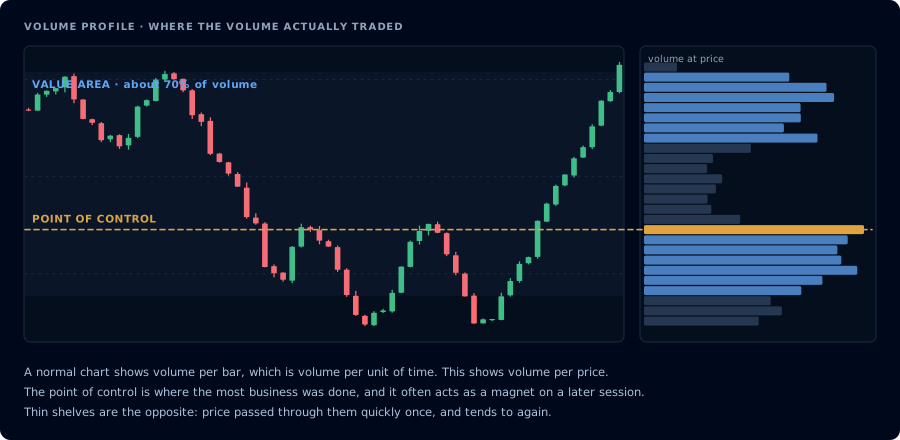
Volume per price instead of volume per bar. The fat shelf is where business got done.
Why Volume Profile matters
Price-and-time charts show where price has been. Volume Profile shows where traders actually transacted at each level. A price where thousands of contracts traded is an accepted fair value. A price where few contracts traded is rejected inventory.
Accepted prices attract price back. Rejected prices repel price. That's the core market-profile insight.
The three levels you must know
Point of Control (POC). The single price with the highest traded volume in the period. Acts as a magnet — price tends to revisit POC during extended moves. Intraday POC is one of the strongest reversion targets on ES and NQ.
Value Area High (VAH). The upper boundary of the range containing 70% of the period's volume. Acts as resistance from below, support from above.
Value Area Low (VAL). Lower boundary of the same 70% range. Mirror role of VAH.
Price outside value = "out of balance." Price inside value = "in balance, rotational trading."
Three ways to trade Volume Profile
1. POC reversion. In range days, price that extends away from POC often reverts to it. Entry: rejection wick outside value. Target: POC.
2. Value area breakout. Price closing outside the prior session's value area with follow-through = trending move likely. Entry: close beyond VAH/VAL with volume. Target: next significant level or 1× the value area height.
3. Virgin POC magnet. A POC from a prior session that price has not revisited ("virgin POC") often acts as a target days or weeks later. Mark them on the daily chart.
Key variants
- Session Profile — one profile per trading session. Standard.
- Composite Profile — one profile over a longer window (week, month). Good for swing traders.
- Visible Range Profile (VRVP) — built from whatever bars are visible on screen. Convenient, slightly less rigorous.
- TPO / Market Profile — time-at-price (letters) instead of volume. Different philosophy, same family.
Volume Profile in Pine Script (v6)
TradingView's built-in Volume Profile indicator (Session Volume, Fixed Range, Visible Range) is the right tool for most use cases. Building a true Volume Profile from scratch in Pine is complicated because it requires aggregating volume by price bin.
The simpler approach for alerts: use TradingView's built-in Session Volume Profile, then create an alert from a separate indicator that tracks price vs. the session POC level (via request.security() or a custom computation).
For a lightweight POC approximation — the price of the bar with the highest volume over N bars — you can do:
//@version=6
indicator("Rolling High-Volume Price (POC proxy)", overlay=true)

length = input.int(30, "Lookback")

int highestVolIdx = 0
float highestVol = 0.0
for i = 0 to length - 1
    if volume[i] > highestVol
        highestVol := volume[i]
        highestVolIdx := i

pocProxy = (high[highestVolIdx] + low[highestVolIdx]) / 2
plot(pocProxy, color=color.yellow, linewidth=2, title="High-Volume Price (POC proxy)")

if ta.crossover(close, pocProxy)
    alert("Price crossed above high-volume level", alert.freq_once_per_bar_close)
if ta.crossunder(close, pocProxy)
    alert("Price crossed below high-volume level", alert.freq_once_per_bar_close)
This is a rough proxy — true Volume Profile is built from intrabar volume, which Pine can access via request.volume() with higher-resolution data. Many traders just use TradingView's built-in tool and trade manually, or export the POC level to CrossTrade via webhook.
Common mistakes
- Using Volume Profile on illiquid instruments. Thin overnight session futures show garbage profiles. Stick to RTH on ES, NQ, CL, GC.
- Ignoring which session the profile covers. Today's POC and yesterday's POC are different levels. Label them.
- Confusing profile shape with direction. A "D-profile" (balanced, bell-shaped) says the market is rotational. A "P" or "b" profile suggests one-sided directional activity. Shape matters more than where price is inside it.
Frequently Asked Questions
What is Point of Control (POC)?
The single price level with the highest traded volume during a period. Acts as a magnet for price — traders often see price return to POC multiple times within a session and use it as a high-conviction reversion target.
What is the Value Area?
The range of prices containing roughly 70% of the total volume for a period, bounded by VAH (Value Area High) and VAL (Value Area Low). Price moving outside the value area is 'out of balance' and often initiates trending moves.
Volume Profile vs Market Profile — what's the difference?
Both are horizontal histograms. Volume Profile plots volume traded per price. Market Profile (TPO) plots time-at-price using letters instead. Same concept — different axis. Modern traders mostly use Volume Profile; institutional desks still prefer Market Profile.
Can you backtest Volume Profile?
With enough work — yes. You need intrabar or tick-level data to build accurate profiles, which is harder in Pine than in NinjaScript. Most systematic implementations use NT8's native volumetric bars or a dedicated backtesting platform.