Risk Management Basics
Automation makes trading faster and more consistent — but it also means mistakes happen faster. A misconfigured alert can place dozens of unintended orders before you notice. Risk management isn't optional — it's the foundation everything else sits on.
The Core Rules
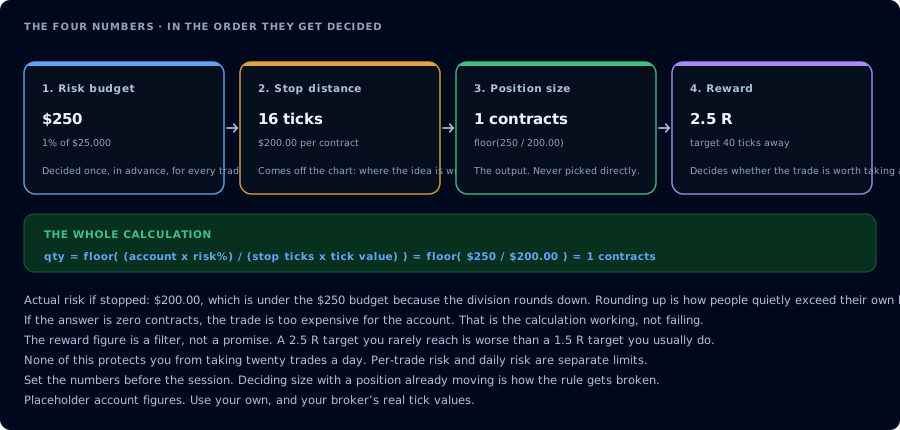
Four numbers, decided in order. Size is the output of the first three, never a choice.
1. Never Risk More Than You Can Afford to Lose
This sounds obvious, but automation makes it easy to forget. Start with a sim account, validate your strategy, then move to live with small size.
2. Use Position Sizing
Don't hardcode large quantities into your alerts. Start with qty=1 and scale up only after you've confirmed the strategy works as expected in live conditions.
3. Set Stop Losses
Every entry should have a defined exit. CrossTrade supports bracket orders with take_profit and stop_loss fields, or you can use NinjaTrader's ATM strategies for managed exits.
command=place;
action=buy;
qty=1;
instrument=ES1!;
order_type=market;
take_profit=20 ticks;
stop_loss=10 ticks;
Use positive distance magnitudes for both protective fields. CrossTrade places the target and stop on the correct side for a Buy or Sell entry automatically.
4. Use CrossTrade's Account Manager
The Account Manager lets you set automated drawdown limits, profit targets, and flatten times — an additional safety net on top of your strategy logic.
5. Monitor Your Strategies
Automated doesn't mean unattended. Check your Alert History regularly, review the CrossTrade NT8 Add-On logs, and make sure your positions match expectations.
Common Pitfalls
Running untested strategies live. Always validate on a sim account first.
No flatten time. If you trade futures, set a flatten time before market close to avoid holding positions overnight unintentionally.
Ignoring "Position Out of Sync" warnings. These mean your strategy's expected position doesn't match what's actually in NinjaTrader. Stop and reconcile before continuing.