Understanding Webhooks
A webhook is a way for one application to send real-time data to another. In the context of trading, it's how TradingView tells CrossTrade that something happened — like a buy signal firing.
The Simple Version
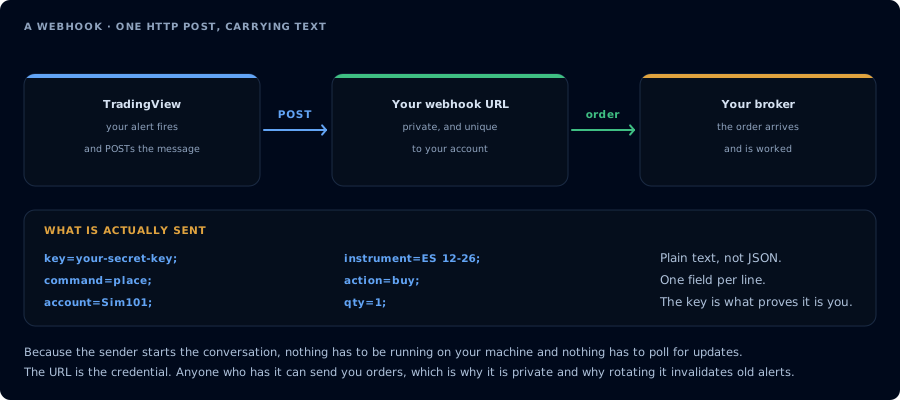
One HTTP POST carrying plain text. Nothing polls, and nothing runs on your machine.
Think of a webhook as a text message between apps:
- You set up an alert on TradingView with a message like
command=place; action=buy; qty=1; - When the alert triggers, TradingView sends that message to a URL you provide
- CrossTrade receives the message, validates it, and chooses the destination
- NinjaTrader places the order by default, or Tradovate places it when the message includes
destination=tradovate;
The URL is your webhook URL — it's unique to your CrossTrade account and acts as your personal mailbox for trading commands.
Why Webhooks?
Before webhooks, automating trades between platforms required complex API integrations, custom scripts, and constant maintenance. Webhooks simplify this to: write a message, point it at a URL, done.
Anatomy of a Webhook Message
Every CrossTrade webhook message is a series of key-value pairs separated by semicolons:
key=your-secret-key;
command=place;
account=Sim101;
instrument=ES1!;
action=buy;
qty=1;
order_type=market;
tif=day;
Each field tells CrossTrade what to do and where to route it. The Commands section covers the vocabulary, and Destinations explains NinjaTrader and Tradovate differences.
Security
Your webhook URL contains a unique identifier tied to your account. Additionally, every message must include your secret key — a private token that verifies the message came from you. Without the correct key, CrossTrade rejects the message.
Never share your webhook URL or secret key publicly. Anyone with access to them could send orders to your account.