Swing Points
Swing Points auto-detects swing highs and lows on your chart and plots horizontal support and resistance lines from those pivots, plus a dynamic center line that shifts color based on the current price's relationship to it. Manual structure analysis without drawing the lines yourself.
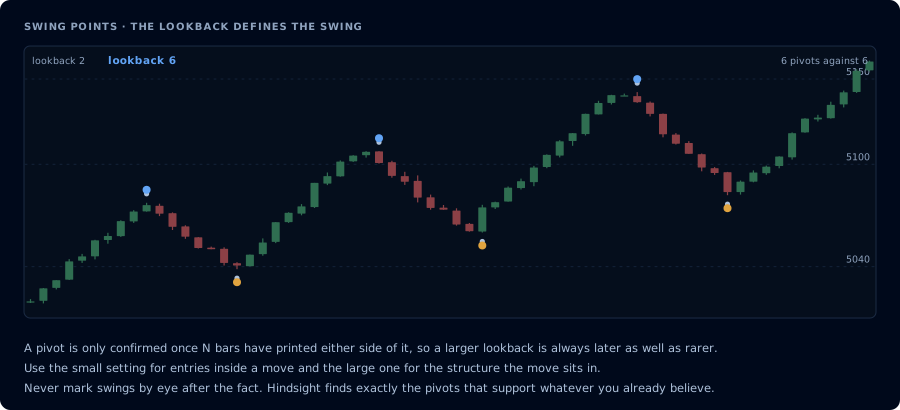
The lookback defines what counts as a swing. Larger is rarer and always later.
What's a swing point
A swing high is a bar with higher highs on both sides — it stuck out as a local peak. A swing low is a bar with lower lows on both sides — a local trough. Together, swing points define the structure of price: higher highs and higher lows make an uptrend, lower highs and lower lows make a downtrend.
Reading swing points is a foundational skill. The problem is doing it consistently — once you've stared at a chart for an hour you'll start seeing structure that isn't there. Swing Points takes the question off your plate by detecting them mechanically.
For the conceptual foundation, see Market structure.
What the indicator plots
Swing pivots:
- Red H above each detected swing high
- Green L below each detected swing low
Dynamic center line:
- A line based on the average of recent pivots
- Color changes based on whether current price is above or below it (trend bias cue)
Horizontal S/R levels:
- Drawn from recent swing highs (resistance)
- Drawn from recent swing lows (support)
- Update as new pivots form
The center line is the most useful single output for trend bias. Above and green = bullish bias; below and red = bearish.
Settings
| Input | Default | What it does |
|---|---|---|
| Pivot Period | 10 | Bars on each side required to confirm a pivot |
| Show Pivots | On | Toggle the H/L labels |
| Show Center Line | On | Toggle the dynamic center line |
| Show Support / Resistance | On | Toggle horizontal pivot levels |
The pivot period is the most important setting. A higher value (15–20) catches only the major pivots — cleaner chart, fewer levels. A lower value (5–7) catches micro-structure — busier chart, more granular levels. 10 is a sensible default for intraday futures on 5-minute and 15-minute charts.
Alerts
Three alert types:
- Swing High Break — a new swing high is detected (potential upside momentum shift)
- Swing Low Break — a new swing low is detected (potential downside momentum shift)
- Center Line Trend Color Change — the center line flips color (trend bias change)
The center-line color flip is the most actionable alert — it telegraphs a regime shift before the structure pivots fully confirm.
Trading applications
Trend identification. Series of higher swing highs and higher swing lows = uptrend. Lower highs and lower lows = downtrend. The indicator labels them so you don't have to count.
Reversal candidates. When a downtrend's pattern of LH/LL breaks — first higher high, then higher low — that's the structural definition of a trend reversal. Swing Points flags it via the swing-high break alert.
Pullback entries. In an uptrend, the most reliable long entries are at touches of the most recent swing low. The S/R lines mark those levels automatically.
Range identification. When swing highs cluster near one level and swing lows near another, you're in a range. Trade the boundaries; skip the middle.
Pairs naturally with
- VWAP with Trend Alerts — VWAP for intraday context, Swing Points for structural pivots. They confirm each other when both align.
- Double Donchian Channels — Donchian's outer channel is a longer-timeframe equivalent of the major swing highs/lows.
- The XT Alert Builder — point its signal source at Swing Points to convert structure breaks into CrossTrade orders.
Common mistakes
- Using a tiny pivot period on a noisy chart. Period 3 will mark every minor wiggle as a pivot. The chart becomes useless.
- Trading the indicator's S/R without confirmation. Horizontal levels from past pivots are weak by themselves — combine with momentum or volume confirmation.
- Ignoring timeframe context. 5-minute swing points are very different beasts from daily swing points. Use a higher-timeframe instance for the dominant structure and the current timeframe for entry timing.
- Overtrading every center-line color flip. In chop the center line will flip frequently. Wait for confirmation closes or pair with a separate trend filter.
Frequently Asked Questions
Why is the indicator marking pivots that don't look obvious to me?
It's mechanical — any bar with N higher bars on each side becomes a swing high (and vice versa). On a noisy chart with a low pivot period, you'll see pivots that don't match what your eye picks out as 'real' swings. Either raise the pivot period or accept the indicator is working as designed.
Does the center line repaint?
The center line updates based on confirmed pivots, so it can shift slightly when a new pivot is added. Once a pivot is confirmed (period bars after the actual high/low), it doesn't move. The line itself doesn't repaint mid-bar.
How is this different from TradingView's built-in pivot points?
TradingView's built-in pivot indicator usually means daily/weekly classic pivots — calculated levels (R1, R2, S1, S2) drawn as horizontal lines. Swing Points is a structural indicator that finds actual pivot bars on the chart based on a lookback rule.
What pivot period works best?
10 for intraday futures on 5- or 15-minute charts. 15-20 for daily charts. 5-7 for tick charts or 1-minute scalping. The right value is whatever produces a chart where you can count maybe 4-8 pivots per visible session — that's the sweet spot between noise and missing structure.