True OHLC
True OHLC plots the actual open, high, low, and close on top of a Heikin Ashi chart so you can see the real prices where trades are occurring — not the smoothed Heikin Ashi values. Critical for any strategy or alert system that needs accurate price data.
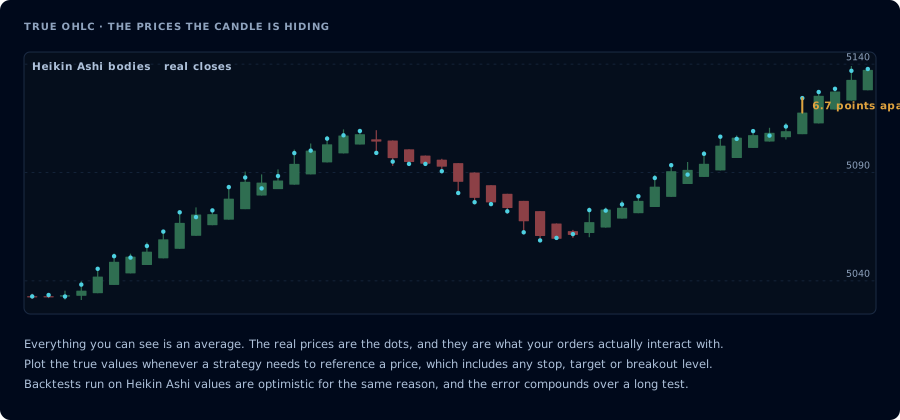
The bodies are averages. Orders interact with the dots, not with what you can see.
The Heikin Ashi data problem
Heikin Ashi charts smooth price action by recalculating each candle's OHLC values:
HA-Open  = (previous HA-Open + previous HA-Close) / 2
HA-Close = (Open + High + Low + Close) / 4
HA-High  = max(High, HA-Open, HA-Close)
HA-Low   = min(Low,  HA-Open, HA-Close)
That math produces visually clean trends but throws away the real prices. The HA-Close is no longer the real close — it's an average. The HA-Open is built off the previous HA candle, not the actual session open.
For visual trading, that's the whole point — Heikin Ashi candles look prettier and trends look more obvious. For automated trading, it's a trap. If your alert fires "when price closes above X," and X is being compared to the HA-Close, you're not watching real price anymore. Your stops and targets drift away from where they should be.
What True OHLC fixes
The indicator pulls the genuine open, high, low, and close values for each bar and plots them on top of your Heikin Ashi candles as overlays. You see both the smoothed HA visualization (for reading the trend at a glance) and the real price levels (for placing orders, setting stops, and writing alert conditions).
It also exposes the real OHLC values as alert sources. So your other indicators — RSI, SuperTrend, custom signals — can reference real prices instead of HA-smoothed ones.
Settings
| Setting | What it controls |
|---|---|
| Plot Style | How the real values draw on the chart — circles, lines, or crosses |
| Line Thickness | Width of the plot lines |
| Open / High / Low / Close colors | Customize each plot color independently |
| Show / hide each plot | Hide noise — show only Close if that's all you reference |
Defaults are sensible. Most users only tweak the colors to match their chart theme.
When to use it
- Heikin Ashi traders running automation. If you trade Heikin Ashi visually but your alerts use price comparisons, this is non-optional.
- Heikin Ashi backtesting. TradingView strategies that run on HA charts will use HA values for stops and targets unless you override them. True OHLC gives you a clean source.
- Mixed-chart workflows. Some traders use Heikin Ashi for the trend read and switch to standard candles to time the entry. True OHLC lets you keep one chart and see both.
When you don't need it
If you never use Heikin Ashi charts, you don't need this indicator — your standard candle chart already plots real OHLC. This indicator only matters when the underlying chart type is Heikin Ashi (or another modified chart type like Renko, where similar issues apply — though the math is different).
Common mistakes
- Using HA values in alert conditions. The whole point of this indicator is to give you real prices. If your alert source is
closeon an HA chart without True OHLC, you're alerting on smoothed data. - Forgetting to hide HA when backtesting. When you're optimizing a strategy that's supposed to run on standard candles, switch the chart to standard candles. True OHLC isn't a substitute for testing on the right chart type.
- Ignoring the gap between HA and real. On strong trend days the HA-Close and real Close can diverge significantly. If your eye is on the HA candles but your stops are on real prices, you'll get stopped out earlier than the chart suggests.
Frequently Asked Questions
Why don't standard candle charts need True OHLC?
Standard candles already plot real prices — the open, high, low, and close are the actual values for that bar. True OHLC only matters on chart types that modify the candle math, like Heikin Ashi or Renko.
Does True OHLC work on Renko charts?
Renko has its own data quirks (bar timing is event-driven, not time-based) so the indicator behaves differently. For Renko-specific automation, refer to the Renko Charts learn page.
Can I use the True OHLC values inside another indicator's settings?
Yes. The plots are exposed as TradingView sources, so you can pick 'True OHLC: Close' as the source input for other indicators that take a price source.
Is True OHLC included with my CrossTrade subscription?
Yes — it's an open-source indicator anyone can use, no subscription required. Just add it from the TradingView indicator picker.