VIX Bars
VIX Bars colors your chart bars based on extreme VIX readings — green when the VIX is above your upper threshold (signaling stress), red when it's below your lower threshold (calm regime). High volatility tends to mean-revert, so extreme readings often mark turning points. Pairs naturally with VIX Heatmap for complete volatility context.
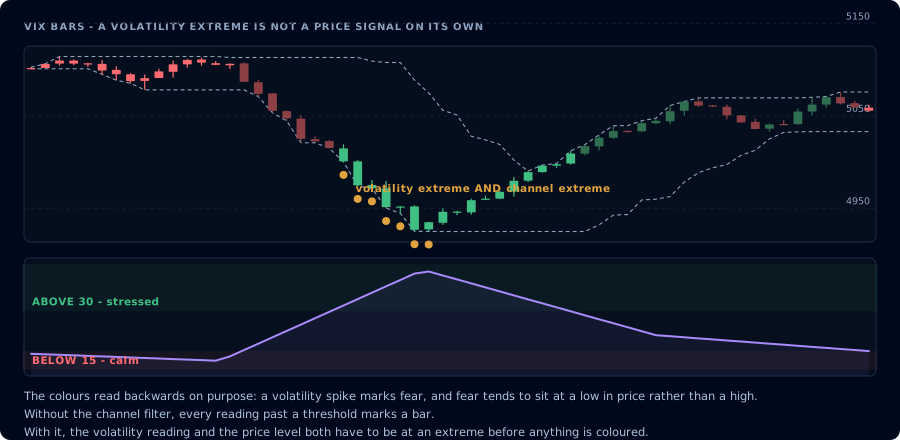
Two thresholds colour the bars. The optional filter is what makes the flag rare.
The mean-reversion premise
Volatility is one of the most mean-reverting time series in markets. When the VIX spikes to 40 during a panic, it almost always falls back toward its long-run average (≈19) over the following weeks. When it drops to 11, it almost always rises again.
Equity and futures prices follow a related pattern: extreme VIX readings often coincide with extreme equity moves. Fear-spike VIX = oversold equities. Complacent VIX = potentially-frothy equities. Not always, not exactly — but often enough to be a useful flag.
VIX Bars puts that flag directly on your chart. When the VIX is at an extreme, the bars on your chart change color so you can't miss it.
How it works
You set two thresholds:
- Upper threshold (default 30) — VIX above this = stressed market
- Lower threshold (default 15) — VIX below this = calm market
When the VIX prints above the upper threshold, the corresponding bars on your chart turn green. Below the lower threshold, red. Between the two, bars stay their default color.
The naming is deliberately counter-intuitive: green = high VIX = stress = potential bottom for equities (mean reversion will likely take VIX down and stocks up). Red = low VIX = complacency = potential top.
If that's confusing, the colors are configurable.
Optional Donchian channel filter
The indicator includes an optional Donchian filter. When enabled, bars only get colored if both conditions hit:
- VIX is at an extreme (above upper or below lower threshold)
- The chart bar is at a Donchian extreme (touching the lookback high or low)
This is a much stronger signal — VIX extreme and chart-level extreme. Reduces false flags significantly. The Donchian default is 52 (rough yearly cycle for daily charts; works fine on lower timeframes too).
Settings reference
| Input | Default | What it does |
|---|---|---|
| Upper VIX Threshold | 30 | VIX above this colors bars green |
| Lower VIX Threshold | 15 | VIX below this colors bars red |
| Use Donchian Filter | Off | Require chart-level extreme too |
| Donchian Length | 52 | Lookback for the Donchian filter |
| Upper Bar Color | Green | Color for high-VIX bars |
| Lower Bar Color | Red | Color for low-VIX bars |
Higher upper threshold (35–40) = rarer but more meaningful flags. Lower (25) = more frequent but noisier. Same logic mirrored for the lower threshold.
Alerts
Two alert conditions:
- VIX Extreme High — fires when a bar prints with VIX above your upper threshold (and Donchian agrees, if filter enabled)
- VIX Extreme Low — fires when a bar prints with VIX below your lower threshold (and Donchian agrees, if filter enabled)
These are context alerts, not entry signals. Pair them with momentum confirmation through the XT Alert Builder before placing an actual order.
Trading applications
Bottom hunting. A flurry of green bars (high VIX) at a major support level is often a tradeable bottom. Wait for momentum confirmation — RSI divergence, a SuperTrend flip, a hammer candle — before entering long.
Top spotting. A run of red bars (low VIX) at major resistance, especially after an extended uptrend, often precedes a pullback. Same logic: wait for confirmation.
Sizing context. Even if you don't take VIX-extreme trades, the colored bars tell you which regime you're in. Many traders cut size during green-bar (stressed) periods because slippage and gaps are wider.
Counter-trend filter. A simple rule: don't take counter-trend trades unless VIX is at an extreme. Cuts the worst counter-trend losses (fading a strong trend in calm markets).
Pairs naturally with
- VIX Heatmap — paints the chart background by VIX level. VIX Bars + VIX Heatmap together gives you both the regime and the extreme-tag in one view.
- Donchian Channels — the optional filter is built on this. Useful even without the filter as a separate confirmation tool.
Common mistakes
- Treating it as a standalone signal. Green bar = potential bottom, not "buy now." Always combine with momentum or structure confirmation.
- Setting thresholds too tight. Upper at 22 will color half your bars during normal volatility. Keep the upper threshold at 25+ unless you're in a long-term low-vol regime.
- Forgetting the Donchian filter. It dramatically reduces noise on intraday charts. If you're getting too many alerts, enable it.
- Ignoring the symbol context. VIX-spike bottoms work for index futures (ES, NQ) and broad equities. They're a much weaker signal for individual stocks or alt-coin crypto, where idiosyncratic factors dominate.
Frequently Asked Questions
Should I use VIX Bars or VIX Heatmap?
Both. They're complementary. VIX Heatmap shows the *current regime* via background color so you always know whether it's calm, normal, or stressed. VIX Bars highlights *specific bars* where the VIX hit an extreme — actionable inflection candidates. Together they give you both the steady-state context and the moment-of-action signal.
Why are 'green' and 'red' inverted from what I'd expect?
Green = high VIX = stress, which historically marks bottoms — so the color is bullish from a chart-bar perspective. Red = low VIX = complacency, which historically marks tops — bearish. The colors describe the chart-level implication, not the VIX level itself. They're configurable if it bothers you.
What VIX threshold should I use for an intraday strategy?
Daily VIX doesn't move enough to trigger meaningful intraday signals at the defaults. For pure intraday work, consider lowering the upper threshold to 25 to catch more bars, OR pair the indicator with the Donchian filter to make sure the chart-level extreme matters even if the VIX is only moderately elevated.
Does the Donchian filter look at the VIX or the chart symbol?
The chart symbol. The filter checks if the current bar is touching the Donchian high or low of the chart you're on. The VIX threshold check happens separately. Both must hit for a bar to be colored when the filter is enabled.