XT Alert Builder Advanced
The Advanced Alert Builder layers two of the most-requested capabilities onto the free builder: dual signal sources with AND / OR / Single combination logic, and indicator filters (RSI and Moving Average) that gate signals before they fire. It also exposes NinjaTrader ATM templates as a managed exit path alongside fixed-tick stops and targets. Same key=…; {{strategy.order.alert_message}} payload as the rest of the family, so upgrading from the free version is a zero-rewrite swap.
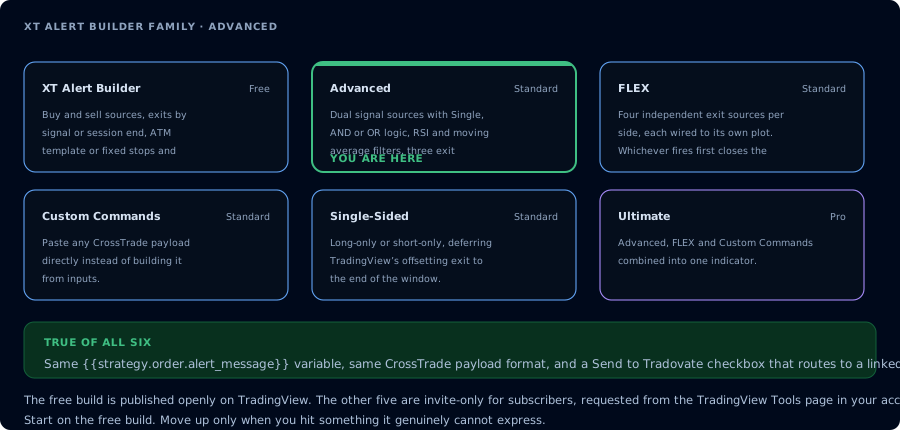
Where the Advanced build sits in the family.
What's different from the free builder
The free XT Alert Builder is great when you have one indicator generating clean buy / sell signals. Advanced exists for everything else:
- Dual signal sources. Wire two independent indicators as the entry decision, then choose how they combine: Single (either fires), AND (both must agree on the same bar), or OR (either side fires standalone).
- Indicator filters. Optional RSI and Moving Average checks that must pass before a signal is allowed to fire. Useful for cutting trades that technically match the signal logic but are happening in conditions you don't want to trade.
- NT8 ATM template support. Point the builder at an ATM template name in NinjaTrader and let NT8 manage stops, targets, and trailing logic from its own template engine.
Everything else (TradingView alert message format, CrossTrade advanced options, account / instrument / qty handling) is identical to the free builder.
Combining two signal sources
The big upgrade is the Signal Mode dropdown. With two sources wired in, you can run:
| Mode | When the builder fires |
|---|---|
| Single | Source A fires for buy, Source B fires for sell — independent signals, no overlap required |
| AND | Both Source A and Source B must agree on the same bar (e.g. SuperTrend says long AND RSI just crossed up) |
| OR | Either source firing is enough (e.g. a primary signal OR a confirmation pullback) |
The right mode depends on the system you're encoding. AND is restrictive — fewer trades, higher conviction. OR is permissive — more trades, more variance. Single is the same dual-source workflow the free builder gives you, just spelled out explicitly.
Indicator filters
Two filter blocks sit between "signal fired" and "alert sent":
RSI filter
Set an RSI length, an upper bound, and a lower bound. The builder only allows the signal through when RSI is inside (or outside, configurable) the band. Common setups:
- Trend-following pullbacks: RSI between 40 and 60 on buys to avoid chasing overheated moves.
- Mean reversion: RSI below 30 on buys, above 70 on sells.
- Momentum continuation: RSI above 50 on buys, below 50 on sells.
Moving Average filter
Pick a length and a type (SMA / EMA / WMA / VWMA). The builder requires price to be on the right side of the MA before signals are allowed through. Pairs naturally with a long-period MA as a trend filter so the strategy only buys when above the MA and sells when below.
Each filter can be turned off independently, so you can run RSI-only, MA-only, both, or neither.
Exits: three ways
Advanced gives you a single Exit Type dropdown with three options:
-
Source Signal. The exit fires when one of the configured sources signals the opposite side. This is the free builder's default behaviour.
-
Fixed Levels. Stops and targets defined as fixed tick distances or percentages from entry. Sign convention is the same as the free builder:
Buy: TP = +50 (above entry), SL = -20 (below entry)Sell: TP = -50 (below entry), SL = +20 (above entry) -
NT8 ATM Template. Point the builder at a template name configured in NinjaTrader. NT8 takes over stops, targets, and any trail logic from the template — the builder just sends entries.
Don't combine fixed levels with an ATM template on the same builder instance — you'll get conflicting management orders. Pick one exit method per chart.
The optional Session End override is available across all three modes — it delays the final close to the last bar of your Trading Hours window regardless of which exit method you picked.
CrossTrade advanced options
Same set as the rest of the family:
- Flatten First — close any existing position before opening a new one (required for reversal strategies)
- Require Market Position — only fire if NT8 reports the expected position state
- Delay Timer — wait N seconds before sending
- Rate Limiting — throttle repeat alerts
- Max Position — cap contracts per account
Details in the CrossTrade advanced options docs.
Setup walkthrough
-
Add the indicators you want as sources to your chart first. Advanced doesn't ship with built-in signals — it reads from other indicators on the chart. A SuperTrend, a Double SuperTrend, an RSI Momentum — whatever you're using as the trade trigger.
-
Add the XT Alert Builder — Advanced from your TradingView favourites (it auto-grants once you have an active subscription — see the TradingView Tools page).
-
Wire Source A and Source B to the indicator plots you want to drive entries.
-
Pick a Signal Mode (Single, AND, OR).
-
Configure the RSI and MA filters if you're using them. Leave them off if you're not.
-
Pick an exit method (Source Signal, Fixed Levels, or ATM Template).
-
NinjaTrader settings — account, instrument, quantity. Same fields as the free builder.
-
Create the alert in TradingView:
key=your-secret-key;{{strategy.order.alert_message}}Webhook URL is your CrossTrade webhook URL from the Notifications tab.
When to use Advanced vs. the free builder
| Situation | Use |
|---|---|
| Single indicator drives both entries and exits | Free |
| Two indicators need to agree before a trade fires | Advanced (AND mode) |
| Two indicators each fire independently and you want both | Advanced (Single or OR) |
| You already have stops / targets / trailing dialed in via NT8 ATM templates | Advanced (ATM exit) |
| You need to filter out signals that fire in the wrong regime | Advanced (RSI / MA filter) |
| You need independent control of stop and target source per side | FLEX |
| You're running long-only or short-only with session-end closes | Single-Sided |
| You need to send raw payloads for any API action | Custom Commands |
| You want every feature in one indicator | Ultimate |
Frequently Asked Questions
Do I still need a paid TradingView plan to use Advanced?
Yes. The webhook alert feature itself is gated behind TradingView's paid plans (Essential or higher). The Advanced indicator is the CrossTrade access — TradingView's pricing is separate.
Can I use the RSI and MA filters at the same time?
Yes. They're independent — both must pass for a signal to fire if both are enabled. Disable either by unchecking its 'Use filter' box on the chart.
What happens if I set both Fixed Levels and an ATM template?
You'll get conflicting management orders in NinjaTrader. Pick one exit method per builder instance. If you need different stops on different sides, look at FLEX.
Does the alert message format change versus the free builder?
No. Same two-line format — your CrossTrade key plus {{strategy.order.alert_message}}. Swapping between free and Advanced (or any Alert Builder variant) never requires rewriting your TradingView alert.
Why is my AND signal not firing even though both sources look right?
AND requires both sources to fire on the same bar. If Source A fires bar N and Source B fires bar N+1, neither bar produces an AND signal. Use OR or Single if you want either source to be enough.