XT Alert Builder FLEX
The FLEX Alert Builder breaks the assumption that exits come from the same source as entries. Pick any indicator or OHLC value as your entry signal, then wire a completely separate source for your stop logic and a third for your target logic. Built for traders whose exit ideas don't naturally map to "the opposite of the entry signal".
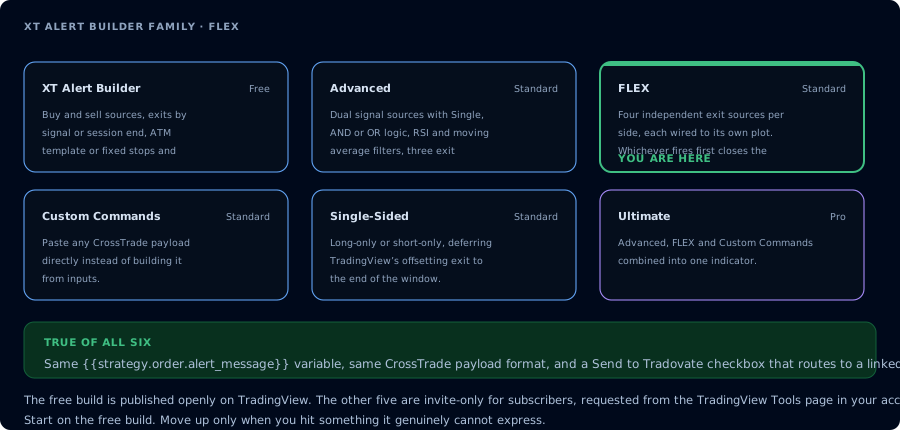
Where the FLEX build sits in the family.
Why FLEX exists
The free Alert Builder and Advanced both assume your exit logic is either (a) the opposite signal from the same source as your entries, or (b) a fixed-tick / percentage offset.
That works for most strategies. It breaks down when:
- Your entry is a momentum signal, but your exit is a structural one (e.g. a swing pivot).
- You want to trail with a different indicator than the one that triggered the entry.
- You're closing on time, volume, or volatility — anything outside the entry source's logic.
- Your stop and target each need to be sourced from a different indicator.
FLEX is the answer to all of those. Every "source" input on the chart is independent, so the entry plot, the exit signal plot, the stop plot, and the target plot can each be a different indicator.
What's configurable
Each of these is its own dropdown on the chart, pickable from any plot on the chart:
- Buy Signal Source — what triggers a long entry
- Sell Signal Source — what triggers a short entry
- Exit Source — what triggers a close (independent of the entry source)
- Stop Source (optional) — a plot the builder uses as the dynamic stop reference
- Target Source (optional) — a plot the builder uses as the dynamic target reference
Uncheck either side's "Use signal" box to make the strategy unidirectional (long-only or short-only). For long-only or short-only setups where you want a session-end close, also consider the Single-Sided builder.
Exit modes
The Exit Signal Type dropdown picks how exits resolve:
- Custom — the exit fires when the configured Exit Source emits a signal. This is the headline FLEX behaviour — your exit decision lives on its own indicator.
- Session End — the exit is held until the last bar of your Trading Hours window. Useful when you want to take multiple entries during a session and close everything at a fixed clock time.
When FLEX exits, it sends a CLOSEPOSITION to the configured instrument and account. The position closes cleanly without leaving a managed stop / target order behind.
Wiring it on a chart
-
Add every indicator you want to use first. FLEX reads from plots — those plots need to exist before you wire them in. Drop your entry indicator (a SuperTrend, a momentum signal, whatever), your exit indicator (could be a swing pivot, a separate trend filter, anything), and any stop / target reference indicators.
-
Add the XT Alert Builder — FLEX from your TradingView favourites.
-
Wire each source dropdown to the right plot. Each one is independent. Don't assume a default — pick deliberately.
-
Pick the Exit Signal Type (Custom or Session End).
-
Set NinjaTrader fields — account, instrument, qty.
-
Create the alert with the standard two-line message:
key=your-secret-key;{{strategy.order.alert_message}}Webhook URL is your CrossTrade webhook URL.
CrossTrade advanced options
Same set as the rest of the family:
- Flatten First — close any existing position before opening a new one
- Require Market Position — only fire if NT8 reports the expected position state
- Delay Timer — wait N seconds before sending
- Rate Limiting — throttle repeat alerts
- Max Position — cap contracts per account
Details in the CrossTrade advanced options docs.
Patterns that fit FLEX
| Idea | Wiring |
|---|---|
| Enter on momentum, exit on structure | Buy / Sell Source = momentum indicator. Exit Source = swing-high / swing-low pivot. |
| Long when trend is up, exit on a different trend filter | Buy Source = fast trend (SuperTrend). Exit Source = slow trend (long-period MA cross). |
| Trade multiple intraday entries, flatten at close | Custom exits at the signal source AND Session End fallback on the Trading Hours window. |
| Time-of-day exit only | Session End mode, configure Trading Hours to the exact window. |
When to use FLEX vs. the others
| Situation | Use |
|---|---|
| Entry and exit share the same source | Free or Advanced |
| Exit must come from a different indicator than entry | FLEX |
| Exit must come from a different indicator on each side | FLEX |
| Two entry sources need to agree | Advanced (AND mode) |
| Long-only or short-only with session-end closes | Single-Sided |
| Send arbitrary CrossTrade API payloads | Custom Commands |
| You want every feature in one indicator | Ultimate |
Frequently Asked Questions
Does FLEX include the same NT8 ATM template option as Advanced?
FLEX is focused on signal-driven exits — its strength is using a different indicator for the close. If you want NT8 to manage stops and targets from an ATM template, use Advanced or Ultimate.
Can I run FLEX as a long-only strategy?
Yes. Uncheck the Sell Signal box. For session-end-close behaviour on a unidirectional strategy, the Single-Sided builder is purpose-built and may fit better.
What does FLEX send when it exits?
A CLOSEPOSITION command to the configured instrument and account. Stops and targets that were placed when the entry fired aren't separately cancelled — that's the standard NT8 behaviour when a position closes flat.
Can the Exit Source be from the same indicator as the Buy or Sell Source?
Yes — FLEX doesn't enforce that they be different. The flexibility is the option to make them different, not a requirement.
Why does Custom exit fire on the wrong bar sometimes?
The Exit Source is read on close of bar by default. If your indicator only paints its signal on a confirmed close, that's the bar the exit fires on. Check the indicator's repaint behaviour if exit bars don't match what you expect.