XT Alert Builder Single-Sided
The Single-Sided Alert Builder solves a specific TradingView headache: strategies require an offsetting exit to close an entry, which gets in the way when you want to take multiple entries in one direction during a session and flatten cleanly at the end. Single-Sided delays the required exit to the last bar of your Trading Hours window, so you can pyramid into a one-direction trend without TradingView trying to flip your position.
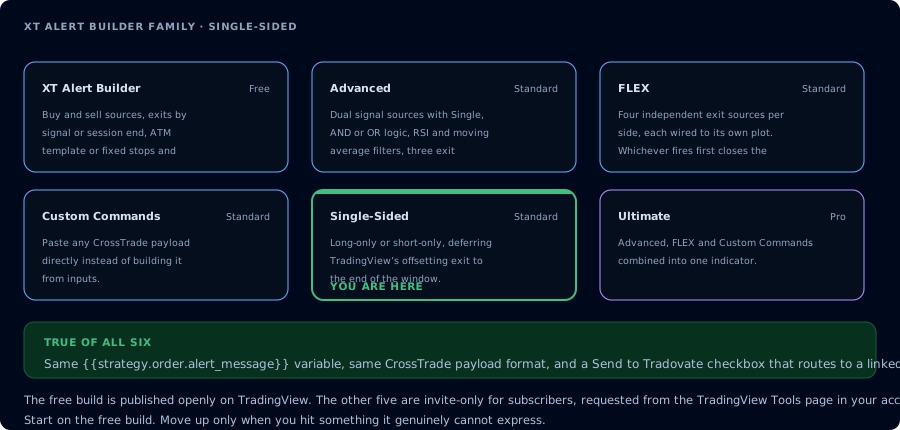
Where the Single-Sided build sits in the family.
The problem this fixes
TradingView strategies need an entry and an exit to count as a complete trade. If you only define long entries, the strategy can't close — your position sits open until something else flips it. The usual workaround is to define an opposite entry as the exit, but that limits you to one position at a time and creates side effects when the opposite signal fires unrelated to your intent.
For one-direction systems that want to:
- Take multiple long (or short) entries through a trending session
- Pyramid the position as conditions confirm
- Close everything cleanly at a fixed clock time at the end of the session
…the standard builder pattern is awkward. Single-Sided is purpose-built for this case.
How it works
The strategy is locked to one direction via a single dropdown: Long or Short. The opposite-side logic is removed entirely — there's no second source to wire, no AND/OR mode, no exit on the opposite signal.
Exits are delayed until the last bar of your Trading Hours window. Until that bar, every signal from the entry source produces a new entry order. After that bar, the strategy closes the entire position with a CLOSEPOSITION send.
Pyramiding behaves naturally: TradingView's strategy property "Pyramiding" controls how many simultaneous entries are allowed. Bump it to whatever fits your system — 3, 5, 10 entries per session — and Single-Sided will take each one as the signal fires.
Exit configuration
Two ways to manage in-position risk:
- Fixed Levels — stops and targets defined as tick distances or percentages from each entry. Each entry gets its own bracket.
- NT8 ATM Template — point Single-Sided at an ATM template name in NinjaTrader. NT8 manages stops, targets, and any trail logic from the template for each entry independently.
Strategy Sync is intentionally removed in Single-Sided — pyramiding-with-sync is a foot-gun in NT8 because the platform's sync logic assumes a single position. Exits are entirely NT8-side, driven by either the ATM or the fixed-bracket orders that ride alongside each entry.
Setup walkthrough
-
Add the indicator that generates your one-direction signal to the chart first. Single-Sided reads from a single Signal Source — pick the side that's relevant to the direction you locked.
-
Add the XT Alert Builder — Single-Sided from your TradingView favourites.
-
Pick Long or Short in the Direction dropdown.
-
Wire the Signal Source to your indicator's plot.
-
Set Trading Hours to your session window. The last bar of this window is when the close fires.
-
Pick an exit method — Fixed Levels or NT8 ATM Template.
-
Set NinjaTrader fields — account, instrument, qty.
-
In TradingView's strategy properties tab, bump Pyramiding to the number of simultaneous entries you want to allow per session.
-
Create the alert with the standard two-line message:
key=your-secret-key;{{strategy.order.alert_message}}Webhook URL is your CrossTrade webhook URL.
CrossTrade advanced options
Same set as the rest of the family:
- Flatten First — close any existing position before opening a new one
- Require Market Position — only fire if NT8 reports the expected position state
- Delay Timer — wait N seconds before sending
- Rate Limiting — throttle repeat alerts
- Max Position — cap contracts per account
Flatten First behaves differently here than on bidirectional builders: since there's no opposite side, it's usually disabled. Keep it on if you want each entry to flatten any unrelated position on the account first.
Details in the CrossTrade advanced options docs.
When to use Single-Sided vs. the others
| Situation | Use |
|---|---|
| Take multiple long-only entries in a trending session, close at session end | Single-Sided |
| Take multiple short-only entries in a trending session, close at session end | Single-Sided |
| Strategy needs to handle both directions | Free, Advanced, or FLEX |
| Need two sources combined into one entry signal | Advanced (AND / OR) |
| Need separate exit indicator from the entry indicator | FLEX |
| Need to send raw CrossTrade API payloads | Custom Commands |
| You want every feature in one indicator | Ultimate |
Frequently Asked Questions
Why doesn't Single-Sided use Strategy Sync?
Strategy Sync assumes one position at a time. Single-Sided is built for pyramiding — multiple simultaneous entries — which conflicts with how the sync logic resolves NT8 state. Exits are handled NT8-side via either the ATM template or fixed brackets attached to each entry.
How do I take five long entries in a session?
Set TradingView's strategy property 'Pyramiding' to 5 (or higher). Each signal from the Signal Source produces a new entry until Pyramiding caps it, then the session-end bar flattens everything at once.
What happens if a signal fires after the last bar of my Trading Hours window?
The session-end close has already fired. New entries are not taken outside the window — the Trading Hours dropdown is the gate for both entries and the exit.
Can I run Single-Sided across multiple NT8 accounts?
Yes. Comma-separate the accounts in the NT8 Account field. Each account receives the same entries, exit timing, and trade management.
Why is my position not closing exactly at the configured end time?
Single-Sided closes on the last bar of your Trading Hours window. If your chart is on 5-minute bars and your window ends at 16:00 ET, the close fires at the open of the 15:55 bar. Drop to a shorter timeframe if you need tighter timing.