XT Alert Builder Ultimate
The Ultimate Alert Builder is the kitchen-sink build of the family. It bundles Advanced (dual sources with AND/OR/Single logic, RSI and MA filters, NT8 ATM templates), FLEX (independent stop and target sourcing), and Custom Commands (raw payload support) into one indicator. One install, every capability. Use it when you don't want to think about which builder to pick and you'd rather have everything at hand on the chart.
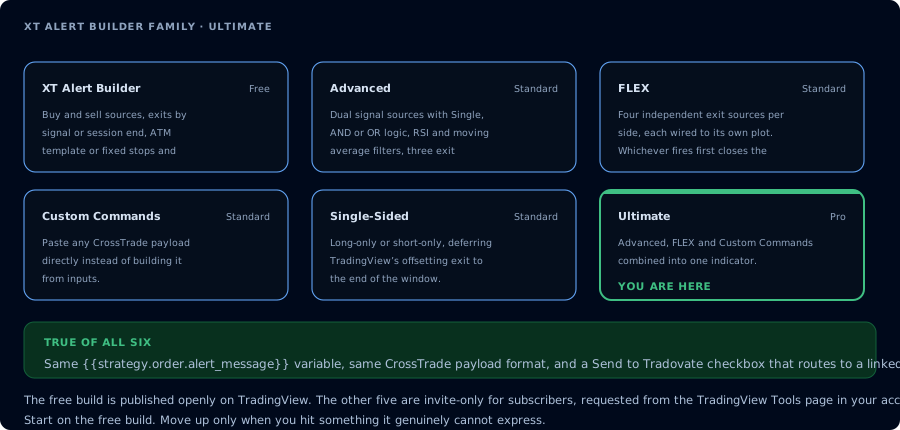
Where the Ultimate build sits in the family.
What's in the box
Ultimate is the union of the other paid variants. Every feature documented on these pages is on this one indicator:
- Two signal sources with combination logic (Single, AND, OR) from Advanced
- RSI and Moving Average filters from Advanced
- NT8 ATM template exits from Advanced
- Fixed-tick / fixed-percent stops and targets from the free builder
- Independent stop and target source plots from FLEX
- Independent exit signal source from FLEX
- Custom command payload slots from Custom Commands
- Session End override to delay the final close to the last bar of your Trading Hours window
- CrossTrade advanced options (Flatten First, Require Market Position, Delay Timer, Rate Limiting, Max Position)
The alert message format is the same as every other builder in the family:
key=your-secret-key;
{{strategy.order.alert_message}}
Swap any other builder out for Ultimate without rewriting your TradingView alerts.
Why pick Ultimate
The tradeoff is honest: Ultimate has more inputs on the chart than any other builder, because it exposes the full feature set rather than a focused subset. If you don't need most of them, the standalone variants are quicker to configure.
Pick Ultimate when:
- You're running multiple strategies on multiple charts and you don't want to remember which builder version you used where.
- You combine features that span variants (e.g. dual sources with AND logic and an independent exit indicator).
- You want one indicator to learn deeply rather than four lighter ones to context-switch between.
- You're iterating on a system and want to flip between features without swapping the indicator out.
Pick a standalone variant when:
- You only need one variant's feature set and want a cleaner configuration surface.
- You're handing the chart off to someone else and want to limit the configurable surface area.
Setup walkthrough
The setup is the same superset of the other builders'. Read the variant pages first if you haven't:
- Free for the base patterns (sources, exits, alert message, CrossTrade advanced options).
- Advanced for dual sources, AND/OR/Single logic, RSI / MA filters, and ATM templates.
- FLEX for independent stop / target / exit source plots.
- Custom Commands for raw payload slots and the JSON format.
Then on the chart:
- Add every indicator you want to use as a source plot — entries, exits, stops, targets, filters. Ultimate reads from plots, so they need to be on the chart first.
- Add the XT Alert Builder — Ultimate from your TradingView favourites.
- Wire the dropdowns for the features you're using. Unused features can be left at their defaults — they just won't affect the output.
- Pick your Exit Type (Source Signal, Fixed Levels, ATM Template, or Custom Command). The four are mutually exclusive per side.
- Set NinjaTrader fields — account, instrument, qty.
- Create the alert in TradingView with the standard two-line message and your CrossTrade webhook URL.
Common configurations
A few useful "presets" you can build on top of Ultimate:
| Setup | Features used |
|---|---|
| Trend-confirmed long-only with session end | Dual sources (AND), one direction, Session End exit |
| Momentum entry with structural exit | Single source for entry, FLEX exit source for the close |
| ATM-managed entries with RSI filter | Single source, RSI filter, ATM exit |
| Mixed system: standard entries + partial-close commands | Standard entry/exit + Custom Command payload at a separate condition |
CrossTrade advanced options
Same set as the rest of the family:
- Flatten First — close any existing position before opening a new one
- Require Market Position — only fire if NT8 reports the expected position state
- Delay Timer — wait N seconds before sending
- Rate Limiting — throttle repeat alerts
- Max Position — cap contracts per account
Details in the CrossTrade advanced options docs.
When to use Ultimate vs. the others
| Situation | Use |
|---|---|
| Single straightforward strategy, one indicator drives entries and exits | Free |
| Need dual sources, filters, or ATM templates but not FLEX exit sourcing | Advanced |
| Need independent stop / target / exit plots but not dual entries | FLEX |
| Long-only or short-only with pyramiding and session-end close | Single-Sided |
| Need to fire raw CrossTrade payloads (modify, cancel, partial close) | Custom Commands |
| You combine features across variants, or you want one indicator to rule them all | Ultimate |
Frequently Asked Questions
Is Ultimate heavier on chart performance than the smaller builders?
Marginally. Ultimate carries the code from every variant, so the script size is larger. TradingView's runtime handles it fine on normal chart workloads — the differences only show up on very fast intraday bars on slow machines.
Do I need to learn the other variants before using Ultimate?
No, but the standalone pages are the clearest explanation of each feature. Ultimate is the union — every feature works the same as it does on the variant page that documents it.
Can I switch from Advanced or FLEX to Ultimate without rewriting alerts?
Yes. Every Alert Builder in the family uses the same key=…; {{strategy.order.alert_message}} format. Swap the indicator, re-wire the inputs, and the existing alert keeps working.
Can I disable features I'm not using on Ultimate?
Most features are off until you wire a source plot or check a 'Use filter' box. Leaving the defaults in place means the feature isn't gating or modifying behaviour. You don't need to actively disable anything.
What's the relationship between Session End and the Custom Command slots?
Session End is an override on the standard exit logic — it delays the close to the last bar of Trading Hours. Custom Command slots are separate fire-points wired to TradingView strategy events. They can coexist, but if you wire a Custom Command for the close AND enable Session End, the close fires twice. Pick one path for any given exit.